


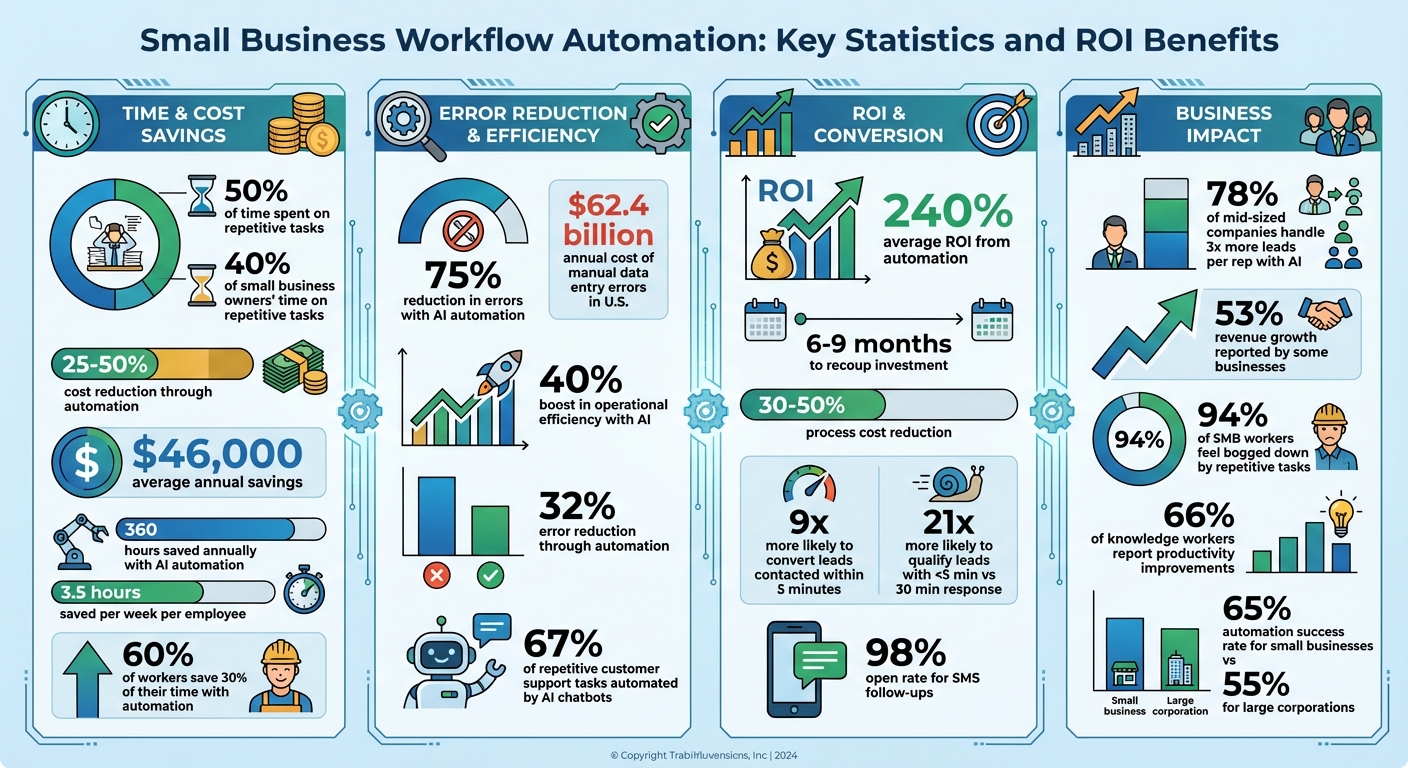
Running a small business often means spending over 50% of your time on repetitive tasks like manual data entry and updating spreadsheets. This inefficiency can cost both time and money. Workflow automation offers a solution by reducing costs by 25% to 50% and saving businesses an average of $46,000 annually. It also helps scale operations without increasing overhead.
Here’s what you’ll learn:
- How automation simplifies tasks like lead capture, expense management, and customer follow-ups.
- The key components of automation: triggers, actions, and rules.
- Benefits of AI-powered automation, which can save 360 hours annually and cut errors by 75%.
- Step-by-step guidance on identifying workflows to automate and calculating ROI.
- Industry-specific examples, from real estate to healthcare, showing how automation boosts efficiency.
Key takeaway: Automation isn’t just about saving time – it’s about enabling growth while keeping costs in check. Start small, track results, and expand gradually to maximize impact.
Small Business Workflow Automation: Key Statistics and ROI Benefits
3 Simple Automations for Small Business
Core Elements of Workflow Automation
Every automated workflow relies on three key components that work together seamlessly: Triggers, Actions, and Rules. A Trigger is the event that kicks off the process – like a customer submitting a form or a scheduled task reaching its due date. An Action is the task performed automatically, such as sending a confirmation email, updating a CRM record, or generating an invoice. Meanwhile, Rules serve as the decision-makers, using "if/then" logic to determine the workflow’s path based on specific data points.
For instance, imagine a potential customer fills out a form on your website (trigger). The system checks whether they selected "Enterprise" as their company size (rule). If they did, the workflow automatically routes them to your senior sales team and sends a personalized welcome email (actions). These components rely on Integrations, which act as the connections that allow data to flow seamlessly between tools like your website, CRM, and email system – eliminating the need for manual data entry.
Triggers, Actions, and Rules
Triggers can range from straightforward events, like receiving an email, to more sophisticated conditions, such as detecting unusual patterns in your accounting software. The real magic happens when these elements are combined. A single trigger can initiate multiple actions across various systems at once. For example, when a new customer signs a contract, your workflow might simultaneously create a project folder in Google Drive, add their details to your CRM, send a welcome email, and notify your team in Slack. All of this happens in seconds, without any manual effort.
Repetitive tasks eat up 40% of small business owners’ time, and manual data entry errors cost U.S. businesses an estimated $62.4 billion annually. By setting up triggers, actions, and rules effectively, you can eliminate these inefficiencies – handling repetitive tasks accurately and consistently every time.
How AI Improves Workflow Automation
Traditional automation relies on rigid "if-this-then-that" rules that you configure manually. AI automation, however, takes things to another level by introducing cognitive capabilities. It can interpret unstructured data and make decisions on its own. Instead of waiting for simple event-based triggers, AI can initiate workflows based on more complex inputs, such as sentiment analysis of customer emails, intent recognition in chat messages, or anomaly detection in financial records.
AI also enhances actions with its ability to generate tailored responses. Instead of sending the same template to every inquiry, AI can craft personalized replies based on the context of the question, summarize meeting notes into actionable tasks, or extract key data from lengthy PDF documents. For example, in 2024, Toyota of Orlando used AI to manage over 30,000 lead records. According to Spencer Siviglia, Director of Operations, this system saved the team 20+ hours of manual work per week by automating lead research and insights.
AI-powered chatbots are another game-changer, capable of automating up to 67% of repetitive customer support tasks. Companies leveraging AI in workflow automation have reported an average boost in operational efficiency of 40%. Unlike traditional systems, AI adapts over time through machine learning, optimizing workflows based on historical performance rather than relying on static rules you set months ago.
Technical Requirements for Small Businesses
To implement workflow automation effectively, you’ll need a solid foundation. This includes a reliable internet connection for cloud-based tools, cloud storage for centralized data access, and organized data management to ensure the quality of your inputs. Modern platforms often come with visual drag-and-drop builders, so you don’t need to be a programmer to get started.
Chances are, your current software already supports automation through built-in features or API connections. The challenge lies in ensuring smooth data flow between systems, often referred to as creating a "data fabric" or unified view of your real-time information. However, if your customer details are scattered across multiple spreadsheets with conflicting data, automation might amplify these inconsistencies instead of resolving them.
Security is another critical consideration, especially for industries with strict regulations. Look for systems with robust encryption, access controls, and audit trails that log every change. For industries like healthcare (HIPAA compliance) or accounting (SOC 2 standards), these features aren’t just helpful – they’re non-negotiable protections for both your business and your clients. Up next, we’ll explore how these elements fit into a larger automation strategy.
Creating Your Automation Strategy
To build an effective automation strategy, start by understanding how your business operates right now. Before diving into automation, figure out where your time is actually going. A practical way to do this is to track your tasks over a week and multiply the total hours by 4.3. This exercise can expose just how much time is being lost to manual, repetitive tasks. Did you know that small business owners spend about 40% of their time on tasks that could easily be automated? That’s a lot of wasted potential.
Evaluating Your Current Workflows
Once you’ve tracked your tasks, it’s time to map out your workflows. Break down each process step by step, noting decision points where "if/then" logic applies and identifying the final outcomes. For instance, if a new lead fills out your contact form, you might review their budget (a decision point) before deciding whether to route them to sales or add them to an email nurture sequence.
Pay attention to manual data transfers – those moments when someone has to move information from one system to another. These are prime candidates for automation. Also, ask your team for input. They’re the ones working with these processes daily and can often point out bottlenecks or inefficiencies you might miss. Start with tasks that are both frequent and straightforward. These are the "low-hanging fruit" of automation and can help you build momentum before tackling more complex processes. This mapping process not only highlights inefficiencies but also lays the groundwork for smart automation that supports your business growth.
Calculating ROI and Cost Savings
The return on investment (ROI) for automation is surprisingly simple to calculate. Multiply the hours you’d save each week by your hourly rate, then multiply that by 4.3 to get the monthly value. For example, saving 10 hours a week at $25 per hour adds up to about $1,075 in monthly savings. And don’t forget the cost of errors – manual data entry mistakes alone cost U.S. businesses a staggering $62.4 billion every year.
On average, companies experience a 240% ROI from automation efforts, often recouping their investment in just 6 to 9 months. Automation can also cut process costs by 30% to 50%. Employees benefit too, saving an average of 3.5 hours per week, with 60% of workers reporting they save 30% of their time using automation tools. When planning your automation budget, factor in software costs – licenses typically range from $30 to $300 per user each month – along with implementation and maintenance expenses. These calculations can guide your strategy and help you roll out automation gradually.
Step-by-Step Implementation Plan
Now that you’ve mapped your workflows and calculated ROI, it’s time to take action. Start small by automating a single, manageable process, like invoice approvals. This allows you to see results quickly and refine your approach. Build the workflow, test it for 2–3 weeks, and make adjustments before expanding automation to other areas.
Set SMART goals – specific, measurable, achievable, relevant, and time-bound. For instance, you might aim to "reduce invoice processing time by 50% within 60 days". Before implementing automation, clean up your data. Standardize formats and correct any inconsistencies in your CRM or spreadsheets, as automation relies heavily on the quality of the input. For high-stakes workflows, such as major contracts or customer-facing communications, consider including a "human-in-the-loop" step. This ensures that while AI handles the heavy lifting, a manager provides final approval, adding a layer of quality control.
Common Workflow Automation Use Cases
Once you’ve established your automation strategy, it’s time to see where AI-powered workflows can make the most impact. These examples highlight areas where automation can quickly resolve common challenges for small businesses, delivering measurable improvements.
Lead Capture and Qualification
Every inquiry – whether it comes from your website, social media, or phone – represents a potential customer. But the reality is, many small businesses struggle to respond quickly enough. Research shows that leads contacted within five minutes are nine times more likely to convert. Unfortunately, many businesses take hours – or even days – to follow up.
AI tools, like Open Head’s AI receptionists, solve this problem by providing round-the-clock coverage. These systems instantly capture inquiries and use natural language processing to qualify leads. They assess factors like budget, urgency, and service interest, then automatically tag and route leads to your CRM – no manual effort required. For instance, All Source Building Services adopted an AI-powered form workflow that categorizes submissions by service type (e.g., commercial painting or repair), organizes them in their CRM, and notifies the correct team member via Slack. This eliminated the need for daily inbox checks and manual lead assignments, ensuring every inquiry is handled promptly.
The impact is clear: businesses that respond within five minutes are 21 times more likely to qualify a lead compared to those that wait 30 minutes or more. AI automation ensures you engage prospects when their interest is at its peak.
Customer Follow-Up and Nurturing
Timely and effective follow-ups are essential, but manual processes often fall short – leading to missed opportunities. AI-powered systems take over by triggering personalized, behavior-based messages. For example, they can send follow-ups based on actions like opening an email or clicking a link, replacing outdated, one-size-fits-all schedules.
SMS follow-ups are particularly effective, boasting open rates as high as 98%. This approach helps re-engage cold leads and drives conversions without requiring additional staff. In fact, 78% of mid-sized companies using AI for lead management report handling three times more leads per sales rep without increasing headcount. With automation, your follow-ups are not only faster but also more relevant to each prospect.
Internal Operations and Approvals
Automation isn’t just for customer-facing tasks – it can also streamline internal processes. Many small businesses lose valuable time on routine activities like routing documents, chasing approvals, and entering data. On average, employees spend 60% of their time on these types of tasks. AI tools can step in to handle these responsibilities, freeing your team to focus on more meaningful work.
Take the Sniffles and Itch Allergy Clinic in San Diego, for example. They implemented Lindy AI agents to process dozens of multi-page faxes daily. The AI extracted medical data, sorted documents, and generated EMR-ready summaries, which were sent directly to Slack. This reduced processing time from hours to mere minutes, saving the clinic over 10 hours each week. The clinic manager summed it up perfectly:
"It’s like we hired a superhuman assistant who never takes a break."
– Clinic Manager, Sniffles and Itch Allergy Clinic
Similarly, Open Head’s AI agents streamline document handling and approvals. Whether it’s sequential approvals requiring sign-offs in a specific order or "first to respond" logic for quicker decisions, automation eliminates bottlenecks and ensures nothing gets stuck in limbo. These workflows also reduce errors by about 75%, making your operations more efficient and audit-ready.
sbb-itb-2339147
Automation Solutions by Industry
Every industry comes with its own set of challenges, and AI-powered automation can be customized to tackle these specific demands. Open Head’s industry-focused AI solutions build on the core benefits of automation, offering tailored tools for various sectors. Here’s how Open Head’s AI transforms workflows in key industries:
Real Estate and Property Services
In real estate, timing can make or break a deal. With multiple leads to manage, real estate professionals need quick and efficient systems. Open Head’s AI automation captures lead details directly from website forms and instantly integrates them into your CRM, complete with personalized follow-ups. Beyond just managing leads, the system simplifies transaction coordination. It sends status updates to clients, reminds agents about inspection deadlines, and notifies everyone involved when documents are signed. This ensures a seamless and consistent experience for both clients and agents.
Accounting and Bookkeeping Firms
Accountants often spend hours on repetitive tasks like entering data from receipts, invoices, and bank statements. Open Head’s AI solutions take over this manual work, automatically organizing data for immediate review. This automation allows firms to perform daily bank reconciliations effortlessly, making month-end closings smoother and catching discrepancies early.
Medical and Healthcare Practices
Healthcare providers juggle patient care with heavy administrative workloads. Open Head’s AI-powered tools simplify patient intake by automatically collecting and storing information like insurance details, medical history, and appointment preferences. This eliminates the need for paper forms and reduces front-desk responsibilities. AI can also act as a medical scribe, creating clinical documentation during or after appointments, giving physicians more time to focus on their patients. Additionally, automated appointment reminders and follow-up messages help reduce no-shows, improve patient engagement, and ensure HIPAA compliance. These solutions integrate effortlessly into broader automation strategies, enhancing efficiency across the board.
Monitoring and Scaling Your Automation
Tracking Automation Performance
To ensure your automation efforts are hitting the mark, focus on tracking 5–7 key performance indicators (KPIs). These might include metrics like lead conversion rates, error reduction, and task completion rates. Real-time dashboards and threshold alerts can help you catch issues as they arise. Consider this: manual errors cost U.S. businesses a staggering $62.4 billion annually. Automation can slash errors by 32% and reduce costs by 15–20%. Keep an eye on the time saved, cost reductions, and customer satisfaction levels to gauge the true impact of your automation. Use these insights to fine-tune and optimize your workflows.
Improving and Adjusting Workflows
Set a schedule to review your workflows – quarterly is a good starting point – to identify inefficiencies and adapt to new challenges. Use performance data to locate bottlenecks or areas where customers are dropping off. For AI-powered systems, refine prompts based on actual results. For example, if your automated email replies aren’t converting leads, tweak the language and test different approaches.
A/B testing can be a game-changer. Experiment with email templates, notification timings, or qualification criteria to see what works best. Always test changes in a controlled environment to avoid unnecessary risks. Don’t forget to involve your team – they’re on the front lines and can offer valuable insights into what’s working and what’s not.
Expanding Automation Across Your Business
Once your workflows are polished, it’s time to scale your automation efforts strategically to drive growth. Start with high-impact departments like HR or finance to showcase measurable efficiency improvements. Before diving into new areas, make sure your workflows are standardized. This includes documenting trigger conditions, step-by-step processes, and how to handle exceptions.
Select tools that can grow with your business – platforms with flexible plans are a smart choice as your team expands. To keep things running smoothly, document your workflows, designate "automation champions" within your team, and conduct regular audits to prevent tool overload. These steps can lead to significant gains, with some businesses reporting revenue growth of 53%.
Conclusion and Next Steps
Key Takeaways
Workflow automation isn’t just a buzzword – it’s a game-changer for small businesses. By allowing AI to handle repetitive, time-consuming tasks, you’re giving your team the freedom to focus on strategy, creativity, and building stronger client relationships. Consider this: businesses save an average of $46,000 annually through automation, and 66% of knowledge workers report noticeable productivity improvements. With 94% of SMB workers feeling bogged down by manual, repetitive tasks, the need for automation is hard to ignore.
What makes AI-driven automation so powerful is its ability to scale your business without requiring a proportional increase in staff or overhead. Whether you’re streamlining lead follow-ups, automating customer onboarding, or simplifying internal approvals, automation creates a foundation for growth. Kathryn Schwab, Founder of Make It Count Creative Solutions LLC, sums it up perfectly:
"By taking repetitive tasks off your plate, automation lets you focus on growing your business and building real connections with your clients".
If you’re just starting out, begin with one workflow that’s draining hours each week and follows clear, predictable steps. Map out the current process, define its triggers and actions, and test thoroughly before implementation. Interestingly, small businesses boast higher automation success rates (65%) compared to larger corporations (55%) because they can adapt and pivot more quickly. Use this agility to your advantage as you dive into automation.
Get Started with Open Head
Take back your time and refocus on what matters most. Open Head specializes in creating custom AI automation systems tailored to your business needs. From AI-powered receptionists that never miss a call to automated lead nurturing that works around the clock, Open Head’s solutions are designed to grow alongside your business.
Ready to take the first step? Schedule a free 30-minute consultation to identify workflows that are draining your resources. During the session, you’ll receive a personalized roadmap with ROI projections tailored to your business. This consultation will help you uncover high-impact automation opportunities and craft a practical plan that aligns with your goals, timeline, and budget.
FAQs
What’s the best way for small businesses to start with workflow automation?
Small businesses looking to streamline operations can start with workflow automation by focusing on repetitive tasks that consume time and resources. Begin by outlining your existing processes to identify bottlenecks or areas where automation could make things easier.
From there, select tools that align with your specific needs. These might include automating tasks like lead generation, customer follow-ups, CRM updates, or internal workflows. Start small – test the new workflows on a limited scale, collect feedback, and fine-tune them before expanding. Taking it step by step helps ensure a smoother transition and more effective results.
What are the main advantages of using AI for workflow automation in small businesses?
AI-powered workflow automation brings a lot to the table for small businesses. For starters, it significantly improves efficiency by taking over repetitive tasks. This means less time spent on manual work – up to 40% less – and fewer chances for human error. The result? Smoother operations and more accurate results.
It also helps businesses scale effectively. With AI, you can expand without needing to heavily invest in additional staff or resources. On top of that, it supports real-time decision-making, keeps businesses aligned with industry regulations, and speeds up the delivery of personalized customer experiences. By simplifying workflows, small businesses can shift their focus to what truly matters: growing strategically and keeping customers happy.
How can I calculate the ROI of automating my business processes?
To figure out the ROI (Return on Investment) of automating your business processes, you’ll need to weigh the total benefits – like cost reductions, better efficiency, and higher revenue – against the total expenses, such as setup, training, and ongoing maintenance. The formula looks like this: ROI = (Net Benefits / Total Costs) x 100%.
Start by putting numbers to the key benefits: How much time is saved? How much are labor costs reduced? Is there measurable revenue growth linked to automation? Once you have those figures, subtract the total costs of implementing and maintaining the automation tools. This calculation gives you a clear view of how automation affects your profits, enabling you to make smarter decisions about scaling your business.