


If you’re spending hours on repetitive tasks, you’re likely losing time, money, and opportunities. Here’s how to fix it: Use data to identify where automation will have the biggest impact. Start by auditing your team’s time – track how long they spend on tasks like data entry or invoice processing. A simple formula – Time × Hourly Rate × Frequency – can reveal the true cost of manual work. For example, a 2-hour daily task at $25/hour costs $13,000 annually, and errors can push that even higher.
Once you’ve gathered the data, rank tasks by frequency, effort, and payoff. High-frequency, error-prone tasks with clear rules are top candidates for automation. Use tools like a Value vs. Effort Matrix to prioritize quick wins – projects that save time and money with minimal setup. For example, automating lead follow-ups or invoice reconciliation can deliver results in weeks, not months.
If you’re unsure where to start, consulting experts can help you map workflows and calculate ROI. The key is focusing on tasks that waste time, create errors, or hurt customer experience. Start small, track results, and scale up as you see measurable returns.
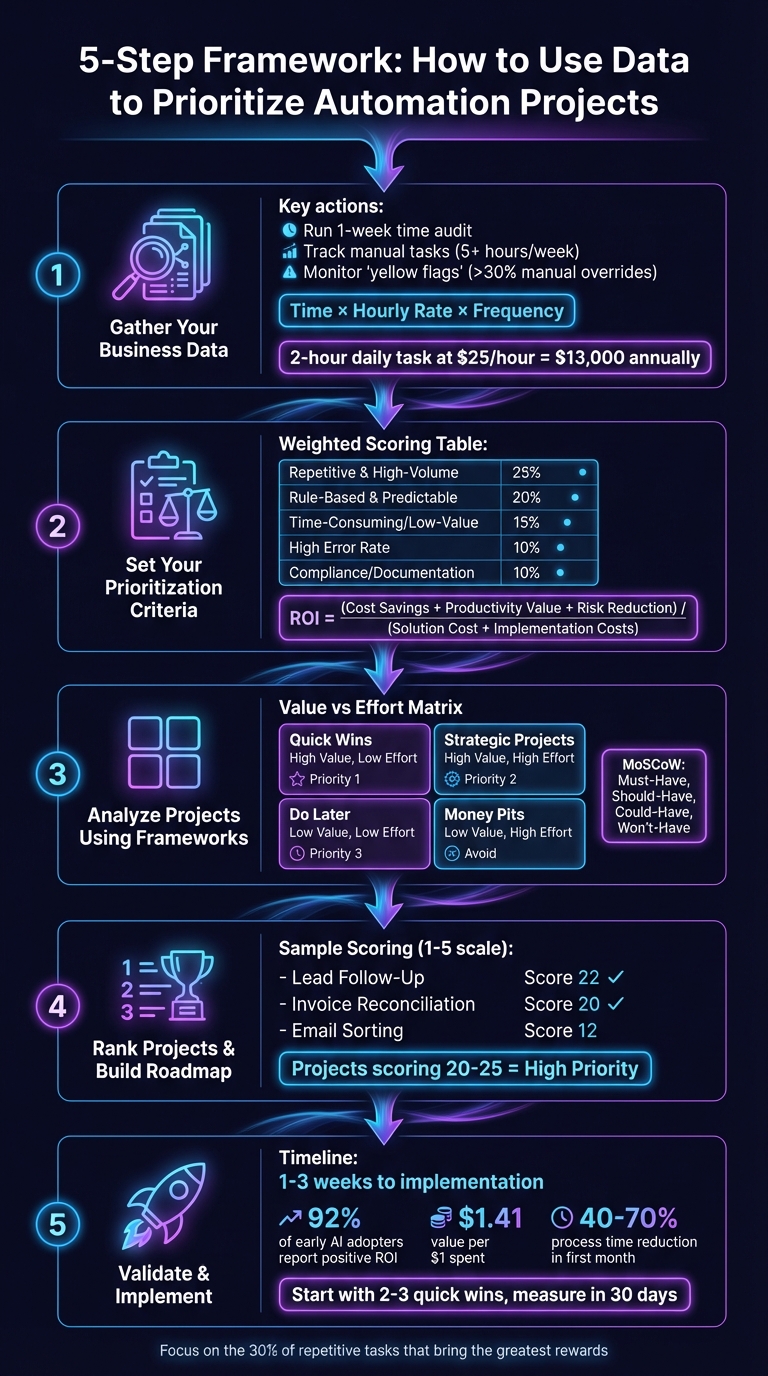
5-Step Data-Driven Automation Prioritization Framework
How to Identify High-ROI Use Cases for AI in Your Business
Step 1: Gather Your Business Data
Before diving into automation, it’s essential to figure out where your business is spending its time and money. A simple formula can help identify where manual processes are costing you: (Time Spent per Task) × (Employee Hourly Rate) × (Frequency) [1]. These numbers often reveal just how much repetitive tasks are eating into your budget.
Start by running a one-week audit. Track how much time your team spends on manual tasks like data entry, generating reports, or following up on leads [2]. If a task takes more than 5 hours a week, it’s likely a strong candidate for automation. Also, keep an eye out for “yellow flags” – those moments when automated workflows fail and your team has to step in manually [5]. If more than 30% of processes require manual overrides, it’s a clear sign that something’s broken and needs fixing.
Review Operational and Financial Metrics
Once you’ve tracked time and costs, shift your focus to measurable operational challenges. Look at metrics like mean time to repair (MTTR), resolution times, error rates, and cost per ticket. For example, how long does it take to process invoices? How often do errors occur? And how much revenue is slipping through the cracks because of missed follow-ups? Research shows that top-performing businesses are 2.5 times more likely to have a solid data strategy [1], so documenting these metrics is a step you can’t skip.
Email volume can also be a useful indicator. A sudden increase in emails about status updates or approval requests often points to bottlenecks that could be automated [5]. If your team is drowning in repetitive admin work, consider using workflow automation tools to cut down on manual handoffs and free up their time for more valuable tasks.
By combining these numbers with direct feedback, you’ll get a complete picture of where your processes need improvement.
Collect Customer and Employee Feedback
The numbers tell part of the story, but the real insights come from the people experiencing the problems firsthand. While data can show where delays and inefficiencies happen, talking to employees can uncover the reasons behind them. As Orpical puts it:
"If there’s a task that people groan about in team meetings, that’s your low-hanging fruit." [3]
Brief, informal interviews with team members can uncover hidden inefficiencies that dashboards might overlook. For example, if employees feel automated workflows are less effective than manual ones, there may be deeper issues to address. High turnover in specific roles could also point to repetitive, frustrating tasks driving employees away.
Don’t stop at internal feedback. Customer support tickets can reveal recurring complaints, like slow response times or inaccurate information. If customers are waiting too long for answers, consider using an AI receptionist to provide 24/7 support and handle urgent issues quickly. Additionally, tracking Employee Net Promoter Scores (eNPS) can help gauge whether your team has confidence in the tools they’re using [4].
Step 2: Set Your Prioritization Criteria
Now that you’ve gathered your data, it’s time to define clear, measurable criteria for ranking automation projects. Without measurable benchmarks, prioritizing can feel like guesswork. A structured framework ensures you’re tackling the most impactful tasks first, especially since many organizations struggle with setting clear metrics for digital initiatives.
Start by evaluating each project based on frequency, duration, complexity, and payoff. A weighted scoring model can help standardize this process. For instance, you might assign 25% weight to repetitive, high-volume tasks, 20% to processes with clear, predictable rules, and 15% to time-consuming but low-value work[3]. This method ensures that the most resource-intensive or problematic tasks rise to the top of your list.
Don’t overlook technical feasibility. A project that promises to save 20 hours a week might not be worth it if it involves integrating outdated systems with poor data quality. To calculate the true ROI, use this formula:
(Aggregate Annual Cost Savings + Value of Productivity + Value of Risk Reduction) / (Solution Cost + Implementation Costs)[1].
If technical complexity feels overwhelming, consider consulting AI experts to evaluate what’s achievable with your current systems.
Apply Weighted Scoring Models
A weighted scoring model assigns numerical values to your criteria, taking the guesswork out of decision-making. Identify the factors that matter most to your business – like frequency, error rates, or number of users affected – and assign a percentage weight to each based on its importance. For example, if reducing errors is critical for your accounting team, you might give "High Error Rate" a 15% weight instead of the standard 10%.
Here’s a breakdown of how to score automation opportunities:
| Criteria for Automation | Weight |
|---|---|
| Repetitive & High-Volume – Ideal for tasks performed frequently with little variation. | 25% |
| Rule-Based & Predictable – Fewer edge cases mean smoother automation. | 20% |
| Time-Consuming / Low-Value – Frees up employees for strategic, high-impact work. | 15% |
| High Error Rate – Reduces costly mistakes and rework. | 10% |
| Compliance/Documentation – Ensures audit trails and regulatory compliance. | 10% |
Score each project on a scale of 1 to 5 for each criterion. For example, a task performed several times daily might score a 5 for frequency, while a monthly task scores a 1. Multiply each score by its weight and add them up to get a total score. Projects scoring above 20 are typically high-priority candidates[6].
For customer-facing workflows – like lead follow-ups or appointment scheduling – consider how automation could improve response times and conversion rates. For instance, an AI sales chatbot that handles lead qualification 24/7 might score high on both "Fast Turnaround Required" and "High Impact on Revenue."
These scores form the foundation for mapping projects on a Value vs Effort Matrix.
Create a Value vs Effort Matrix
Using your weighted scores, visualize each project on a Value vs Effort grid. Plot "Value" (impact) on the vertical axis and "Effort" (complexity) on the horizontal axis. This creates four quadrants that guide your next steps:
- High Impact, Low Effort: These "Quick Wins" deliver results fast and build momentum. For example, syncing customer data between your CRM and email platform. These projects often show results within weeks[2].
- High Impact, High Effort: These "Strategic Automations" require more resources and planning but address major business challenges. Examples include automating the entire customer journey or implementing custom AI workflows. Start with Quick Wins to prove ROI before diving into these[2].
- Low Impact, Low Effort: These "Do Later" projects are nice to have but not urgent – like personal productivity tools or experimental workflows. Save them for downtime.
- Low Impact, High Effort: Known as "Money Pits", these projects are overly complex and don’t solve meaningful problems. Skip them altogether[2].
When defining "Value", focus on measurable outcomes like time savings, error reduction, better customer experiences, or direct revenue growth[4]. For "Effort", consider factors like implementation costs, technical complexity, integration challenges, and the level of change management required[7].
Step 3: Analyze Projects Using Prioritization Frameworks
Once you’ve mapped out your Value vs. Effort Matrix, it’s time to dig deeper. This step involves using proven prioritization frameworks to make smarter decisions. Two standout methods – MoSCoW and WSJF (Weighted Shortest Job First) – can help you organize your data in ways that clarify which automations deserve immediate action. These tools take the insights you’ve already gathered and apply structured approaches to highlight your next steps.
MoSCoW Method: Organize by Priority
The MoSCoW method is all about categorizing projects into four buckets: Must-Have, Should-Have, Could-Have, and Won’t-Have.
- Must-Have: These are mission-critical projects, often tied to high pain points (like a score of 13 or above on your pain-point scale). They usually address repetitive, high-volume, error-prone tasks – think data entry, compliance documentation, or lead follow-ups. For instance, if your sales team is losing leads because of missed follow-ups, an AI sales chatbot that works 24/7 would fall into this category. Ask yourself: What’s the cost of not automating this? If the answer involves lost revenue, compliance risks, or unhappy customers, it’s a Must-Have.
- Should-Have: These projects bring significant value but need more planning or resources. Examples include automations that span multiple departments or require complex integrations. While important, delaying these by a few months won’t cause major disruptions.
- Could-Have: These are the "nice-to-haves." They might save individual employees a bit of time – like automating email sorting or basic productivity tools – but they don’t make a big impact on the business overall. Tackle these only after addressing Must-Haves and Should-Haves.
- Won’t-Have: These are the low-impact, high-effort projects that aren’t worth pursuing. Automating broken processes or integrating unstable systems often falls into this category. If something feels like a money pit, it probably is.
To quickly identify Must-Haves, use a checklist for pain points. If a process has frequent bottlenecks, high labor costs, and error rates – and you can check off 8 or more criteria – it’s likely a strong candidate for automation.
While MoSCoW helps you rank projects by urgency, WSJF takes it a step further by adding financial context to your decisions.
WSJF: Prioritize Based on Financial Impact
The WSJF framework helps you calculate the cost of delaying automation. It’s particularly useful when you have several Must-Have projects competing for resources. The formula evaluates three key factors – User-Business Value (revenue potential or cost savings), Time Criticality (how urgent the need is), and Risk Reduction/Opportunity Enablement (avoiding penalties or improving reliability). These are then divided by the Job Size (effort required).
Here’s how to apply it:
- Quantify the Cost of Inaction: For example, if missing 15% of after-hours calls costs your business $10,000 per week, automating call handling becomes a financial priority.
- Calculate the Cost of Manual Work: Use this formula: Time × Hourly Rate × Frequency. Say your accounting team spends 10 hours a week on manual invoice reconciliation at $50/hour. That’s $26,000 annually in labor costs – before factoring in errors or rework.
- Focus on High-Impact, Low-Effort Projects: Projects with a high Cost of Delay and a small Job Size should move to the top of your list. These are often quick wins that deliver immediate benefits.
For WSJF to work effectively, you’ll need solid data. Metrics like transaction volumes, error rates, and SLA compliance feed directly into the formula. If gathering this data feels overwhelming, AI consulting services can help you build a tailored, data-driven prioritization model.
Both MoSCoW and WSJF bring clarity to your decision-making, ensuring you tackle the most impactful automations first while keeping an eye on financial returns.
sbb-itb-2339147
Step 4: Rank Projects and Build Your Roadmap
Now that you’ve identified your priorities and applied analytical frameworks, it’s time to rank your automation projects and map out a clear implementation plan. This step transforms your insights into a practical, ranked roadmap designed to launch impactful automations quickly. By connecting analysis with action, you’re setting the stage for measurable results.
Compare Projects Using Tables
When you’re juggling multiple automation ideas, a comparison table can make decision-making much easier. Use a 1–5 scoring system for key factors like:
- Frequency: How often the task occurs.
- Pain Level: How frustrating or disruptive the task is.
- Time Spent: The manual hours it consumes.
- Error Rate: How often mistakes happen and their consequences.
- Impact: The potential for increasing revenue or cutting costs.
Here’s an example of how this might look:
| Project | Frequency | Pain Level | Time Spent | Error Rate | Impact | Total Score |
|---|---|---|---|---|---|---|
| Lead Follow-Up Automation | 5 | 5 | 4 | 3 | 5 | 22 |
| Invoice Reconciliation | 4 | 3 | 5 | 4 | 4 | 20 |
| Email Sorting | 5 | 2 | 2 | 1 | 2 | 12 |
Projects scoring between 20 and 25 should be prioritized for quick action[6]. This format also makes it easy to share your findings with key stakeholders. Decision-makers are more likely to greenlight projects when they can see clear, data-backed priorities[8].
If you’re unsure how to calculate the actual cost of manual tasks (using metrics like Time × Hourly Rate × Frequency), AI consulting services can help create a customized prioritization model tailored to your business needs.
With your projects ranked, it’s time to focus on those quick wins that deliver immediate results.
Start with High-Impact, Quick-Win Projects
After ranking your projects, tackle the high-impact, low-effort automations first. These are the ones that give you measurable returns quickly, build momentum within your organization, and help secure executive support for future initiatives[2][4]. Look for tasks that involve heavy manual effort, frequent errors (like data entry), or customer-facing delays that hurt response times[2][6].
For instance, if missed customer calls are a recurring issue, automating call handling with an AI receptionist can help capture leads and improve response times. Similarly, automating repetitive tasks like invoice reconciliation can save significant labor hours and reduce errors, often delivering a return on investment within 6 to 18 months[7][6].
"High-ROI automations aren’t about the most complex technology – they’re about solving the right problems. Focus on processes that waste time, create errors, or hurt customer experience." – Zak Kann[2]
Start by implementing 2–3 of these quick-win automations in the first two weeks. Set "Day 0" benchmarks to measure improvement, and use a 30-day evaluation cycle to track progress[2][4][5]. During this period:
- Measure adoption rates in the first week.
- Monitor financial and operational impact by week three.
- Decide whether to scale, adjust, or discontinue by day 30.
This structured approach ensures your automations are delivering real value and lays the groundwork for scaling up in the final implementation phase with Open Head.
Step 5: Validate and Implement with Open Head
Once you’ve ranked your automation projects, it’s time to bring your plans to life. While many businesses identify what they want to automate, they often lack the technical know-how to make it happen. That’s where Open Head steps in, offering expertise to validate your priorities and craft tailored automation solutions that fit seamlessly into your workflows. The first step? A detailed audit to confirm your priorities.
Get a Custom Automation Audit
Every Open Head project begins with a Custom Automation Audit, designed to pinpoint inefficiencies and calculate the hidden costs of manual processes. This structured evaluation uses a proven methodology to uncover areas draining your resources. For instance, a task that eats up just a few hours a day can quietly rack up thousands of dollars in annual costs. By building on the metrics and feedback you’ve already collected, the audit provides a clear picture of where automation can deliver the most value.
The audit also measures your readiness across six critical areas: Strategy, Governance, Data, Infrastructure, Talent, and Culture[1]. High-performing businesses are 2.5 times more likely to have a solid data strategy and 3 times more likely to define analytics roles clearly before diving into AI solutions[1]. This ensures that your automation projects are not only technically feasible but also aligned with your broader business objectives. If you’re unsure where to start, AI consulting services can help map your workflows and spotlight the most impactful opportunities.
Implement with Open Head’s Workflow Automation
After the audit, Open Head takes the findings and turns them into actionable solutions using top-tier platforms like n8n, Make, and Zapier. These tools integrate seamlessly with your existing systems – CRMs, project management tools, accounting software – without the need for custom coding. Open Head handles the entire process, from designing workflows to connecting with over 3,000 apps, including Salesforce, HubSpot, Slack, Google Workspace, Shopify, and QuickBooks.
The implementation process is phased for maximum effectiveness. It starts with defining SMART goals, selecting the best tools, and launching a pilot project before scaling up[1]. Most solutions are operational within 1–3 weeks, and early adopters often see a quick return on investment. In fact, 92% of businesses adopting AI early report positive returns, with many generating $1.41 in value for every dollar spent[4]. Whether you’re looking for workflow automation services to eliminate repetitive tasks or an AI receptionist to handle after-hours calls, Open Head delivers results you can measure – no technical expertise required from your team.
Conclusion
When it comes to a data-first approach, prioritizing automation isn’t about chasing the newest tech – it’s about tackling the right problems first. By analyzing operational metrics, using weighted scoring models, and targeting quick wins, you can focus on the 30% of repetitive tasks that bring the greatest rewards, all while avoiding the pitfalls of over-automation.
The numbers back this up. Early adopters of AI are seeing $1.41 in value for every dollar spent, while automation projects often cut process times by 40% to 70% in just the first month[4][5]. Yet, 73% of organizations struggle to measure the exact outcomes of their digital initiatives[4]. That’s why a structured, data-driven strategy is key to success.
Once you’ve identified your opportunities, the next step is to act on them. Open Head’s AI consulting services start with a Custom Automation Audit to validate priorities and uncover the real cost of manual tasks. From there, Open Head’s workflow automation services – powered by tools like n8n, Make, and Zapier – integrate with your systems to deliver results in as little as 1–3 weeks.
With a clear roadmap in hand, begin with high-impact, low-effort projects to build momentum and show ROI fast. Whether it’s an AI receptionist to handle after-hours calls or an AI sales chatbot to qualify leads automatically, the right automation partner ensures you’re not just adopting technology – you’re achieving meaningful business results.
Ready to take the next step? Turn your data into action by booking a free consultation with Open Head to create your custom automation roadmap.
FAQs
How can I calculate the cost savings of automating a task?
To figure out your cost savings, start by determining how much the task currently costs. Take the number of hours spent on it each week (say, 8 hours) and multiply that by the employee’s hourly wage. Don’t forget to include any additional expenses from mistakes or inefficiencies. Once you have that total, subtract the cost of automation – this includes software fees and any setup costs. What’s left is your net savings.
For a clearer picture, think about the added benefits of automation, like fewer errors, quicker results, and freeing up your team to focus on tasks that bring more value to your business. Not sure where to begin? Open Head can guide you in spotting and prioritizing automation opportunities that fit your needs.
How do I decide which tasks to automate first?
To begin, pinpoint tasks that eat up a lot of time, especially those that are repetitive, follow strict rules, or consume more than 5 hours weekly. Pay close attention to processes where errors are common, compliance is critical, or where customer experience and revenue are directly affected. Automating these areas can help you reclaim valuable time, minimize mistakes, and boost both efficiency and returns.
How can I successfully implement automation projects for my business?
To kick off a successful automation project, start by analyzing your business data to pinpoint tasks that eat up the most time and resources. Look for repetitive, high-volume activities like manual data entry, report creation, or moving information between systems. Once identified, estimate the potential impact – think time saved, errors reduced, and costs avoided, such as rework or missed opportunities.
After narrowing down the possibilities, focus on projects that offer measurable ROI and improve the customer experience. For instance, cutting lead response times from 48 hours to just a few minutes can make a noticeable difference in conversions. At Open Head, we specialize in building custom AI-powered workflows with tools like n8n, Make, and Zapier. These solutions integrate effortlessly with platforms you already rely on, such as Salesforce, HubSpot, or QuickBooks.
When you work with Open Head, you can skip the headaches of tackling technical challenges on your own. We take care of everything – from defining success metrics and creating step-by-step implementation plans to monitoring and fine-tuning the system over time. Let us help you reduce errors, free up your team’s time, and fuel your business growth. Ready to take the next step? Book a free consultation today and see how tailored AI automation can transform your operations.