

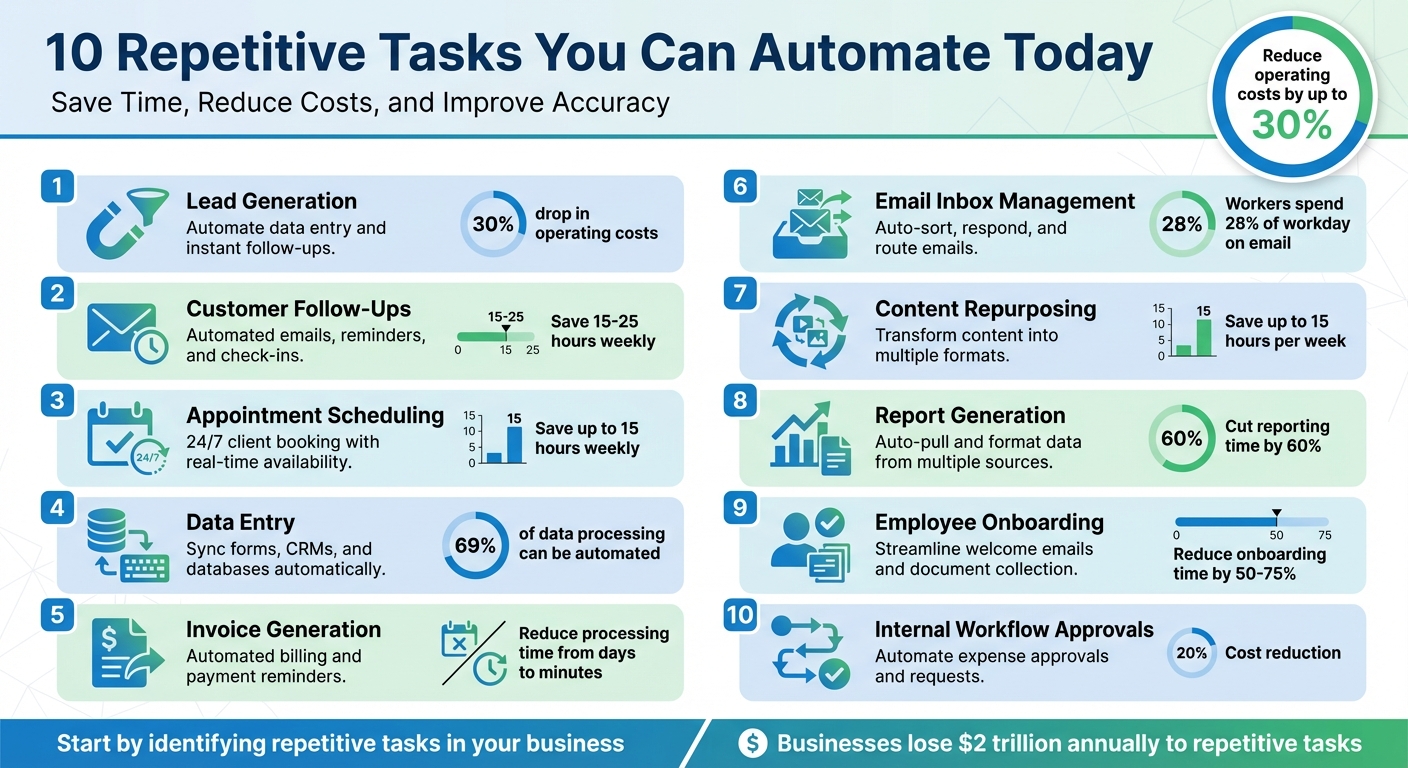
Running a business often means spending hours on repetitive tasks that don’t directly contribute to growth. From data entry to appointment scheduling, these tasks are time-consuming and prone to errors. The solution? Automation. By automating specific processes, you can save time, reduce costs, and improve accuracy. Here’s a quick overview of the 10 tasks you can automate right now:
- Lead Generation: Automate data entry and follow-ups to respond to leads instantly, improving conversion rates and cutting costs.
- Customer Follow-Ups: Use automated systems to send timely emails, reminders, and check-ins, saving up to 25 hours weekly.
- Appointment Scheduling: Let clients book directly through automated tools, reducing back-and-forth communication.
- Data Entry: Eliminate manual input by syncing forms, CRMs, and databases for error-free and faster processing.
- Invoice Generation: Automate billing, reminders, and recurring payments to save time and reduce errors.
- Email Inbox Management: Use automation to sort, respond, and route emails, cutting down on wasted hours.
- Content Repurposing: Transform one piece of content into multiple formats for broader reach with minimal effort.
- Report Generation: Automate pulling and formatting data from multiple sources into ready-to-use reports.
- Employee Onboarding: Streamline welcome emails, document collection, and training setups with automated workflows.
- Internal Workflow Approvals: Simplify processes like expense approvals and vacation requests with automated routing.
Automation not only saves time but also reduces errors and operational costs by up to 30%. Start by identifying repetitive tasks in your business and explore tools or custom AI systems to handle them efficiently.
10 Repetitive Business Tasks You Can Automate Today
The Beginner’s Guide to Automating Your Business
1. Lead Generation
Lead generation can be a major drain on time and resources. Every website form submission, Facebook ad inquiry, or LinkedIn message often requires someone to manually copy contact details into a spreadsheet and then follow up before the lead loses interest. This manual process not only eats up valuable time but also causes delays that hurt conversion rates. Waiting just 30 minutes to contact a lead reduces your chances of qualifying them by 21 times compared to responding within five minutes [10].
Saving Time with Automation
Automating lead generation eliminates the need for manual data entry entirely. Inquiries from your website, Facebook Lead Ads, or Instagram can flow straight into your CRM without any human intervention. This means your team can skip the tedious admin work and focus on closing deals. The result? A huge boost in efficiency that also paves the way for cutting costs [3][12].
Cutting Costs
Businesses that adopt automated lead generation often see a 30% drop in operating costs related to managing and nurturing leads [3]. Marketing automation also trims overhead by 12.2% [9]. On top of that, 80% of companies report generating more leads after implementing automation [9]. And those leads? They’re less expensive to nurture. In fact, companies that excel at automated lead nurturing produce 50% more sales-ready leads at a lower cost [10].
Practical Applications Across Industries
Automation isn’t just a one-size-fits-all solution – it’s tailored to fit the unique needs of different industries.
- Real estate agents can respond to late-night Facebook inquiries instantly, engaging buyers when their interest is highest – even if it’s 11 PM on a Saturday.
- Law firms can use automated client intake forms to securely log sensitive information as soon as a potential client reaches out, eliminating the need for follow-up calls to gather missing details [7][10].
- Local service businesses can leverage AI-powered lead scoring to identify and prioritize high-intent prospects, ensuring their sales teams focus on the warm leads most likely to convert [3][6].
For instance, in September 2022, McCrindle, a social research agency, implemented automated lead scoring. By personalizing engagement based on user actions, they achieved a 34% open/click rate on their marketing campaigns [6].
Open Head’s custom AI systems streamline this entire process. They capture leads from every channel, score them based on engagement, and ensure high-priority prospects are routed to your sales team 24/7. This kind of automation doesn’t just simplify workflows – it lets your team focus on what truly matters: driving revenue.
2. Customer Follow-Ups
Relying on manual follow-ups can slow down your sales process and leave potential revenue on the table. When a prospect fills out a contact form or abandons their shopping cart, timing is everything. The reality is, most businesses can’t keep up with fast response times – especially outside normal working hours.
Time Savings Potential
Automating follow-ups takes the hassle out of tracking and responding to customer actions. Instead of spending time sending welcome emails, cart reminders, or post-purchase check-ins manually, automated systems handle these tasks instantly. This approach can save small business owners anywhere from 15 to 25 hours a week [8][4].
Cost Efficiency
Automation doesn’t just save time – it saves money too. By streamlining follow-ups, businesses can cut operating costs by 30% and reduce support expenses by managing up to 80% of routine inquiries. This translates to an additional 50% savings in support costs [8]. A great example comes from Morrow Audio founder Mike Morrow, who implemented a two-email automated abandoned cart campaign in September 2022. The result? A 26% recovery rate, reclaiming approximately $30,000 in sales that might have been lost [6].
Industry Relevance
The benefits of automated follow-ups vary depending on the industry. For e-commerce, automated reminders can help recover up to 63% of abandoned carts [10]. In the B2B world, nurturing campaigns are critical, as 73% of leads aren’t ready to convert immediately [10]. Professional services can reduce no-shows with appointment reminders, while real estate agents can stay on top of leads – even after hours.
Open Head’s custom AI systems seamlessly integrate automated follow-ups into your broader customer engagement strategy, ensuring every lead gets the attention it deserves. Just like lead generation, effective follow-ups are a cornerstone of a smooth sales process, setting the stage for the next automated step.
3. Appointment Scheduling
The back-and-forth of scheduling can feel like a never-ending game of "phone tag." You propose a few time slots via email, only to get a delayed reply suggesting completely different options. Meanwhile, double-bookings and scheduling mishaps disrupt your workflow and leave clients feeling less than thrilled.
Time Savings Potential
This is where automation steps in to save the day. Automated scheduling tools eliminate the need for endless emails or calls. Clients can check your real-time availability and book a time that works for them – even if it’s late at night or over the weekend. This 24/7 accessibility not only boosts convenience but also frees up up to 15 hours a week for small business owners [3]. Plus, by reducing the mental juggling act of managing schedules, you can reclaim as much as 40% of your productivity [14].
Mike Palazzolo, Owner of Fintentional, puts it best: "Automating the task of scheduling client appointments is a major time saver for everyone. Automation reduces the time I spend scheduling appointments, provides clients the flexibility to schedule at any time, and allows me to efficiently balance my day" [14].
Cost Efficiency
Beyond saving time, automated scheduling tools can also protect your bottom line. Features like email or text reminders – sent 24 hours and 1 hour before an appointment – help cut down on no-shows. And with modern systems capable of managing up to 80% of routine scheduling inquiries [3], you can significantly reduce the need for manual follow-ups.
Industry Relevance
The benefits of automated scheduling extend to a wide range of industries. Healthcare providers, legal professionals, and accountants often see fewer no-shows and better use of their calendars. Real estate agents, for instance, can let potential buyers book property viewings without the hassle of phone calls. Even businesses with global or distributed teams can easily coordinate meetings across time zones [5]. These examples show just how crucial a streamlined scheduling solution can be.
Open Head’s custom AI systems take it a step further by syncing directly with your calendar and CRM. Every appointment is captured, confirmed, and organized – no manual effort required.
4. Data Entry
Manual data entry is a time sink and a breeding ground for errors. From transferring web form details to updating spreadsheets, every keystroke adds to the risk of mistakes.
Time Savings Potential
Office workers spend over three hours daily on manual, repetitive tasks [6]. Around 69% of data processing and 64% of data collection tasks could be automated [11]. By automating these processes, businesses can cut the time spent on repetitive tasks by up to 50% [16]. This means your team can shift their focus to tasks that actually grow the business – whether it’s closing deals, improving customer service, or developing new products.
And here’s the kicker: saving time also means cutting operational costs.
Cost Efficiency
Automation can slash data entry costs by 20% to 30%, eliminating the need for manual labor on routine tasks [11][16][3]. In accounting, for example, automation could save 30% of a full-time employee’s workload by reducing the need for manual rework [11]. Plus, when customers fill out web forms themselves, they’re essentially doing the data entry for you – no staff time required [13][15]. This allows your team to focus on high-value activities, like strategic planning and customer engagement, which directly contribute to revenue growth.
Industry Relevance
Automation isn’t just for one industry – it’s a game changer across the board. Real estate agents, accounting firms, e-commerce businesses, and legal professionals all benefit from systems that minimize manual input [1][7][5][11][3][2].
- Real estate agents can automatically route leads from Facebook ads or website forms straight into their CRM.
- Accounting firms use receipt-scanning apps to digitize travel expenses, syncing them directly to platforms like QuickBooks.
- E-commerce companies streamline inventory management by syncing stock levels in real-time across multiple sales channels.
- Legal professionals automate client onboarding with standardized online forms that feed directly into case management systems.
At Open Head, we specialize in creating AI systems that ensure seamless data flow across all your apps and databases. No manual copying, no errors, and no wasted hours – just streamlined operations that keep your business running smoothly.
5. Invoice Generation and Billing
Manually creating invoices and chasing payments is a time drain that could be better spent growing your business. On average, an accounting employee processes just five invoices per hour. That’s 12 minutes per invoice tied up in data entry, proofreading, and processing [17]. Plus, the cost of manual invoice processing adds up quickly – nearly $4.00 per invoice [17].
Time Savings Potential
Automating invoicing transforms what used to take days into a task completed in just minutes. Take Accenture, for example: in 2020, they implemented an automated invoicing system that slashed their processing time from three days to less than 10 minutes [17]. Even better, the system eliminated spreadsheet errors, reducing their error rate to 0% [17].
For subscription-based businesses, automation takes the hassle out of recurring billing. The system generates and sends invoices on a set schedule – whether monthly, quarterly, or annually – and even sends automatic reminders for overdue payments [17][7]. No more manual follow-ups or last-minute scrambles.
Cost Efficiency
The numbers speak for themselves. Invoicing software typically costs around $21.50 per month – about the same as one hour of an employee’s wages [17]. Yet, it processes dozens of invoices in seconds. Companies heavily relying on automation close their financial books in six days or less 71% of the time, compared to just 23% for those using little to no automation [20].
Industry Relevance
Different industries reap unique benefits from automated invoicing. Law firms, for instance, rely on automated audit trails to track every invoice and payment for compliance. Accounting firms can save up to 30% of a full-time employee’s workload by eliminating repetitive tasks and rework [18]. Meanwhile, local service providers using platforms like Calendly or Acuity can collect payments at booking, removing the need for post-service billing entirely.
At Open Head, we take automation a step further by integrating your sales data, time-tracking tools, and accounting software into one smooth workflow. When a sale is finalized or a project is completed, the invoice is automatically generated, saved to cloud storage, and sent to your client. This streamlined invoicing process is just one example of how AI-powered automation can drive efficiency across your business operations.
sbb-itb-2339147
6. Email Inbox Management
Did you know office workers spend about 28% of their workday on email? That adds up to more than two hours daily just reading, sorting, and replying to messages [7]. And when you factor in the time lost switching between your inbox and other tools, the hit to productivity becomes even more obvious.
Time Savings Potential
Automating email management can dramatically reduce the time spent on inbox-related tasks – by as much as half [19]. For example, sales teams using AI tools for email follow-ups save over two hours each day [19]. Automation can handle tasks like sorting emails, routing inquiries, and turning action items into tasks on your project board.
Consider automated lead responses: they ensure every inquiry gets an instant acknowledgment, no matter if you’re in a meeting or it’s after hours.
This isn’t just theory – it’s happening in real-world scenarios. In 2025, Norwegian telecom company VEV adopted Agentforce 360 through Salesforce Foundations to manage customer communications. The results? The system now resolves 30% of support cases automatically, and smarter routing for complex queries boosted handling speeds by 40% for the rest [3].
Cost Efficiency
The benefits of automation go beyond saving time; it can also cut operational costs by 20% to 30% [16][11]. Employees spend over three hours a day on repetitive tasks, and 51% say these digital admin duties keep them from focusing on their core responsibilities [6]. With automated workflows, tasks like transferring email details into a CRM, setting calendar reminders, or adding tasks to project boards are done instantly. This eliminates manual busywork, reduces errors, and ensures nothing – like a follow-up or critical data entry – falls through the cracks.
Industry Relevance
Email automation isn’t a one-size-fits-all solution; it’s adaptable to various industries. For instance:
- Real estate agents can automatically send property details to leads and schedule showings.
- Law firms can route urgent client emails to the right attorney while directing general inquiries to support staff.
- Accounting firms can instantly file tax documents and receipts into the correct client folders in cloud storage.
At Open Head, we specialize in creating custom email automation systems that integrate with the tools you already use. Imagine this: a lead fills out your contact form, and our system instantly adds them to your CRM, sends a personalized welcome email, and notifies your sales team – all without manual intervention. These seamless workflows help small businesses stay efficient while keeping overhead low.
7. Content Repurposing
Creating quality content is no small feat – it takes time and effort. Yet, many businesses only use that content once. Repurposing changes the game by transforming a single piece of content into formats suited for multiple platforms. The result? Broader reach without adding to your workload.
Time-Saving Benefits
Repurposing content builds on the efficiency gains from automation, taking it a step further. Automation tools can save business owners up to 15 hours per week by handling tasks like content distribution [3]. Imagine having Instagram captions automatically adapted for LinkedIn or blog posts reformatted for social media snippets in seconds.
For example, tools like Lately AI can take a blog post and turn it into dozens of social media updates [21]. Your YouTube content can be shared directly to Facebook Pages and LinkedIn [12]. Even Eventbrite listings can seamlessly generate LinkedIn updates [11]. With these tools, your brand can maintain a consistent presence across platforms without the need for constant manual effort [2].
Cost Efficiency
Automation doesn’t just save time – it also cuts costs. Studies show that automation can reduce expenses by 20% [11]. In fact, 69% of data processing tasks and 64% of data-collection activities can be automated [11]. By automating content repurposing, your team can focus on strategic, high-impact work instead of repetitive tasks.
Globally, workers waste nearly $2 trillion on repetitive tasks [5]. CEOs themselves spend over 20% of their time on activities that could be automated [5]. Repurposing content through automation turns an hour of effort into weeks or even months of content distribution, tackling inefficiencies head-on.
Tailored for Every Industry
Content repurposing isn’t a one-size-fits-all solution – it adapts to the unique needs of different industries. For instance:
- Real estate agents can transform property listings into Instagram stories, Facebook posts, and email campaigns.
- Law firms can repurpose educational blog content into LinkedIn articles and newsletter snippets.
- Accounting firms can turn tax reminders into automated posts across multiple platforms.
This strategy ensures businesses maximize the value of their content while streamlining their operations. Open Head’s custom engines take this a step further by linking your existing tools into smooth workflows. Whether it’s formatting, caption optimization, or scheduling posts at the best times, our systems ensure your content works harder for you – without the endless manual grind.
8. Report Generation
Creating reports by pulling data from multiple systems can feel like a never-ending chore. You’re copying numbers from your CRM, pasting them into spreadsheets, double-checking analytics dashboards, and then formatting everything into a polished document. It’s a time-consuming process that keeps you from actually using the insights to push your business forward.
Time Savings Potential
Automating report generation slashes the time spent on these tasks. Studies show it can cut weekly reporting hours from 6 to 3 [19] and save over 2 hours daily on repetitive analysis [19]. In fact, AI tools can trim report compilation time by up to 60% [22], letting your team focus on strategy instead of slogging through data.
The best part? Automated reporting works on autopilot. For example, you can set up a dashboard to pull live data from Google Analytics and your CRM, then schedule PDF summaries to be emailed to clients on the 1st of every month [1]. Once it’s set, it just runs.
Cost Efficiency
It’s not just about saving time – automation also saves money. Companies using workflow automation have cut operational costs by as much as 30% while improving the quality of their output [19].
Automation also eliminates human errors in data collection. Instead of spending hours on routine admin work, your team can shift their focus to activities that bring in revenue. Manual reporting eats up staff time and incurs administrative costs, while automated systems operate efficiently on relatively low-cost software subscriptions.
Industry Relevance
Automated reporting isn’t limited to one sector – it’s valuable across the board, though the type of reports needed varies. Here are some examples:
- Real estate agents: Generate market analysis reports to track listings and buyer engagement.
- Accounting firms: Create profit and loss statements, balance sheets, and cash flow reports directly from accounting software [23].
- Law firms: Automate client billing summaries and case status updates.
- Marketing agencies: Monitor lead generation, customer behavior, and social media engagement without manual effort [23][10].
This kind of integration not only simplifies reporting but also fuels smarter decision-making. Tools like Open Head’s custom engines can link your CRM, accounting software, and analytics platforms into seamless workflows that produce accurate, up-to-date reports. The result? Your team stays informed, your data stays current, and you reclaim hours every week to focus on growing your business.
9. Employee Onboarding Tasks
The onboarding process for new employees often involves a series of repetitive tasks – sending welcome emails, collecting tax forms, setting up access permissions, ordering equipment, and scheduling orientation sessions. These tasks, while essential, can slow down productivity and create compliance issues if even one step is overlooked. For HR teams, this administrative burden can take time away from focusing on what truly matters: helping new hires thrive in their roles.
Time Savings Potential
Employee onboarding and offboarding are time-consuming, with 51% of IT teams acknowledging that these tasks occupy a large chunk of their workload [27]. Automation offers a game-changing solution, cutting onboarding time by an impressive 50%–75% [24].
Take, for instance, a tech-focused SME in 2023 that revamped its onboarding process using a custom automated workflow. By integrating its HR platform with project management tools, the company set up a system that automatically granted access permissions and scheduled training sessions as soon as hire details were entered. This reduced onboarding time by half, allowing new hires to hit the ground running much faster. On a larger scale, automation can save approximately 1.75 hours of labor per hire, which translates to 175 hours saved for every 100 hires annually [24]. This streamlined approach not only speeds up productivity but also fits seamlessly into existing workflows.
Cost Efficiency
The costs of manual onboarding can range from $4,000 to $40,000 per hire [24], driven by administrative labor, errors, and delays. Automating these processes can slash those costs by 30% to 50% [24], primarily by reducing redundant data entry, minimizing paperwork errors, and allowing HR teams to focus on strategic priorities like talent development.
In 2024, one organization demonstrated the financial benefits of automation by digitizing its I-9 verification process. By enabling new hires to authenticate documents via mobile devices, they eliminated the need for manual workarounds and paper-based systems. This transition not only reduced regulatory risks but also saved the company six figures [25].
Industry Relevance
While the specific tasks involved in onboarding may differ across industries, automation brings value to all sectors. From license verification and document signing to conflict checks and scheduling, automated workflows can handle a wide range of onboarding activities.
Here’s how it works: when a new hire is added to the system, automated workflows kick in to send welcome emails, set up user accounts, dispatch e-signature requests for contracts and I-9 forms, assign training modules, and introduce the new hire to team communication channels [26][1]. Additionally, automated pulse surveys at 30, 60, and 90 days can provide valuable feedback on the onboarding experience [25][26].
Open Head’s custom AI systems integrate tools for HR, project management, and communication, ensuring a smooth and efficient onboarding process. This approach not only enhances the onboarding experience but also aligns with broader automation strategies, freeing up resources for initiatives that drive business growth.
10. Internal Workflow Approvals
Streamlining internal workflow approvals is another way automation can enhance productivity. Whether it’s handling purchase orders, vacation requests, expense reimbursements, or content sign-offs, these processes often rely on lengthy email chains and manual follow-ups. This not only wastes time but also increases the risk of errors when approvals are missed.
Time-Saving Benefits
Automation isn’t just for external communication – it can completely transform internal approval workflows too. By routing approval requests directly to the appropriate person and sending real-time notifications via tools like Slack or Microsoft Teams, automation eliminates the need for back-and-forth emails and manual reminders[15][1][6]. For instance, MeisterLabs simplified its vacation request process by using Google Forms integrated with automated Slack notifications for manager approvals. Once approved, the system updates shared calendars and documents automatically[11].
Cutting Costs
Automating internal approvals can also lead to significant cost savings. On average, companies report a 20% reduction in costs by lowering administrative workloads and minimizing errors[11]. Rules-based automation further reduces labor-intensive tasks[11][28]. A trade credit insurance company, for example, automated its process for determining client credit limits, saving over 2,400 hours of manual work each month[28]. Another company cut the time needed to process premiums from an entire day to just 30 minutes[28].
Broad Applications Across Industries
The advantages of automating internal approvals extend to various departments and industries. Finance and accounting teams use automation for invoice approvals and purchase orders, reducing errors and speeding up payment cycles[5][15]. HR departments streamline vacation requests, onboarding documentation, and payroll approvals, ensuring consistency and efficiency[11][15][14]. IT teams benefit by automating software requests and access permissions, while marketing departments use it to expedite content reviews and campaign approvals[15][1][14].
Open Head’s custom AI systems integrate effortlessly with tools like Slack, Microsoft Teams, or your accounting software to create workflows tailored to your business needs. These systems automatically route requests, send real-time updates, and offer centralized visibility into pending approvals. This ensures nothing gets overlooked, allowing your team to stay focused on growth while aligning seamlessly with your overall automation strategy.
Conclusion
Repetitive tasks take up time and resources that could be better spent on growing your business. The automation opportunities discussed in this article – ranging from lead generation to internal approvals – are just the tip of the iceberg when it comes to streamlining operations. Globally, businesses lose nearly $2 trillion each year to repetitive tasks that could easily be automated[5].
Automation isn’t just about saving time; it delivers measurable results. It can free up as much as 15 hours per week[8], reduce operating costs by 30%[8], and provide near-perfect data accuracy at 99.99%. Companies leveraging AI automation tools report a 40% increase in productivity[29], while AI chatbots can handle up to 80% of routine customer inquiries, slashing support costs by 50%[8].
"Automation isn’t a luxury anymore – it’s a competitive edge."[8]
To get started, take a close look at your workflows. Identify repetitive, high-volume tasks that follow clear rules – these are prime candidates for automation. Encourage your team to highlight processes that involve manual data entry or transfer, such as lead follow-ups, appointment scheduling, or sending invoice reminders. Before diving in, ensure your data collection methods are standardized to allow smooth integration between systems. Begin with small-scale tests to refine your approach before rolling out automation across your organization.
Open Head specializes in building tailored AI systems that integrate seamlessly with your existing tools, allowing your team to focus on strategic initiatives. Start with a free 30-minute consultation where we’ll map out your workflows, identify automation opportunities, and estimate potential ROI. From there, we’ll deploy custom AI solutions designed to meet your specific needs, complete with ongoing monitoring and optimization to ensure scalability as your business grows. The results speak for themselves – AI automation lays the groundwork for long-term success and growth.
FAQs
How does automation help lower my business’s operating costs?
Automation can cut down operating costs by handling repetitive, manual tasks through AI-powered workflows. This approach trims labor hours, reduces mistakes, and brings down overhead expenses. By shifting routine processes to automation, your team can dedicate more time to meaningful, high-impact work, driving efficiency and increasing profitability.
Take tasks like data entry, scheduling appointments, or managing customer follow-ups – automation handles these seamlessly. It not only saves time and money but also ensures your operations stay accurate and consistent.
What’s the best way to automate lead generation and follow-ups?
Automating lead generation and follow-ups works best when you combine AI-driven tools with efficient workflows. This approach not only saves time but also improves results. Here are three key features to focus on:
- AI-powered lead enrichment and scoring: Automatically collect and verify contact information, then rank leads based on their likelihood to buy. This eliminates the need for time-consuming manual research and helps your team prioritize high-potential prospects.
- Personalized, automated outreach: AI can craft customized emails or messages that include details like the lead’s name, company, and specific needs. Follow-ups are sent automatically based on how the lead engages, ensuring a smooth and consistent communication process.
- Seamless workflow integration: Sync your automation tools with your CRM, calendar, and reporting systems. This ensures leads are assigned to the right team members, meetings are scheduled without hassle, and every interaction is tracked for easy reference.
By adopting these strategies, small and medium-sized businesses can simplify their sales processes, nurture leads more effectively, and close deals faster. Open Head specializes in creating tailored AI systems that integrate these features into your current tools, making automation both simple and scalable.
How can I start automating repetitive tasks in my business?
Getting started with automation doesn’t have to be overwhelming. The first step is to pinpoint repetitive, time-consuming tasks in your daily workflow. Think about activities like data entry, sending follow-up emails to customers, or managing appointment schedules. These types of tasks are usually rule-based, with clear inputs and outputs, making them perfect candidates for automation.
Start small by selecting one or two tasks that are straightforward but can make a noticeable difference. For example, you might define a simple logic like: "When a new lead is added, send a welcome email." Platforms like Open Head can help you set up these processes by creating triggers, actions, and AI-powered steps to handle the work for you.
Before going live, test your setup with sample data to ensure everything works as expected. Once it’s running smoothly, keep an eye on its performance and make adjustments as needed. Over time, you can expand your automation efforts, tackling more tasks and building a system that saves time, minimizes errors, and improves overall efficiency in your business.