


Scaling your business doesn’t have to mean hiring more people. Instead, you can use AI to handle repetitive tasks like customer inquiries, lead follow-ups, scheduling, and invoicing. Here’s what you need to know:
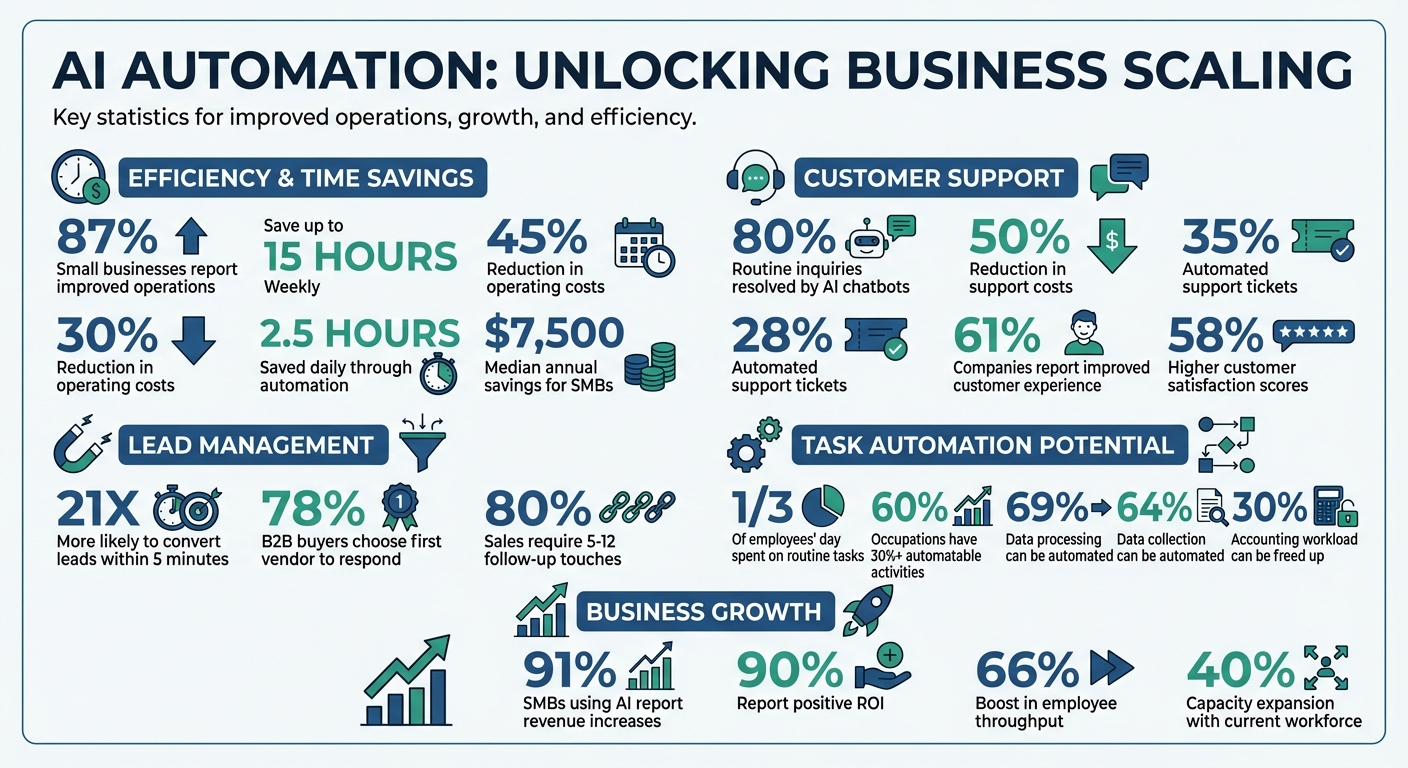
- AI boosts efficiency: 87% of small businesses report improved operations with AI, saving up to 15 hours weekly and cutting costs by 30%.
- Customer support automation: AI chatbots can resolve up to 80% of routine inquiries, reducing support costs by 50%.
- Lead management: AI tools ensure fast follow-ups, increasing conversion chances by 21 times when responding within five minutes.
- Internal tasks: Automate scheduling, financial processes, and data entry to free up time for strategic work.
AI tools like Open Head integrate with your systems, offering 24/7 support, personalized lead follow-ups, and streamlined workflows. Businesses using AI report higher revenue, better profit margins, and significant time savings – all without expanding their teams. Let AI handle the busywork so you can focus on growth.
AI Business Automation Statistics: Time Savings, Cost Reduction, and ROI
10 AI Automations That Run My Business (Steal These)
Finding Tasks to Automate in Your Business
The first step in automating your business is figuring out which tasks are eating up too much time. Research shows that employees spend nearly a third of their day on routine tasks, and about 60% of all occupations include at least 30% of activities that could be automated. Tasks prone to human error due to fatigue or boredom are especially worth targeting.
Take a close look at your workflows to identify these repetitive tasks.
How to Review Your Current Workflows
Start by mapping out your daily operations. Look for tasks that are manual, repetitive, predictable, and prone to errors. A simple way to spot these is by using the "Sigh Test" – tasks that consistently frustrate your team are prime candidates for automation. Also, keep an eye out for bottlenecks where employees repeatedly make the same small decisions.
Take the example of Popl, a digital business card platform. In 2025, they faced hundreds of demo requests daily. By introducing an AI system to handle email triage, filter spam, and route leads by region, they managed to save $20,000 annually.
Before diving into automation, make sure your data inputs are clean and well-organized – automating messy data only amplifies existing problems. Document your workflows to spot recurring data transfers or frequently asked questions that can be streamlined.
Once you’ve identified inefficiencies, group them into categories to prioritize which ones to automate first.
Common Tasks That Can Be Automated
Customer support is a big area for automation. AI chatbots, for example, can handle up to 80% of routine customer inquiries, cutting support costs by as much as 50%. Norwegian telecom company VEV demonstrated this in 2025 when they deployed AI agents for customer service. The result? 30% of support cases were resolved automatically, and the handling speed for complex issues improved by 40%.
Lead follow-ups and data entry are also ripe for automation. Responding to leads within five minutes makes companies 21 times more likely to convert them into customers. Financial tasks like invoicing, payroll, and expense tracking can free up about 30% of an accountant’s workload. On top of that, studies show that 69% of data processing and 64% of data collection activities could be automated.
Other areas to consider include scheduling, appointment booking, internal communication routing, social media posting, meeting summaries, and applicant tracking. On average, businesses save 2.5 hours daily through automation, with small and medium-sized businesses reporting median annual savings of $7,500.
Using AI Receptionists for Customer Support
Customer support can be a major time drain, especially when your team is stuck answering the same questions over and over. That’s where AI receptionists come in. These tools handle repetitive inquiries 24/7, freeing up your human team to tackle more complex problems that require their expertise. Curious about how this works? Let’s dive into the details.
How AI-Powered Customer Support Helps Your Business
AI receptionists offer instant, round-the-clock responses across various channels, ensuring your business is always available. This means no more missed leads or customers left waiting. In fact, research highlights that 61% of companies using AI in customer experience reported noticeable improvements, while 58% of businesses saw higher customer satisfaction scores after adopting these tools.
One of the standout benefits is how AI handles initial inquiries. With features like sentiment detection, these systems can identify when a customer is upset or when an issue is urgent. In such cases, the AI escalates the conversation to a human team member, providing them with a full transcript for context. This allows businesses to automate 28% of all support tickets, saving hundreds of hours every month.
What Open Head‘s AI Receptionists Can Do
Open Head’s AI receptionists seamlessly integrate with your existing CRM systems, syncing every conversation, lead detail, and customer interaction automatically. This eliminates the hassle of manual data entry and ensures your team has full visibility into customer communications.
These AI tools handle a wide range of tasks, including scheduling, answering FAQs, managing client intake, and qualifying leads – all in one streamlined process. They operate across multiple channels like voice, SMS, and web chat, all while maintaining a consistent brand message. For businesses with diverse audiences, the AI even communicates in multiple languages, helping you expand your reach without the need for multilingual staff.
Automating Lead Generation and Follow-Ups
AI doesn’t just simplify customer support – it also takes lead generation and follow-ups to a whole new level. For small businesses, juggling lead capture and follow-ups can be a major challenge, especially with limited staff. AI steps in to handle these tasks automatically, ensuring no opportunity slips through the cracks while your team focuses on closing deals. And here’s why speed matters: 78% of B2B buyers go with the first vendor that responds to their inquiry. Quick, consistent follow-ups can make all the difference.
Automatic Lead Capture Systems
AI-powered systems work 24/7 to collect leads from your website, forms, and even social media. Imagine someone visiting your site at 2:00 AM – an AI-powered virtual assistant can greet them, answer questions, and gather their contact details without any human involvement. These systems use natural language processing to ask qualifying questions, ensuring only the most promising leads reach your sales team.
Here’s a staggering stat: Businesses that respond to leads within five minutes are 21 times more likely to qualify them compared to those waiting just 30 minutes. AI ensures lead data is captured instantly and routed directly to your CRM.
Take Open Head’s lead capture systems, for example. They integrate seamlessly with your existing CRM, automatically updating records and alerting team members when high-priority leads come in. AI even analyzes website behavior – like time spent on pricing pages or resource downloads – to rank leads by their likelihood to convert. This means your team knows exactly where to focus their efforts.
Sending Personalized Messages Automatically
Capturing leads is just the first step; keeping them engaged with personalized follow-ups is equally important. Research shows that 80% of sales require 5 to 12 follow-up touches, yet many companies stop after just one or two attempts. AI solves this by sending timely, personalized messages across email, SMS, and other channels based on each prospect’s specific actions and interests.
These aren’t generic messages. AI analyzes browsing history, past interactions, and other data to craft messages that feel tailored to each prospect. For instance, in 2023, insurance brokerage Holmes Murphy used automated follow-up systems to save 44,000 hours of manual work and cut costs by $5.5 million, streamlining renewals and identifying at-risk accounts. Similarly, RapidMiner deployed an AI chatbot that qualified over 4,000 leads and influenced 25% of their total sales pipeline.
"The follow-up is where deals are won or lost – plain and simple. If you’re not following up, you’re leaving money on the table." – SalesRoads Content Team
Open Head’s automated follow-up systems take it a step further. They send behavior-triggered messages at just the right time – like when a prospect downloads a resource, visits your pricing page, or abandons a form. These messages are spaced strategically (usually 2 to 5 days apart) to keep prospects engaged without overwhelming them. And when someone shows strong buying intent or asks detailed questions, the system seamlessly transitions them to a human team member, complete with all the conversation history. This ensures a smooth handoff and keeps the momentum going.
sbb-itb-2339147
Improving Internal Operations with AI
AI is reshaping the way businesses handle internal operations. Open Head’s custom AI systems go beyond the rigid "if-this-then-that" rules of traditional automation. Instead, these systems provide what experts call "automation with a brain" – capable of understanding context and intent to autonomously manage complex workflows. The results? Leaders save as much as 15 hours per week and reduce costs by up to 30%.
The distinction between basic automation and AI-driven systems is striking. Traditional tools follow fixed paths, while AI can adapt to evolving circumstances and integrate seamlessly across various software platforms. No more manually transferring data or chasing down information across different systems. These internal efficiencies build on the earlier successes seen in customer-facing automation. Now, let’s dive into how AI simplifies scheduling and financial management.
Automating Scheduling and Task Management
Scheduling and task management often take up more time than most business owners realize. On average, entrepreneurs spend about 16 hours a week on repetitive administrative tasks. AI offers a smarter way to handle these processes. For instance, it can manage appointment bookings and calendars end-to-end by syncing with tools like Google Calendar or Outlook. It checks availability across multiple calendars, proposes meeting times, sends confirmations, and even reschedules when conflicts pop up. Beyond that, AI can assign tasks based on project progress or team availability, send deadline reminders, and update status reports automatically.
A real-world example? In 2025, Remote introduced an AI-powered IT support workflow to handle 1,100 support tickets monthly for its 1,800 employees. The system classified issues, referenced past tickets for solutions, and resolved 28% of the tickets autonomously, saving the IT team over 600 hours each month. Open Head’s AI systems take this even further. For example, when a new contract is signed, the system can automatically create a project folder, generate a task list, assign responsibilities based on team capacity, and notify relevant stakeholders. It can also handle internal requests – like IT or HR inquiries – by sorting them by urgency and either resolving them using an internal knowledge base or routing them to the right department.
Automating Financial Tasks
Financial tasks require accuracy and consistency, making them perfect for AI automation. Manual processes like invoicing, expense tracking, and data entry not only waste time but also increase the risk of costly errors. Studies show that automating avoidable rework could save 30% of a full-time accounting employee’s work hours.
AI can simplify invoicing by generating and sending invoices based on completed work or contract terms, and even following up on overdue payments with personalized reminders. For expense tracking, AI scans receipts and PDFs in real time, categorizes expenses automatically, and syncs with your accounting software.
"We have Intuit Assist now making much more accurate, explainable, and transparent recommendations on expense categorizations, effectively automating accounts payable and accounts receivable." – Amit Talach, Senior VP of Product, Intuit
Businesses using similar systems have seen significant savings in labor costs. Open Head’s financial automation tools integrate seamlessly with existing accounting software, CRMs, and banking platforms. They monitor for discrepancies, flag unusual transactions for review, and ensure smooth data flow – all while maintaining the necessary human oversight.
AI Automation for Specific Industries
AI automation isn’t a one-size-fits-all solution. Every industry has its own set of challenges, and Open Head’s custom AI systems are designed to tackle these unique needs. Here’s how tailored AI solutions are transforming operations in real estate, accounting, and medical practices.
Real Estate: Automating Client Inquiries and Follow-Ups
For real estate professionals, managing property inquiries, scheduling showings, and following up with leads can be time-consuming. Open Head’s AI receptionists streamline these tasks, working 24/7 to handle inquiries from website forms, chat widgets, and social media messages. The system even assigns scores to leads based on their likelihood of conversion, allowing agents to prioritize the most promising opportunities.
In real estate, speed is everything. If a potential buyer asks about a property late at night, the AI instantly replies with details and available showing times. It syncs directly with the agent’s calendar, enabling buyers to book, reschedule, or cancel appointments without needing to pick up the phone. After interactions like property viewings or discovery calls, the system automatically sends personalized follow-up emails or text messages.
This automation ensures faster responses, reduces manual workload, and helps agents focus on closing deals.
Accounting: Automating Expense Tracking and Invoicing
For accounting firms, managing invoices, receipts, and financial documents can feel like an endless task. Open Head’s AI systems simplify this process by extracting, verifying, and routing data for approval automatically. Beyond basic automation, the system organizes complex invoices and purchase orders into structured categories, flags discrepancies, and identifies inefficiencies.
One striking example comes from a global biotech company that, in November 2025, implemented AI to ensure invoice-to-contract compliance. The system tracked invoices against contract terms, uncovering contract leakage worth 4% of total spend – equating to a $40 million margin improvement for every $1 billion spent.
The time savings are substantial. A 2025 study by MIT Sloan and Stanford University found that accountants using AI-enabled tools completed monthly financial statements nearly a week faster than their peers. Firms that train staff in AI save an average of seven weeks per year per employee.
"In accounting, there’s laundry and there’s poetry. Make the laundry – inputting and processing data – more efficient and you free up time and space for the poetry".
Medical Practices: Automating Appointment Booking
Medical practices often juggle appointment requests, prescription refills, and patient inquiries. Open Head’s AI receptionists handle these routine tasks seamlessly, offering 24/7 support. The system uses intelligent routing to manage simple tasks like booking appointments automatically, while directing more complex issues to the right team member.
The AI doesn’t just book appointments – it also sends reminders via email or SMS and syncs patient data with the practice’s CRM for quicker issue resolution. For practices with multiple specialists, the system asks qualifying questions to ensure patients are matched with the right provider before displaying available time slots.
Tracking and Improving AI Performance
Rolling out AI automation is just the first step. To truly understand its impact and identify opportunities for growth, tracking performance is essential.
Measuring ROI and Efficiency Improvements
Start by establishing a baseline. Measure task duration, error rates, and workflow bottlenecks across 30–50 instances to create a clear "before" picture. This sets the stage for meaningful comparisons after implementation.
Focus on three core metrics:
- Time per task: Look at both median and mean durations.
- Throughput: Track how many tasks are completed in a given timeframe.
- Rework or error rates: Identify how often tasks need to be corrected or redone.
Additional metrics, like reduced customer response times or increased employee capacity, can provide valuable context. To calculate net savings, use this formula:
(Annualized Time Saved × Fully Burdened Hourly Rate) – Total Implementation Costs.
For most small businesses, a good payback period is between 6 and 18 months. However, watch out for pitfalls like the Hawthorne effect – where productivity spikes simply because employees know they’re being observed – or selection bias, which can skew results if only the easiest tasks are automated.
"The real cost isn’t the tool; it’s the uncertainty: how do you prove, reliably, that this change will save time, reduce errors, and free staff to do higher‑value work?"
- Michael Grillo, AI Consultant, MyMobileLyfe
The results can be significant. A whopping 91% of small and medium-sized businesses using AI report revenue increases, and 90% say AI delivers a positive ROI. In fact, by 2025, employees using AI tools saw a 66% boost in throughput.
Once you have these metrics in place, the next step is to continually refine your AI systems to keep the momentum going.
Refining Your AI Systems Over Time
Your performance metrics provide a roadmap for ongoing improvements. AI systems need regular updates to stay aligned with your business goals and maintain accuracy. One key issue to watch for is model drift – when changes in data or business needs cause AI performance to decline.
"AI workflows aren’t set-it-and-forget-it machines, and they’re not psychic. They need guardrails and the occasional review from an actual person."
- Nicole Replogle, Staff Writer, Zapier
To keep your AI running smoothly, establish feedback loops where employees can report limitations and suggest enhancements based on their experiences. Regularly update your underlying data to ensure outputs remain accurate and relevant as your business evolves.
Track leading indicators like:
- Time to Value: How quickly new processes start delivering results.
- Workflow Automation Success: The percentage of workflows successfully automated.
- Hours Saved: The weekly time saved per team member.
These metrics help identify areas where AI can further expand your capabilities. For example, Zota, a global payments marketplace, adopted an AI-first strategy in 2024/2025. They scaled from 500,000 to 1 million merchants while keeping their workforce capped at 300 employees. By deploying an AI-powered FAQ agent to handle 180,000 inquiries annually, they scaled their operations across departments, enabling a team of 140 to function like a team of 800.
Set clear milestones to guide your AI journey:
- First 90 days: Focus on foundational deployment.
- By 6 months: Achieve measurable capacity increases.
- By 12 months: Secure sustainable ROI.
As your systems improve, redirect freed-up capacity to strategic, high-value tasks. The real payoff isn’t just in hours saved – it’s in what your team can accomplish with that extra time. These continuous refinements ensure your AI investment delivers long-term benefits, helping your business scale efficiently without increasing headcount.
Conclusion
By leveraging the strategies outlined, AI automation offers a powerful way to achieve sustainable growth without increasing your team size.
With AI, you can expand your capacity by as much as 40% using your current workforce. How? By cutting out manual bottlenecks and automating time-consuming, repetitive tasks. Companies that integrate AI into their operations have reported 30% reductions in operating costs – a clear indicator of its impact.
Start by pinpointing tasks that eat up hours each week, like appointment scheduling, lead follow-ups, and data entry. Implement AI receptionists to provide round-the-clock coverage and handle routine inquiries efficiently. Automate lead capture and follow-ups to ensure no opportunity slips through the cracks. These simple changes can free up to 25% of your team’s time, allowing them to focus on high-value, strategic work that drives growth.
The benefits are clear. While your team concentrates on closing deals, nurturing client relationships, and innovating, AI takes care of the administrative load. This shift allows more time for crucial initiatives like product development and targeted marketing.
Open Head’s custom AI solutions are designed to help small and medium-sized businesses achieve growth without adding headcount. Whether you need an AI receptionist, automated lead management, or streamlined workflows, these tools adapt seamlessly to your industry and processes. The payoff? Improved service, reduced costs, and scalable growth – all without hiring more staff.
Transform operational hurdles into growth opportunities with Open Head’s tailored AI systems. It’s time to reimagine what your business can achieve.
FAQs
How can AI help improve lead response times and boost conversions?
AI can make lead response times lightning-fast by delivering instant, tailored replies to customer inquiries. This quick interaction helps potential clients feel acknowledged and keeps them engaged. Beyond that, AI can handle tasks like setting up follow-up reminders and identifying top-priority leads, freeing up your sales team to concentrate on sealing the deal.
By taking care of these repetitive tasks, AI not only eliminates delays but also enhances the customer journey. The result? Better conversion rates and smoother, more efficient sales processes.
What internal tasks can small businesses automate with AI to save time and resources?
AI offers small businesses a powerful way to handle repetitive tasks, freeing up time for more important work. For instance, AI tools can draft and customize routine emails, summarize lengthy documents, and clean or validate data in spreadsheets. These tasks are completed quickly and accurately, cutting down on manual labor.
Beyond that, AI simplifies back-office operations like tracking cash flow, processing invoices, and categorizing expenses, turning raw data into useful insights. It can also take over human resources tasks such as managing onboarding paperwork, enrolling employees in benefits, and answering common questions through chat assistants. This reduces the workload for administrative staff.
By automating processes like email creation, data management, financial tracking, and HR workflows, small businesses can boost efficiency and grow without needing to bring on extra employees.
How does AI improve accuracy in financial task automation?
AI brings precision to automating financial tasks by verifying data entries, spotting irregularities, and using rule-based controls to maintain consistency. With machine learning, historical data patterns are analyzed, enabling these systems to get better over time at catching errors and simplifying workflows. The result? Fewer manual mistakes, time saved, and greater confidence in your financial processes.