


Stop wasting time on repetitive support tasks. A no-code knowledge base helps small businesses handle FAQs, troubleshooting, and how-to guides – without hiring developers or managing complex software.
Here’s the problem: 47% of employees avoid using their company’s knowledge base because it’s disorganized, and traditional self-service tools only solve 14% of issues. Modern no-code platforms fix this by using AI to deliver clear, actionable answers instead of just dumping links.
Why it matters: Companies like Intuit QuickBooks reduced support case resolution time by 36% in 2025 with an AI-powered knowledge base. For small businesses, these tools can save thousands of dollars monthly by cutting ticket volume, improving response times, and boosting customer satisfaction.
Quick Benefits:
- Faster resolutions: AI cuts search time by up to 60%.
- Lower costs: Automates repetitive tasks, reducing the need for full-time staff.
- 24/7 support: Customers solve issues anytime without waiting for human agents.
Want to build one? Start by setting clear goals, organizing content logically, and choosing the right no-code tools like Slite or Help Scout. Add AI for intelligent search and automation to keep it running smoothly.
Pro Tip: Tools like Open Head can integrate your knowledge base with Slack, Salesforce, and other platforms, ensuring everything works together effortlessly. Schedule a free consultation to see how automation can transform your support operations.
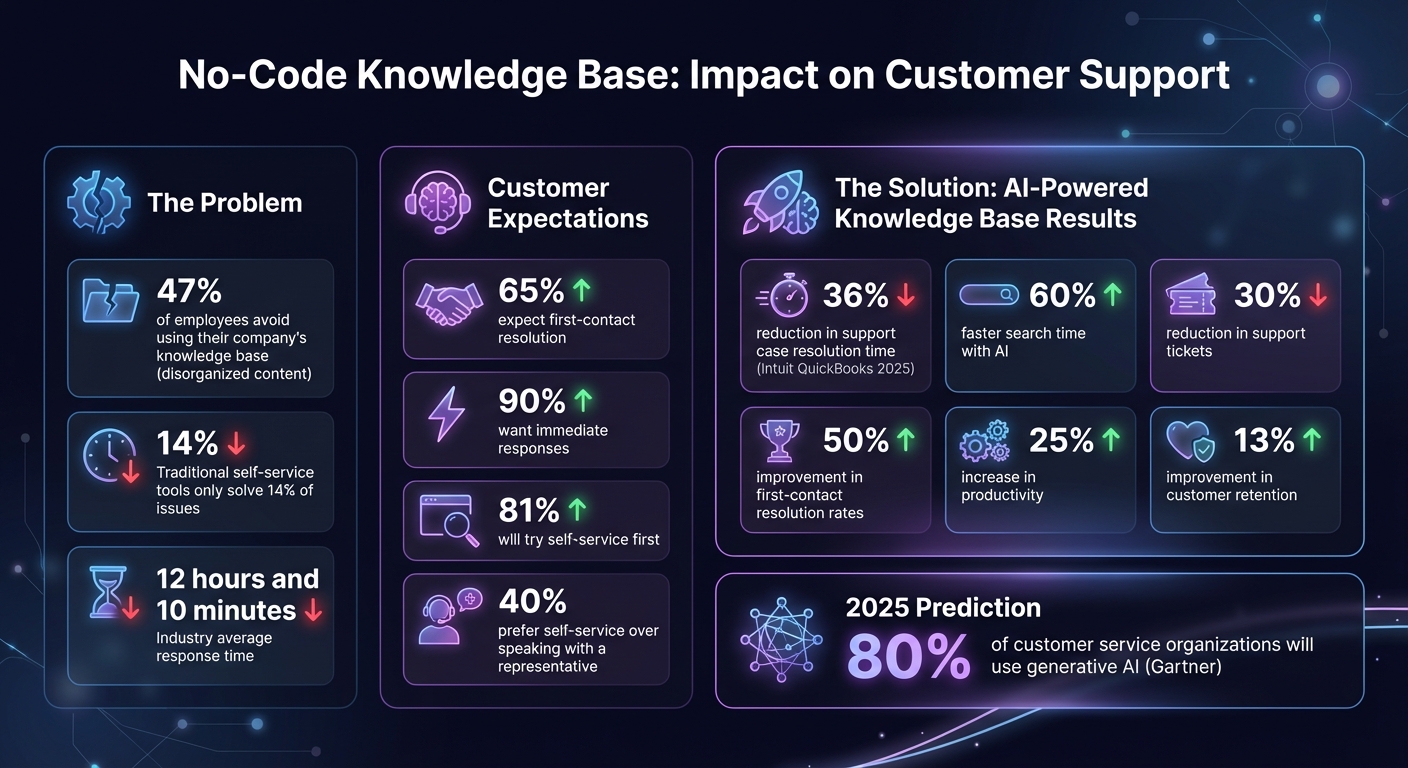
No-Code Knowledge Base Benefits: Key Statistics and ROI Metrics
How To Build an AI Knowledge Base for Your Business (w/ No Code)
Identify Your Support Goals and Requirements
Before diving into creating a no-code knowledge base, take a moment to define what success looks like for your support team. Without clear goals, you risk ending up with a chaotic content repository that no one uses. When content is messy or hard to navigate, employees often avoid it altogether. Start by identifying your pain points – whether it’s slow response times, agents bogged down by repetitive inquiries, or inconsistent answers for customers. Once you’ve pinpointed the issues, you can set actionable goals to address them.
Set Clear Objectives
Focus on specific, measurable outcomes that directly impact your business. Common targets include cutting down response times, increasing ticket deflection through self-service, and boosting customer satisfaction (CSAT). Consider this: 65% of customers expect their issue to be resolved on the first contact, and 90% want an immediate response [3]. If your current response time averages 12 hours and 10 minutes – the industry benchmark [3] – you might set a SMART goal like, "Reduce response times by 30% within 90 days" [4].
Another key metric to track is ticket deflection. Monitor how often customers solve their own issues without needing agent help, especially since 40% of consumers prefer self-service over speaking with a representative [3]. With these goals in mind, take a closer look at your current workflows to uncover areas for improvement.
Map Your Current Support Workflows
Examine all the channels your team uses – email, phone, live chat, and social media – and identify where agents struggle to access accurate information [4]. Talk to your support reps daily to uncover recurring issues, from frequently asked questions to outdated or missing resources [4]. Pay attention to repetitive tasks like copying and pasting responses or digging through documentation. These are prime candidates for transformation into knowledge base articles or automated responses [3]. If your team is spending hours on the same questions, tools like workflow automation services can help streamline these processes with instant, AI-powered solutions.
Involve Key Stakeholders
Bring in support managers, frontline agents, and operations teams to capture and document institutional knowledge before it’s lost [5]. Senior agents often hold critical insights that haven’t been written down, and when they leave, that expertise goes with them.
"Your agents are your most potent resource, and they all have varying experiences and expertise. The more people that add to your knowledge base with their articles, the more answers you’ll solve" [3].
Decide early on what content should be customer-facing and what technical details should remain internal [5]. Since 81% of customers will try self-service first [5], getting this balance right will save your team from handling avoidable tickets later.
Design Your Knowledge Base Structure
After defining your support goals and workflows, the next step is to create a structure that makes information easy to locate and manage. A well-organized knowledge base eliminates the confusion that causes 47% of employees to avoid using their company’s knowledge base entirely [2]. The secret lies in crafting logical categories, setting clear access permissions, and establishing consistent formatting standards. This structure forms the backbone of an efficient, automated knowledge base that integrates smoothly with your support systems.
Organize Content by Category
Divide your knowledge base into intuitive, broad categories that match how users typically search for information. Common examples include:
- Getting Started: Onboarding guides for new users.
- Troubleshooting: Step-by-step solutions for common errors.
- Billing & Account: Policies related to payments, refunds, and subscriptions.
- Internal SOPs: Guidelines for escalation procedures and internal workflows.
- HR & IT: Resources for employees, like benefits and IT support.
Each category should address a specific audience. For instance, new customers might need setup guides, while your internal support team will benefit from detailed tool instructions and approval processes. Keep category names short, clear, and free of jargon that might confuse users.
Set Up User Roles and Permissions
Separate public-facing articles from internal documents by using strict access controls. Assign Subject Matter Experts (SMEs) to oversee each category and conduct biannual audits of user roles [4].
"AI knowledge bases enhance information security with knowledge access controls, ensuring only people and tools with permissions can access sensitive data." – Slack [2]
Maintain user-specific access permissions across your systems to protect sensitive data, particularly if your business handles customer information under SOC 2 or GDPR compliance standards.
Create Formatting Guidelines
Develop clear formatting rules to maintain consistency across all content. Use standardized naming conventions, article templates, and metadata like document IDs and update timestamps. Break content into smaller, digestible sections for better AI retrieval and easier human reading [2]. For example, instead of a lengthy troubleshooting guide, create individual articles for each error code with clear headings and step-by-step instructions.
"Linking to the source document builds trust when people interact with AI." – Slack [2]
Implement a thorough editing process to catch spelling, grammar, and technical errors before publishing [3]. Consistent formatting ensures that automated tools can efficiently retrieve and update content. Open Head’s custom automation solutions follow these guidelines, keeping your knowledge base accurate and ready to support your team in real time.
Build and Populate Your Knowledge Base
Creating a robust knowledge base starts with building a system that’s easy to manage and filled with actionable content. The process includes selecting an intuitive no-code platform, designing reusable templates, and seamlessly integrating your knowledge base with other tools your team already uses. The aim? To simplify content creation, maintain consistency, and automate repetitive tasks. This frees up your support team to focus on what really matters – helping customers. A well-maintained knowledge base can improve customer satisfaction while cutting down on support tickets. Let’s dive into the tools and strategies that make this possible.
Choose the Right No-Code Tools
The right tools can make all the difference. Look for a platform that’s user-friendly and works well with your current tech setup. For example, Slite (rated 4.7/5 on G2 Crowd) offers AI-powered formatting and document generation starting at $8 per user per month. If your team relies on video tutorials, Document360 can convert them into step-by-step guides. Need a solution for customer-facing documentation? Help Scout is a solid choice. For internal knowledge sharing, Guru excels. The key is picking a tool that integrates smoothly with your CRM, helpdesk, and communication platforms like Slack, HubSpot, or Salesforce. If you’re juggling multiple systems, automation services from Open Head can connect everything without requiring custom code.
Create Article Templates
Templates are the backbone of an efficient knowledge base. They ensure every article is structured the same way, making them easier to read and quicker to produce. A good template might include numbered steps, bullet points, and clear headings for better readability. For instance, a troubleshooting guide could have sections like “Problem Description,” “Step-by-Step Solution,” “Common Mistakes,” and “Related Articles.” Many platforms already offer templates for things like SOPs, employee handbooks, and product guides. Standardized formats also make automation tools more effective by creating predictable structures that are easy to update. Once your articles follow a consistent format, automation can take over routine tasks, speeding up content creation and maintenance.
Automate Content Creation with Open Head
Manually updating your knowledge base can quickly become a time sink as it grows. That’s where automation tools like n8n, Make, and Zapier come in. Open Head can connect your knowledge base to data sources like HubSpot or Salesforce, automating the creation of draft articles. For example, when a support ticket is resolved in Salesforce, an automation can pull details from the ticket – like the issue, solution steps, and customer questions – and generate a draft article. This approach has been shown to improve case resolution speed significantly [2]. Open Head’s AI consulting services can help pinpoint which workflows should trigger automatic updates, ensuring your knowledge base stays current without adding to your team’s workload. By automating repetitive documentation tasks, your team can dedicate more time to solving complex customer issues, while the system keeps your content fresh and relevant.
sbb-itb-2339147
Add AI and Automation to Your Knowledge Base
Building a knowledge base is just the first step – making it smarter is where the real magic happens. By incorporating AI, you transform static documentation into a dynamic, real-time support system. Gartner predicts that by 2025, 80% of customer service organizations will use generative AI in some capacity to boost productivity [9]. An AI-powered knowledge base can lead to a 30% reduction in support tickets as customers find answers independently and a 50% improvement in first-contact resolution rates [6]. But remember, the quality of your AI system depends entirely on the quality of its content. To get the best results, ensure your data is accurate, consistent, and well-organized [6].
AI isn’t just about reducing workload. It’s about creating a 24/7 system that understands natural language, learns from every interaction, and gets smarter over time. These capabilities open the door to advanced features that elevate the overall support experience.
AI Features for Customer Support
Today’s AI-powered knowledge bases go far beyond simple keyword searches. They leverage natural language processing (NLP) to understand the intent and context behind customer queries, pulling relevant answers from various sources. Features like intelligent search, automated article recommendations, and proactive self-service can deliver solutions before a customer even submits a ticket [8]. For instance, AI can detect keywords while someone fills out a support form and suggest helpful articles in real time, potentially resolving issues before they reach your team.
AI also takes over tedious content management tasks. It can identify gaps in your knowledge base, flag outdated or duplicate articles, and even suggest tags or titles for new content [7][8]. Some platforms support multimodal input, allowing text, voice, and video to be converted into searchable documentation [10][1]. Before activating these features, it’s essential to audit your existing content. Remove outdated articles, consolidate duplicates, and organize your documentation with clear headings and question-and-answer formats. Structured data is much easier for AI to process effectively [1].
With these tools in place, adding tailored automation becomes the next logical step.
Open Head’s Custom Automation Solutions
While off-the-shelf AI tools are great for basic tasks, custom automation delivers the most impactful results. Open Head specializes in building AI agents tailored to your unique workflows using tools like n8n, Make, and Zapier. For example, their AI receptionist can handle calls 24/7, answer common questions using your knowledge base, and route complex inquiries to the right team member. Similarly, their AI sales chatbot can qualify leads, schedule demos, and access product information – all without human involvement.
Open Head also offers workflow automation services that integrate your knowledge base with CRMs like Salesforce and HubSpot, helpdesk platforms, and communication tools like Slack and Microsoft Teams. These systems don’t just save time; they eliminate repetitive tasks, allowing your support team to focus on solving more complex customer issues. By connecting your knowledge base to your tech stack, you create a dynamic, evolving resource. Open Head’s AI consulting services can help prioritize workflows for automation, ensuring you see measurable results from the start.
Connect Your Knowledge Base Across Channels
Your knowledge base shouldn’t operate in isolation. The most effective AI systems integrate documentation across all customer touchpoints – your website, chat widgets, internal tools like Slack or Microsoft Teams, and even SMS or WhatsApp. This cross-channel integration allows support teams to access information without switching platforms, speeding up resolution times and improving customer satisfaction.
For example, a chat widget on your website can instantly answer customer questions using your knowledge base. When someone calls your support line, an AI agent can pull accurate answers in real time. Open Head’s chatbot development services deploy AI agents across web, SMS, WhatsApp, and voice channels, ensuring conversation context is maintained across all interactions [11][10]. By embedding your knowledge base into every channel, customers have access to reliable support whenever they need it, enhancing efficiency and the overall customer experience.
Maintain and Measure Performance
To keep your knowledge base effective, it needs ongoing care and regular evaluation. If you skip these steps, your knowledge base can quickly lose its value. Here’s a startling fact: 47% of employees avoid using their company’s knowledge base because the content is either disorganized or the search tools don’t work well [2]. The solution? Make sure your content stays relevant and easy to navigate.
Keep Content Up to Date
Your support team is your frontline resource for identifying outdated information and content gaps. Encourage agents to flag inaccuracies and suggest new articles based on recurring questions they handle. Plan quarterly content reviews to audit high-traffic articles, clear out duplicates, and archive anything no longer needed. If you’re using AI to generate answers, always include links to the original documentation. This not only allows users to verify the information but also gives them a way to report errors [2]. A feedback loop like this keeps your knowledge base accurate and builds trust with users and staff alike.
Track Key Performance Metrics
To understand how well your knowledge base is working, focus on these key metrics:
- Ticket deflection rates: How often users resolve issues without needing human help.
- Search abandonment rates: When users search but can’t find anything useful.
- Click-through rates: Whether users are engaging with the results they see.
- Agent handle time: How long it takes agents to resolve issues before and after the knowledge base is implemented.
- AI escalation rates: How often issues handled by AI are passed to human agents.
Feedback tools, such as "Was this article helpful?" buttons, are also invaluable for gauging the quality of your content.
Improve Results with Open Head
Once you’ve gathered performance data, the next step is knowing how to act on it. That’s where Open Head’s AI consulting services come in. They analyze your data to uncover automation opportunities and refine your systems. For instance, if your metrics show high search abandonment for certain topics, Open Head can create custom workflows using tools like n8n, Make, or Zapier to automatically generate new articles based on recurring ticket trends.
Their workflow automation services also integrate your knowledge base with platforms like Salesforce, HubSpot, and Slack, ensuring seamless data sharing across your tools. As your business grows, Open Head scales your AI capabilities to manage higher volumes without increasing your team size. The result? Faster response times, reduced support costs, and a knowledge base that consistently delivers measurable ROI. Regular evaluations and targeted automation tweaks keep your system running at peak performance.
Conclusion
A no-code knowledge base transforms how customer support operates. It allows non-technical team members to update documentation instantly, enables 24/7 self-service, and lightens the workload for support agents through automation. With knowledge management, businesses can see a 25% increase in productivity and a 13% improvement in customer retention. Plus, AI-driven search, which understands user intent, boosts resolution rates beyond the typical 14% achieved by traditional self-service systems [12][13][1].
But creating the knowledge base is just the beginning. The real test lies in keeping it relevant, easy to search, and seamlessly integrated with your existing tools. This is where automation becomes a game-changer. By linking your knowledge base to platforms like Salesforce, HubSpot, and Slack, and using AI to identify outdated content, you build a system that grows with your business. Automation not only keeps the system up-to-date but also enhances its effectiveness, ensuring it delivers scalable results.
Open Head’s AI consulting services help identify the best ways to integrate automation into your support workflows. Their team examines your data and connects your tech stack, whether it’s Salesforce, HubSpot, or Slack. From an AI receptionist that handles after-hours inquiries to workflow automation services that keep your knowledge base aligned across platforms, Open Head creates systems designed to drive measurable results.
These custom solutions lead to lasting improvements in your support operations. Shorten response times, lower support costs, and give your team the tools they need to succeed. Schedule a free consultation with Open Head to discover how an AI-powered knowledge base can elevate your customer support.
FAQs
How does a no-code knowledge base help small businesses save on support costs?
A no-code knowledge base allows customers to quickly find the answers they need without reaching out to your support team. This means fewer support tickets and less time spent on repetitive questions, giving your team more bandwidth for complex or high-priority issues.
The result? Faster responses, lower labor costs, and a smoother experience for your customers. It’s a win-win: your team stays focused, and your customers get the help they need, when they need it.
How can I get started with building a no-code knowledge base for my customer support team?
To build a no-code knowledge base that works, start by pinpointing the key details your audience needs. Focus on the essentials – like frequently asked questions, common customer challenges, or internal processes. Organize this information into straightforward categories such as Getting Started, Troubleshooting, or Billing, making it simple for users to navigate and find answers.
Next, pick a no-code platform to host your knowledge base. Companies like Open Head excel at creating these systems using tools like n8n, Make, or Zapier. These platforms let you design intuitive, searchable hubs without needing technical skills. Once your platform is set up, craft clear, step-by-step articles. Use plain language and add visuals to make the content easy to digest.
Finally, connect your knowledge base to tools your team already relies on – like Slack, Google Workspace, or HubSpot. This ensures your team and customers can access answers instantly. Following these steps can help you improve response times, ease your team’s workload, and create a solution that grows with your business.
How does AI improve no-code knowledge bases for customer support?
AI takes no-code knowledge bases to the next level by enabling them to interpret natural language, connect user questions with the most relevant answers, and continuously improve through machine learning. What used to be static documents now become interactive, conversational tools that deliver quicker, more tailored support.
For customer support teams, this means automating self-service across various channels, cutting down response times, and enhancing the overall customer experience – all without needing advanced technical skills. It’s an efficient way to manage repetitive questions while allowing your team to tackle more complex challenges.