


Managing compliance documents manually is costing your business time and money. Between tracking expiration dates, avoiding penalties, and preparing for audits, small businesses spend weeks each year on repetitive tasks that could be automated. Compliance document automation saves you from this hassle by using AI and workflows to handle licenses, permits, and policies efficiently.
Here’s what you need to know:
- 77% of organizations in 2025 struggled with complex compliance requirements.
- Manual compliance tasks took 11 working weeks annually in 2024 – up from 10 weeks in 2023.
- U.S. businesses spend 1.3%-3.3% of payroll on regulatory compliance.
With automation, you get centralized storage, real-time tracking, and automated alerts to manage deadlines, reduce errors, and stay audit-ready. For example, businesses using automation report saving thousands of hours annually and cutting compliance costs by over $500,000 per year.
The takeaway? If you’re still managing compliance manually, you’re missing an opportunity to save time, reduce risks, and focus on growing your business. Open Head’s custom solutions can help you set up an automated system in as little as 1–3 weeks, without technical headaches.
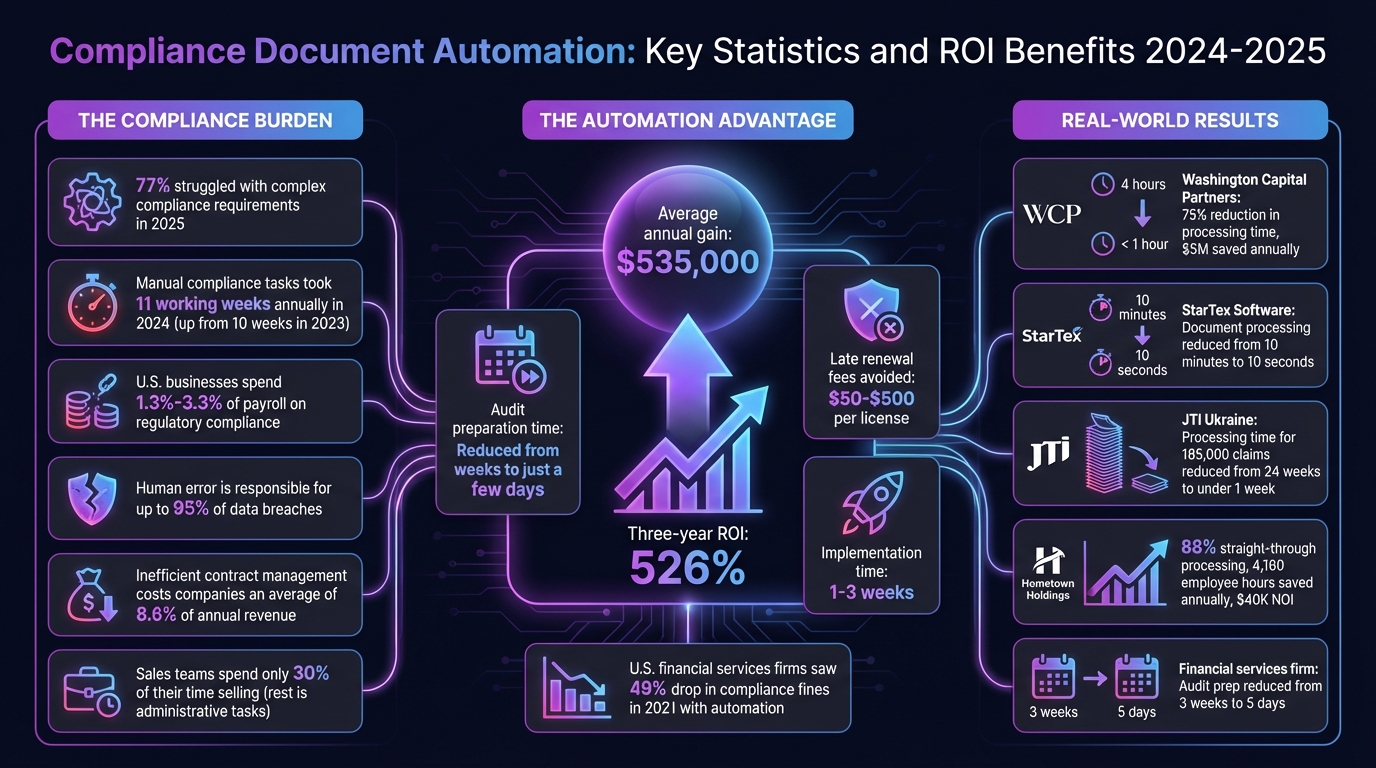
Compliance Document Automation: Key Statistics and ROI Benefits 2024-2025
Benefits of Automating Compliance Documents
Fewer Manual Errors
Human error is responsible for up to 95% of data breaches [1][3]. Often, these mistakes stem from "version drift" – a scenario where conflicting document versions, like an outdated emailed copy versus a cloud-updated file, cause confusion. This can lead to missed renewals and hefty regulatory penalties, increasing compliance risks [1].
AI-powered validation solves this problem by checking every document submission for accuracy and completeness before it enters your workflow [5]. For example, if a contractor uploads an insurance certificate without an expiration date, the system immediately flags the issue and requests the missing details. Unlike periodic manual audits, this real-time monitoring catches errors and vulnerabilities as they happen, not weeks later [2][4].
This kind of system is especially helpful for businesses managing multiple locations or complex licensing requirements. Open Head’s workflow automation services integrate seamlessly with tools like QuickBooks, Salesforce, or Google Workspace to ensure compliance policies are applied consistently. By reducing manual mistakes, you not only minimize errors but also save time and resources.
Time and Cost Savings
Manual compliance tasks are becoming more time-consuming. In 2024, the average time spent on these tasks increased to 11 working weeks, up from 10 weeks in 2023 [7]. For small businesses, automating document management can reclaim nearly three months of staff time. Beyond time savings, inefficiencies in contract management cost companies an average of 8.6% of their annual revenue [8]. Meanwhile, sales teams dedicate only 30% of their time to selling, with administrative tasks taking up the rest [10].
Automation simplifies these processes. Instead of digging through emails and file folders, your team can access any document within minutes using a centralized dashboard. Automated reminders help avoid last-minute scrambles and prevent late renewal fees, which can range from $50 to $500 per license [1]. Audit preparation, which used to take weeks, can now be completed in just a few days [2].
The financial benefits are striking. Companies using compliance automation report an average annual gain of $535,000 and a three-year ROI of 526% [7]. To put this in perspective, U.S. businesses typically spend between 1.3% and 3.3% of their payroll on regulatory compliance [3]. By automating repetitive tasks like data entry, document classification, and approval routing, businesses can expand without the need to hire additional staff [9][10]. These efficiencies also improve audit readiness, making compliance a smoother and more cost-effective process.
Better Audit Preparation
Traditional compliance checks often leave businesses scrambling to gather evidence at the last minute. Whether it’s discovering expired licenses during a client meeting or realizing key documents are missing when an auditor calls, these "point-in-time" approaches can be chaotic. Continuous control monitoring (CCM) eliminates this stress by keeping your records audit-ready at all times [3][4].
Automated systems generate on-demand reports with detailed timestamps, version histories, and audit trails [5]. Instead of searching across multiple platforms, a centralized system logs every action – who uploaded a document, when it was reviewed, and which stakeholders approved it. This ensures documents are ready for audits in minutes, not hours. Such transparency not only satisfies auditors but also helps businesses promptly address issues like unauthorized access or expired certifications [7][2].
| Aspect | Manual Compliance Workflow | Automated Compliance Workflow |
|---|---|---|
| Evidence Collection | Email chasing and manual spreadsheets | Automated file requests with AI validation [5] |
| Approvals | Informal and scattered email chains | Structured routing with e-signatures [5] |
| Audit Readiness | Compiled at year-end (reactive) | Continuous audit trails and exportable reports [5] |
| Time Investment | Hours spent searching for documents | Minutes to retrieve any document [2] |
For businesses navigating complex regulations, such as HIPAA in healthcare or OSHA in construction, this proactive approach is essential. Open Head’s AI consulting services can create customized compliance workflows tailored to your existing tools. These solutions ensure your automated reports and continuous audit trails translate into a more efficient and proactive compliance strategy across all regulatory requirements.
sbb-itb-2339147
Best Practices for Compliance Document Automation
Centralized Document Storage
Keeping compliance documents scattered across email attachments, shared drives, and local computers only adds confusion. It’s hard to know which version is current, and that can lead to costly mistakes. A centralized virtual document store changes the game by consolidating all key records in one secure location, making it simple to access the latest, approved versions [13].
Centralized systems also come with rights-based access control, meaning you can decide who can view, edit, or delete sensitive files based on their role [12]. Add to that robust version control, which logs every single change, ensuring that only the most up-to-date documents are in circulation [11][12]. AI tools take it a step further by identifying important information and converting it into structured data – no more manual data entry [12].
Open Head’s workflow automation services integrate seamlessly with tools like QuickBooks, Salesforce, and Google Workspace. This ensures compliance policies are applied consistently across your operations. Plus, cloud storage offers advanced encryption and offsite backups, adding an extra layer of security for disaster recovery [12]. In 2021, U.S. financial services firms saw a 49% drop in compliance-related fines, thanks to the growing use of automated solutions [13].
To get started, standardize sensitive documents with templates for contracts and agreements. This reduces errors and ensures consistency [14]. Also, apply the principle of least privilege, giving users only the access they need to do their jobs [14].
Automated Alerts and Notifications
Centralized storage is just the first step. Automated notifications take compliance management to the next level by ensuring deadlines aren’t missed. Manual reminders can fail – emails get buried or staff turnover disrupts the process. Automated alerts keep your team ahead of the curve by monitoring controls and flagging issues before they become problems. With time spent on compliance increasing from 10 weeks in 2023 to 11 weeks in 2024 [7], these alerts are now essential.
Set reminders at intervals like 90, 60, 30, and 14 days before key deadlines. This gives teams enough time to review requirements, submit applications, and escalate urgent tasks if needed. Always assign both a primary and a backup owner for each compliance document to keep notifications running smoothly during staff transitions.
Make sure alerts reach your team where they’ll see them – whether that’s Slack, Microsoft Teams, or even SMS. If a compliance task stalls or a deadline is missed, automated workflows can escalate the issue to senior management, helping you avoid fines or audit failures.
Open Head’s AI consulting services can design custom alert systems that integrate with your existing tools, ensuring no critical deadline goes unnoticed.
Real-Time Tracking and Analytics
Relying on periodic compliance checks often leads to last-minute scrambles before audits. Real-time tracking offers continuous visibility into your compliance status, helping you spot bottlenecks and resolve issues as they arise [7][5]. With 77% of organizations reporting that increasing compliance complexity hurt their operations in 2025 [4], real-time dashboards are now a must-have.
These dashboards provide metrics like task completion times, error rates, compliance percentages, and SLA adherence. For instance, in October 2025, a financial services firm using automated tracking tools cut their audit prep time from three weeks to just five days by automating evidence collection and monitoring sign-offs in real time [5].
"Automation shifts teams from reactive fixes to proactive assurance – monitoring controls continuously, collecting evidence as work happens, and flagging drift early." – Matt Collis, StackGo [7]
AI-powered analytics add another layer of efficiency, pre-checking submissions for completeness and formatting so only valid data enters the system [5][15]. You can also set up automated escalations to notify managers if tasks remain unresolved past a certain SLA [5]. By integrating workflows with master databases, data lookups can automatically validate vendor names or GL codes, cutting down on manual entry errors [15]. Businesses using automation for compliance reported a three-year ROI of 526% and an average annual benefit of $535,000 [7].
These practices provide a solid framework for effective compliance automation, as delivered by Open Head.
How to Implement Compliance Document Automation
Identify Your Compliance Requirements
Before diving into automation, you need to clearly define your compliance scope. Gather a team of legal, finance, and operations experts to conduct a risk assessment. This step ensures you document all applicable regulations – whether they’re local, state, federal, or international. For instance, if you handle European customer data, you’ll need to comply with GDPR, while California-based information falls under CCPA [16]. Industry-specific standards like HIPAA for healthcare, PCI-DSS for payment processing, or the Basel Accords for financial services are equally important [16][17].
Don’t overlook document retention schedules. For example, tax records might need to be retained for seven years, while employee records may have entirely different timelines. Mismanaging these schedules can create unnecessary legal risks. Additionally, consider any third-party requirements from suppliers, contractors, or customers. Security protocols, such as data encryption (both at rest and in transit), multi-factor authentication, and role-based access controls, should also be part of your compliance checklist.
With 83% of risk and compliance professionals emphasizing the importance of compliance in strategic decision-making [16], this initial mapping phase is critical. Implement the principle of least privilege – grant users only the access they need for their roles to minimize risks of unauthorized changes.
Once you’ve mapped out these requirements, it’s time to link them to your existing software tools.
Integrate with Your Existing Tools
To make automation effective, your compliance system must integrate seamlessly with your current tools. Set up connections with essential platforms like Google Drive, SharePoint, or APIs to enable smooth data flows [15].
The aim is to eliminate manual data transfers. For instance, if a vendor emails an insurance certificate, your system should automatically extract the information, validate it against your compliance criteria, and update your tracking dashboard – all without human intervention. Open Head’s workflow automation services specialize in creating these integrations using platforms like n8n, Make, and Zapier.
Another key step is cleaning and enriching your data. Use automated tools to standardize formats (e.g., converting dates to MM/DD/YYYY), match vendor names with GL codes, or validate addresses against USPS standards [15]. This ensures only accurate, reliable data enters your compliance system.
Build Custom Workflows
With requirements and integrations in place, focus on creating workflows tailored to your compliance needs. Use the "Trigger-Action-Control" model: triggers initiate the process (e.g., onboarding a new vendor), actions define the steps (e.g., requesting files, extracting data, updating records), and controls enforce rules (e.g., escalating overdue tasks or flagging incomplete submissions) [5].
Custom workflows can drastically cut processing times. For example, StarTex Software in Texas reduced the time to digitize complex, multi-page Safety Data Sheets from 10 minutes per document to just 10 seconds [15]. Similarly, JTI Ukraine slashed the processing time for 185,000 excise stamp tax refund claims from 24 weeks to under one week [15].
Start with high-volume documents like NDAs or vendor agreements for immediate impact. When training AI models for document extraction, use diverse samples – 10 to 50 from different vendors – to ensure your system can handle various formats [15]. Modern Intelligent Document Processing platforms typically achieve over 95% accuracy [15]. Open Head’s AI consulting services can help design these workflows and train AI models to align with your specific processes.
Test and Optimize
Testing is essential to ensure your workflows function as intended. Conduct internal audits and test edge cases – what happens if a vendor submits a document in the wrong format? How does the system handle missing signatures or expired certificates? AI-powered validation checks can catch errors before final data entry [5][6].
Monitor performance metrics from the start, such as task completion times, error rates, automation coverage, and user adoption rates [5]. For example, Hometown Holdings in Virginia achieved an 88% straight-through processing rate for property invoices, saving 4,160 employee hours annually and boosting their Net Operating Income by $40,000 [15]. These results came from ongoing monitoring and fine-tuning, not a one-off setup.
"One of the most challenging aspects is embedding compliance into day-to-day business and technical operations, rather than treating it as the responsibility of a single team." – Faisal Khan, GRC Solutions Expert, Vanta [6]
Continuous monitoring is key to catching issues before they escalate into audit failures [6][2]. When errors occur, feed corrections back into your AI models to improve accuracy over time. Assign both a primary owner and a backup for every automated workflow to maintain accountability, especially during staff transitions [1]. With compliance tasks now taking an average of 11 working weeks annually [6], optimization is essential to keep pace with growing regulatory demands.
Open Head’s Approach to Compliance Document Automation
Tailored AI Solutions for Your Compliance Needs
Open Head creates compliance automation systems designed specifically for your regulatory requirements. Each project kicks off with a discovery phase, where they map out your compliance documents, retention schedules, and approval workflows. Whether you’re navigating HIPAA regulations for a healthcare practice, PCI-DSS compliance for payment processing, or managing multi-state licensing for a home services business, Open Head’s AI consulting services pinpoint exactly what can be automated and which integrations will deliver the quickest return on investment.
Their custom workflows utilize tools like n8n, Make, and Zapier to seamlessly connect platforms such as Google Workspace, SharePoint, Salesforce, and QuickBooks. For example, when a vendor emails an insurance certificate, the system automatically extracts key dates and updates your compliance dashboard. Open Head’s workflow automation services handle all the technical details, so you don’t need to worry about coding or managing integrations.
Quick Implementation with Ongoing Support
Open Head ensures that your custom compliance automation system is up and running in as little as 1-3 weeks. They take care of everything – from linking your apps and training AI models to fit your document formats, to testing edge cases and setting up monitoring dashboards. To make the transition smooth, they provide hands-on training and detailed documentation, giving your team the tools to manage workflows effortlessly.
Their support doesn’t stop after deployment. Open Head offers continuous assistance to adapt workflows as regulations evolve or new compliance needs arise. If your team faces challenges or needs to integrate additional document types, you’ll work directly with their Denver-based team – no ticket queues or frustrating delays.
Real Results for Small Businesses
Open Head’s solutions deliver measurable outcomes that small businesses can feel almost immediately. Tasks that once took significant time, like processing vendor onboarding documents, can drop from 10 minutes per submission to under 30 seconds. For businesses managing hundreds of contracts, licenses, or certificates each year, this translates into thousands of hours saved – time that can be reinvested into activities that drive revenue.
Automation also minimizes audit risks by eliminating manual errors and maintaining version control. During a free consultation, Open Head provides ROI projections to show how much you can save. Most small businesses see their investment pay off within 90 days, thanks to lower labor costs and reduced compliance penalties.
Common Mistakes and How to Avoid Them
Scattered Document Storage
Keeping compliance documents scattered across email attachments, local drives, and physical filing cabinets is a recipe for trouble. It increases the risk of human error, and with 95% of data breaches involving such mistakes, the stakes are high[3]. When audit time rolls around, you could spend weeks searching for the right version of a license or permit – only to realize you missed a crucial renewal.
Take the example of Washington Capital Partners. In 2025, this private equity firm managing over $3 billion had compliance analysts spending 4 hours per client manually digging through paper files and local drives. By switching to a centralized cloud system with automated OCR and an immutable audit trail, they slashed processing time by 75% – down to under an hour per client. The result? $5 million saved annually and complete audit readiness[18].
"Disorganized systems make it hard to quickly access the right documents, especially during audits or urgent customer requests." – Revver[19]
Open Head tackles this issue by offering workflow automation services that consolidate all your compliance documents into a secure, digital repository. Files follow consistent naming conventions like "DocumentName_Authority_ExpiryDate", and automated version histories ensure nothing gets lost. When a vendor sends an updated certificate, the system automatically extracts key dates, organizes the document in the correct folder, and updates your compliance dashboard – no manual effort required.
But even with organized storage, integration gaps can create new headaches.
Integration Gaps
Centralizing your documents is a great start, but if your compliance system doesn’t integrate with your existing tools, you’ll still face inefficiencies. For instance, when document storage doesn’t sync with your CRM, ERP, or accounting software, you’re stuck with manual workarounds – like exporting CSV files to upload into systems like SAP or QuickBooks. These extra steps lead to delays, data entry errors, and incomplete audit trails.
The numbers back this up: compliance-related tasks took an average of 11 working weeks in 2024, up from 10 weeks in 2023[7]. Much of this increase stemmed from teams spending hours transferring data between disconnected systems.
Open Head solves this by building custom integrations using tools like n8n, Make, and Zapier. These integrations connect over 3,000 apps, including Salesforce, HubSpot, Google Workspace, SharePoint, QuickBooks, and Stripe. With this setup, new compliance documents automatically update CRM records, sync expiration dates, and flag policy issues in real time. Companies using these integrations reported a three-year ROI of 526% and an average annual benefit of $535,000[7].
Even with seamless integration, though, manual errors in version control can still derail compliance efforts.
Manual Errors in Version Control
Tracking compliance with spreadsheets and manual updates often leads to chaos. Conflicting file versions spread across multiple locations make it nearly impossible to determine which one is accurate. During an audit, this confusion can mean presenting outdated documents – or worse, missing critical deadlines for renewals.
Open Head’s AI-driven solutions eliminate version control problems by implementing automated tracking systems. These systems send alerts at 90, 60, 30, and 14 days before a document’s expiration[1], giving your team plenty of time to act. This automated version control integrates directly with your centralized system, creating a seamless compliance framework. The result? Audit preparation time shrinks from weeks to just a few days[2][5].
How to Automate PDF Compliance Checks with AI Workflows
Next Steps
Automating compliance documents can cut manual work by up to 73% when done right[20]. Start by performing a detailed audit: list all your licenses and permits, noting each document’s expiration date, processing timeline, and the person responsible for it[6]. This step will give you a clear understanding of where automation can make the biggest impact. Once you’ve mapped out your compliance requirements, the next step is to simplify how you handle document intake.
Centralize how you collect documents. Set up a single entry point, like a dedicated email address or a secure cloud folder, where all compliance documents are submitted[15]. This approach ensures everything flows through one secure system, making the process more efficient and consistent. After centralizing, track your document workflow – record how many files you process each month and identify the key data fields that need to be extracted from each type of document[15]. This information will help you prioritize which tasks to automate first.
With a centralized intake system in place, Open Head can help you take things further. Open Head specializes in building custom AI solutions that integrate directly with tools you already use, such as QuickBooks, Salesforce, and Google Drive. Their workflow automation services include automated alerts and real-time tracking dashboards, while their AI consulting services can pinpoint high-value use cases and calculate your potential ROI with precision.
The best part? Open Head’s solutions are up and running in just 1–3 weeks. You don’t need any technical expertise – Open Head handles the setup, training, and ongoing support, so you can ditch those compliance spreadsheets for good. Schedule a free consultation to explore how a tailored AI system can save your team hours each week and ensure you’re always ready for audits.
FAQs
How long does it take for Open Head to set up compliance document automation for my business?
The time it takes to set up compliance document automation varies based on your business’s unique workflows and requirements. Open Head focuses on building tailored AI solutions, ensuring the system aligns perfectly with how your operations run.
For a precise timeline, schedule a free consultation with Open Head. This session helps us understand your needs and provide a clear plan for implementation.
What tools does Open Head use to streamline compliance automation?
Open Head uses tools like n8n and Zapier to streamline compliance and regulatory tasks. These platforms connect effortlessly with your current systems, creating smooth, accurate workflows designed specifically for your business.
Paired with custom AI-driven solutions, Open Head takes the hassle out of managing complex compliance processes. The result? Less time spent on tedious tasks and fewer mistakes for small and medium-sized businesses.
How can automating compliance documents save time during audits?
Automating compliance documents takes the hassle out of managing records by automatically generating, organizing, and updating them in one centralized system. Say goodbye to tedious tasks like paperwork and manual data entry – automation ensures all required evidence is always at your fingertips.
Need to prepare for an audit? Automation has you covered. Audit packages can be created instantly, cutting preparation time and boosting accuracy. Instead of scrambling for documents when audits roll around, businesses can stay focused on what really matters: running their operations.