

Missed appointments cost businesses thousands of dollars every year. For example, a healthcare practice with a 20% no-show rate could lose $470,000 annually. Why? Most no-shows happen because people forget. That’s where automated reminders come in.
These systems send SMS, email, or voice reminders to clients, reducing no-shows by 30–40% – sometimes as much as 90%. With SMS open rates at 98% and most texts read within 3 minutes, reminders ensure clients confirm, reschedule, or cancel in advance. Businesses save time, recover lost revenue, and keep schedules running smoothly.
Key benefits of automated reminders:
- Fewer no-shows: Confirmed appointments reduce no-shows by 78%.
- Revenue recovery: A business losing $10,000/month to no-shows could save $3,000–$4,000.
- Time saved: No more manual follow-ups – reminders sync with your calendar automatically.
Industries like healthcare, mental health, and beauty services see the biggest impact, with no-show rates dropping from 30% to as low as 4.4% when reminders are used effectively. The secret? Timely, multi-channel communication tailored to client preferences.
Want to stop losing money to no-shows? Start with automated reminders.
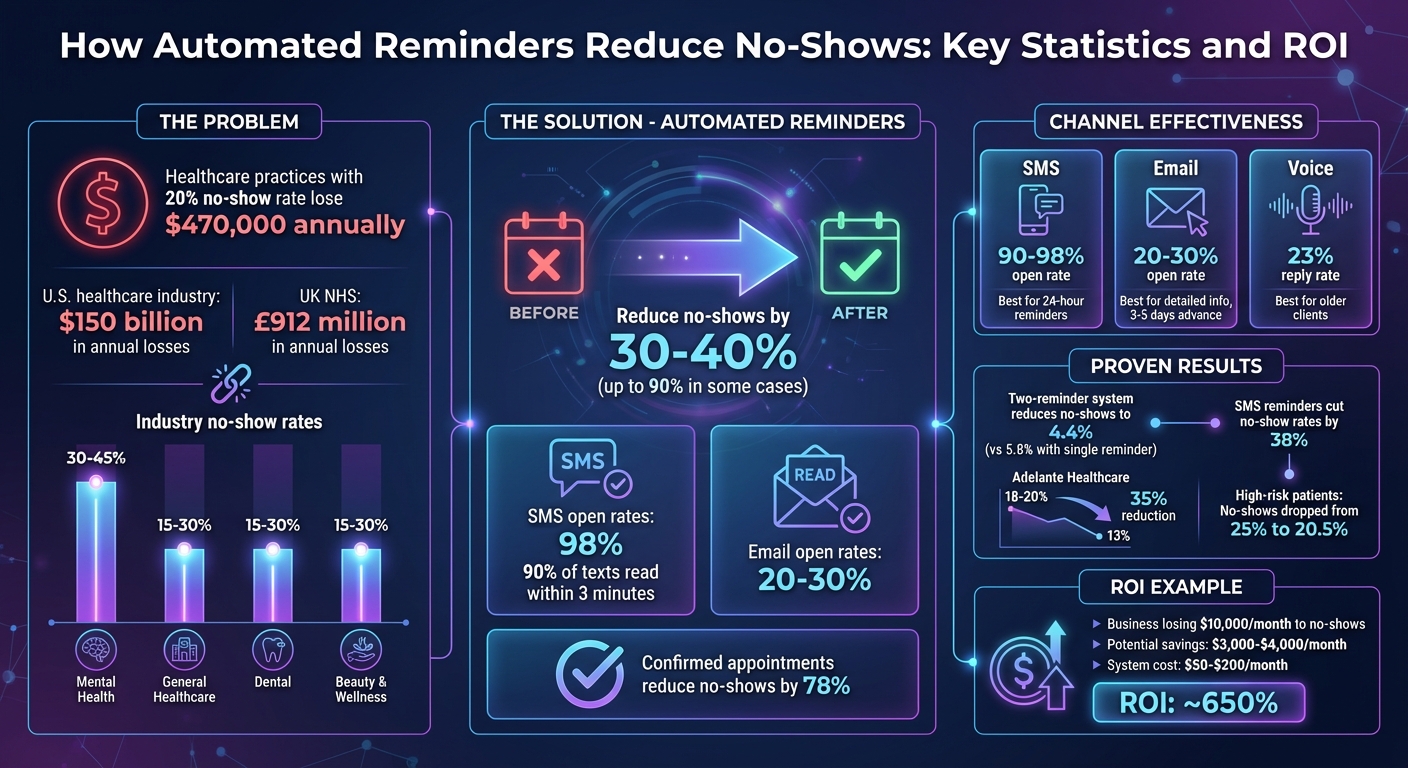
How Automated Reminders Reduce No-Shows: Key Statistics and ROI
The No-Show Problem in Small Businesses
Revenue Loss and Customer Experience Issues
Missed appointments are more than just an inconvenience – they directly cut into revenue. In the U.S. healthcare industry alone, no-shows rack up over $150 billion in losses annually [2]. Across the Atlantic, the National Health Service in the UK reports losses of approximately £912 million each year due to the same issue [4].
Beyond the financial hit, no-shows disrupt operations and create ripple effects that impact everyone. Empty slots lead to scheduling backlogs and longer wait times, which frustrate both clients and staff [2]. For industries like healthcare, these disruptions can have serious consequences. Missed appointments mean delayed care, fragmented treatment plans, and reduced access for other patients [6].
"No-shows result in fragmented continuity of care, reduce access for other patients in the practice, and decrease provider productivity." – Journal of General Internal Medicine [6]
Operational inefficiencies pile up when resources like equipment, facilities, and staff are underutilized [2]. For businesses that depend on billable hours – think legal firms or coaching services – those lost time slots are gone forever. The fallout isn’t just financial; it also erodes client trust and loyalty.
Industries Feeling the Brunt of No-Shows
Some industries are hit harder than others, especially those with longer gaps between booking and the actual appointment. Mental health services face the highest no-show rates, ranging from 30% to 45% [2]. Other sectors like general healthcare, dental practices, beauty and wellness, and professional services see no-show rates between 15% and 30% [2]. The longer the wait between scheduling and the appointment, the greater the risk of someone forgetting or canceling last minute. Salons and spas, which often book weeks or even months in advance, know this struggle all too well.
| Industry | Typical No-Show Rate | Primary Impact |
|---|---|---|
| Mental Health | 30% – 45% | Lost billable hours, fragmented care |
| General Healthcare | 15% – 30% | Revenue loss, reduced patient access |
| Dental | 15% – 30% | Wasted chair time, backlogged schedules |
| Beauty & Wellness | 15% – 30% | Empty slots, staff downtime |
| Professional Services | 15% – 30% | Unrecoverable billable hours |
This challenge highlights the need for timely intervention. Forgetfulness is often the root cause, and businesses that use workflow automation services to send reminders have seen dramatic improvements. By reaching out to clients before they forget, no-show rates drop by 30% to 40%, with some businesses reporting reductions as high as 90% [2]. The solution lies in acting early – before no-shows become a problem.
How Automated Reminders Reduce No-Shows
Better Scheduling and Customer Communication
Automated reminder systems take the hassle out of manually contacting clients by syncing directly with scheduling platforms like Google Calendar, Outlook, or EHR software. Once an appointment is booked, the system automatically sends out notifications – no extra effort required [2]. This not only saves time but also keeps communication smooth and efficient.
The real game-changer is two-way communication. Modern systems allow clients to confirm, cancel, or reschedule their appointments directly from the message they receive. For example, a customer can reply "C" to confirm or click a link to reschedule, and the system updates the calendar instantly. No more back-and-forth phone calls, missed voicemails, or forgotten messages [2].
"In addition to reduced no-show rates, our front office operations have benefited… because we no longer have to spend time manually calling patients to remind them of upcoming visits." – Jodi Shephardson, Director of Support Services, Adelante Healthcare [10]
If a client cancels through the automated reminder, the system can immediately notify waitlisted clients to fill the vacant slot [2][8]. This quick action turns potential revenue loss into a new opportunity. For businesses using workflow automation services, this process happens seamlessly, reducing no-shows in real time.
By sending reminders at just the right moment, every time, these systems eliminate human error – no more forgotten calls or miscommunicated appointment details.
SMS, Email, and Voice Reminder Options
Using a mix of communication channels – SMS, email, and voice – boosts confirmation rates and ensures you reach clients in the way they prefer.
SMS text messages are the most effective, with open rates between 90% and 98% [2][7]. Since 90% of texts are read within three minutes [3], they’re perfect for last-minute reminders. A simple text like "Reply YES to confirm your appointment tomorrow at 2 p.m." can make all the difference.
Email reminders, though less immediate, are perfect for sharing detailed information. With open rates around 20% to 30% [2], emails work best for sending maps, parking instructions, pre-appointment forms, or links to patient portals. They also provide a permanent record clients can reference later. Including an "Add to Calendar" link ensures the appointment is synced with their digital schedule – something 70% of adults rely on to manage their time [11].
Voice calls remain essential for reaching older clients and those who use landlines [2]. Automated voice systems allow real-time rescheduling through voice menus, so clients can cancel or adjust their appointments without needing to speak to a staff member [9]. This reduces the workload for front-desk teams while still offering a personal touch for those who prefer traditional communication.
| Channel | Open/Reply Rate | Best Use Case |
|---|---|---|
| SMS Text | 90-98% open rate [2][7] | Last-minute reminders (24 hours before) |
| 20-30% open rate [2] | Detailed info, forms, advance notice (3-5 days) | |
| Voice Call | 23% reply rate [8] | Older clients, landlines, traditional preferences |
In 2025, Adelante Healthcare adopted a multi-channel reminder strategy, slashing its no-show rate for specialist treatments from 18-20% to 13% – a 35% reduction [7]. Their approach? Staggered reminders: an email five days before, a phone call three days before, and a text message 24 hours before the appointment [1].
An AI receptionist handles voice confirmations, while automated workflows take care of SMS and email reminders. This ensures clients are reached on their preferred device, making engagement seamless and effective.
When and How Often to Send Reminders
Industry-Specific Timing Guidelines
The timing of reminders should match the nature of the appointment. For routine visits, a single SMS reminder sent 24 hours before the appointment works well. For appointments that require preparation, an email sent 72 hours in advance with detailed instructions is more appropriate [2].
Studies have shown that sending two reminders – one 3 days before and another 1 day before – can drastically lower no-show rates. This approach reduced missed appointments to just 4.4%, compared to higher rates when using only a single reminder [5]. For patients at higher risk of missing appointments, this dual-reminder strategy decreased no-shows from 25% to 20.5% [5]. The 3-day notice is especially helpful because it gives enough time to fill canceled slots with waitlisted clients [5].
The time of day matters, too. For healthcare appointments, sending SMS reminders at 6 p.m. the day before proved most effective, with only a 6.5% reschedule rate [8]. However, avoid sending messages too early (before 8 a.m.) or too late (after 9 p.m.) [2]. A final reminder sent 2 to 4 hours before the appointment can also help secure last-minute confirmations [2].
| Appointment Type | Recommended Timing | Primary Channel |
|---|---|---|
| Routine/Brief Visits | 24 hours before | SMS |
| Prep-Heavy (Medical/Home Service) | 72 hours before | Email (for instructions) |
| Long-Scheduled (Spas/Salons) | 1 week + 24 hours before | Email then SMS |
| Same-Day/Urgent | 2 hours before | SMS |
These guidelines provide a solid starting point, but it’s important to fine-tune the schedule based on the specific needs of your clients and the type of appointment.
Finding the Right Reminder Frequency
The frequency of reminders is just as important as their timing. While the ideal schedule varies by industry, it should also reflect your clients’ behavior. Striking a balance is key. A common and effective sequence includes an immediate confirmation, a reminder 72 hours ahead, another 24 hours before, and a final notice 2 hours prior [2].
Research supports the idea that two reminders are far more effective than just one [5]. To keep your messages engaging and avoid overwhelming your clients, spread them across different channels. For example, send an email for long-term notices (5 to 7 days in advance) and use SMS for closer, time-sensitive reminders (24 hours or less) [1]. This variety keeps the communication fresh and prevents clients from feeling inundated with repetitive messages.
"Today’s patients expect appointment reminders through telephone calls or texts prior to their appointment. After all, automated appointment reminders have become the norm for almost every service industry."
- Nick A. Fabrizio, PhD, Principal, MGMA Consulting [1]
Adjust the frequency based on your clients’ history. Those with frequent no-shows benefit from multiple reminders, while reliable clients may only need one [5]. A confirmation rate above 75% typically indicates that your reminder strategy is working. If it’s lower, consider adding another reminder or experimenting with different channels [2].
Finally, always include an easy opt-out option, like "Reply STOP to unsubscribe", to maintain trust and ensure compliance with regulations [2][3]. Tools like an AI receptionist can handle voice confirmations for clients who prefer phone calls, while workflow automation services can streamline reminder sequences across SMS and email without requiring manual intervention.
Setting Up Automated Reminder Systems
Building Reminders with n8n, Make, and Zapier
When it comes to setting up automated reminders, the right tool depends on the complexity of your workflows. For simple, linear processes, Zapier is a great choice. For example, it can send an SMS reminder 24 hours after a new appointment is booked in Google Calendar, and it integrates seamlessly with over 8,000 apps [13][15]. A real-world success story: in 2025, the SaaS company Vendasta used Zapier to automate its lead enrichment and follow-up process, reclaiming over $1 million in revenue and saving 282 workdays annually [14].
If your workflows involve branching logic – say, sending an email to new clients but an SMS to returning ones – Make offers more flexibility. Its visual "Scenarios" with routers make it easy to map out complex workflows, and it connects with over 2,000 apps [13][15].
For teams that require full control over their data or need advanced AI-driven automation, n8n is the go-to. With self-hosting options, n8n ensures sensitive data stays within your infrastructure, making it an excellent fit for HIPAA-compliant healthcare practices or legal firms. For instance, in 2025, the fintech consultancy Kunai used a self-hosted instance of n8n to rebuild a recruiting workflow after switching ATS platforms, saving over 300 hours of engineering time [14].
Here’s how it typically works: once an appointment is created, the system pulls contact details and triggers a reminder sequence. While these platforms offer powerful automation, many businesses find that tailored solutions work best for their specific needs.
Custom Reminder Solutions from Open Head
For businesses that lack the time or technical expertise to design and maintain automated systems, Open Head offers fully customized solutions. Unlike generic setups, Open Head builds reminder workflows tailored to your business, seamlessly integrating with your existing tools like Google Calendar, Outlook, or practice management software. This eliminates the need to master complex platforms or troubleshoot technical issues.
A typical Open Head system handles everything automatically. For example, it can pull appointment data and send a sequence of reminders:
- An immediate booking confirmation via email
- A 72-hour advance reminder with preparation instructions
- A 24-hour SMS reminder
- A final text 2 to 4 hours before the appointment [16][2]
Each message is personalized with details like the client’s name, provider information, location links, and any specific instructions – whether it’s COVID-19 protocols or required intake forms.
Clients can interact directly with these reminders. They can confirm, cancel, or reschedule appointments with a simple reply, and the system updates your calendar in real time [12][2]. This eliminates the back-and-forth that often ties up front desk staff. For businesses handling sensitive data, Open Head ensures the system complies with HIPAA and other industry-specific security standards from the start [12].
Open Head also handles the finer details. For instance, it can distinguish between landline and mobile numbers to ensure texts only go to SMS-capable devices [1]. It tracks confirmation rates, flags unresponsive clients for follow-up, and provides ongoing support. If an integration fails or you need to tweak reminder timings, you won’t be left to figure it out on your own. Most systems are up and running within one to three weeks.
If your team is bogged down by manually confirming appointments or dealing with no-shows, Open Head’s workflow automation services can take that burden off your plate. For businesses needing after-hours coverage, their AI receptionist can answer calls 24/7 and sync directly with your reminder system, ensuring no opportunity slips through the cracks.
sbb-itb-2339147
Tracking Results and Return on Investment
Metrics That Matter
Keeping an eye on key metrics can help you measure the impact of automated reminders. Start with your no-show rate, calculated as: (no-shows ÷ total appointments) × 100. For instance, if a dental office schedules 200 appointments and 30 patients don’t show up, the no-show rate is 15%. Many businesses report a 30–40% drop in no-shows within just three months of using automated reminders [2].
Next, look at confirmation rates. If less than 75% of your appointments are being confirmed, it could indicate issues with how your messages are delivered or worded [2]. Confirmed appointments are a game-changer – they can reduce no-shows by as much as 78% compared to unconfirmed ones [2].
Another critical metric is revenue recovery. This involves multiplying the reduction in no-shows by your average appointment value. For example, preventing five missed appointments per month at $150 each means recovering $750 in revenue. Since most reminder systems cost between $50 and $200 per month, the savings can translate to an ROI of around 650% [2].
Don’t forget to factor in staff time savings. If a receptionist spends 10 hours a week making reminder calls, and they’re paid $20 per hour, that’s $800 a month in labor costs. Automation can free up that time entirely [2]. For businesses needing constant phone coverage, an AI receptionist can manage reminders and handle calls 24/7, further streamlining operations.
Real Results from Industry Studies
The numbers don’t lie – industry studies show how automated reminders deliver measurable results. Between October 15, 2016, and December 15, 2016, Kaiser Permanente Colorado ran a randomized trial with 54,066 patients to test different reminder strategies. By using a two-reminder system – one sent 3 days before and another 1 day before appointments – they reduced missed appointments to 4.4%, compared to 5.8% with a single reminder. For high-risk patients, no-shows dropped from 25% to 20.5% [5].
Another study by Imperial College London found that SMS reminders cut no-show rates by 38% [2]. Consider the financial impact: a medical practice seeing 40 patients daily at $150 per visit could lose around $470,000 annually with a 20% no-show rate. Cutting that rate in half through automated reminders could recover $235,000 a year [2].
These findings underscore the financial and operational benefits of tailored reminder systems, like those offered by Open Head. With the right tools, businesses can significantly reduce missed appointments and boost their bottom line.
Get INSTANT Automation Appointment Reminders! | n8n
Next Steps
Automated reminders can make a huge difference – they cut no-shows by 30–40%, help recover lost revenue, and save your staff from spending hours on manual calls. These benefits often start paying off in just a few weeks [2].
To tap into these advantages, you need a reliable, integrated reminder system. That’s where Open Head steps in. We design custom, multi-channel reminder sequences that seamlessly connect with your current systems. From ensuring HIPAA and TCPA compliance to setting up message templates and running thorough tests, we handle the entire process. No technical know-how? No problem – we’ve got it covered [9][17].
Most clients notice real improvements within three months. Think higher confirmation rates, better use of appointment slots, and significant time saved for your team [18].
If no-shows are draining your time and revenue, it’s time to make a change. Automate your appointment reminders with Open Head and start seeing the difference. Schedule your free consultation today at openhead.ai.
FAQs
How do automated reminders help reduce no-shows in different industries?
Automated reminders play a key role in cutting down no-show rates across different industries by keeping appointments front and center for clients. Take dental offices, for instance – these reminders can slash no-show rates by 40%, with some practices reporting drops as steep as 90%. In medical settings, the results are just as impressive, with no-show rates typically shrinking from 23% to less than 15%. Telehealth appointments see even better outcomes, with missed appointments dropping to just 7.5%, compared to 36% for in-person visits.
By leveraging automated reminders, businesses not only improve their overall efficiency but also boost customer satisfaction and recover revenue that would otherwise be lost to missed appointments.
What’s the best way to time and space out appointment reminders to reduce no-shows?
Studies reveal that sending two to three well-timed reminders is the sweet spot for cutting down on missed appointments. The best approach? An initial reminder 24 to 48 hours before the appointment followed by a final nudge 2 to 4 hours prior. Anything more than three reminders risks irritating your clients and may even backfire.
With Open Head, you can automate this entire process seamlessly. Using tools like n8n, Make, and Zapier, we connect your calendars (such as Calendly or Google Workspace) and CRMs (like HubSpot or Salesforce) to set up automated reminders. These systems send SMS, email, or push notifications at just the right times, helping reduce no-shows by 30–40%. Even better, client responses – whether confirmations or rescheduling requests – are captured in real time, letting your team focus on more impactful work.
Looking to improve attendance and grow your revenue? Schedule a free consultation with Open Head today, and we’ll design a custom reminder system tailored to your business.
How can businesses ensure their automated reminders comply with regulations?
To stay compliant, businesses need to build automated reminder systems that respect privacy and adhere to legal standards. Start by securing explicit consent from customers before sending reminders. Make it easy for them to opt out with clear options like “Reply STOP.” Also, follow regulations specific to the communication channel used – for example, TCPA for SMS or HIPAA for healthcare-related messages.
Platforms like n8n, Make, and Zapier can simplify this process by offering encryption and audit-ready logs, which protect customer data and ensure transparency. Open Head takes it further by integrating these tools with systems like Google Workspace and Salesforce, ensuring your reminders meet the same compliance and security benchmarks as the rest of your operations.
By prioritizing consent, safeguarding data, and maintaining auditability, businesses can reduce no-shows while staying in line with U.S. privacy and communication laws.