


Your website could be running smoother, faster, and with fewer interruptions – without you lifting a finger. AI tools now handle backups, content updates, and performance monitoring automatically, saving small businesses hours of manual work each week.
Here’s what this means for you:
- 24/7 Monitoring: AI detects and resolves issues before they impact users.
- Automated Content Updates: Publish blogs, refresh product pages, and optimize images without logging in.
- Backups on Autopilot: Never worry about losing data with automated, error-free backups.
- Performance Optimization: Faster load times and fewer errors keep visitors happy.
For example, businesses using AI for website maintenance report a 40% reduction in issue resolution time within six months. Tools like n8n, Make, and Zapier make this possible without hiring extra staff.
Want to spend less time on maintenance and more time growing your business? AI makes it happen.
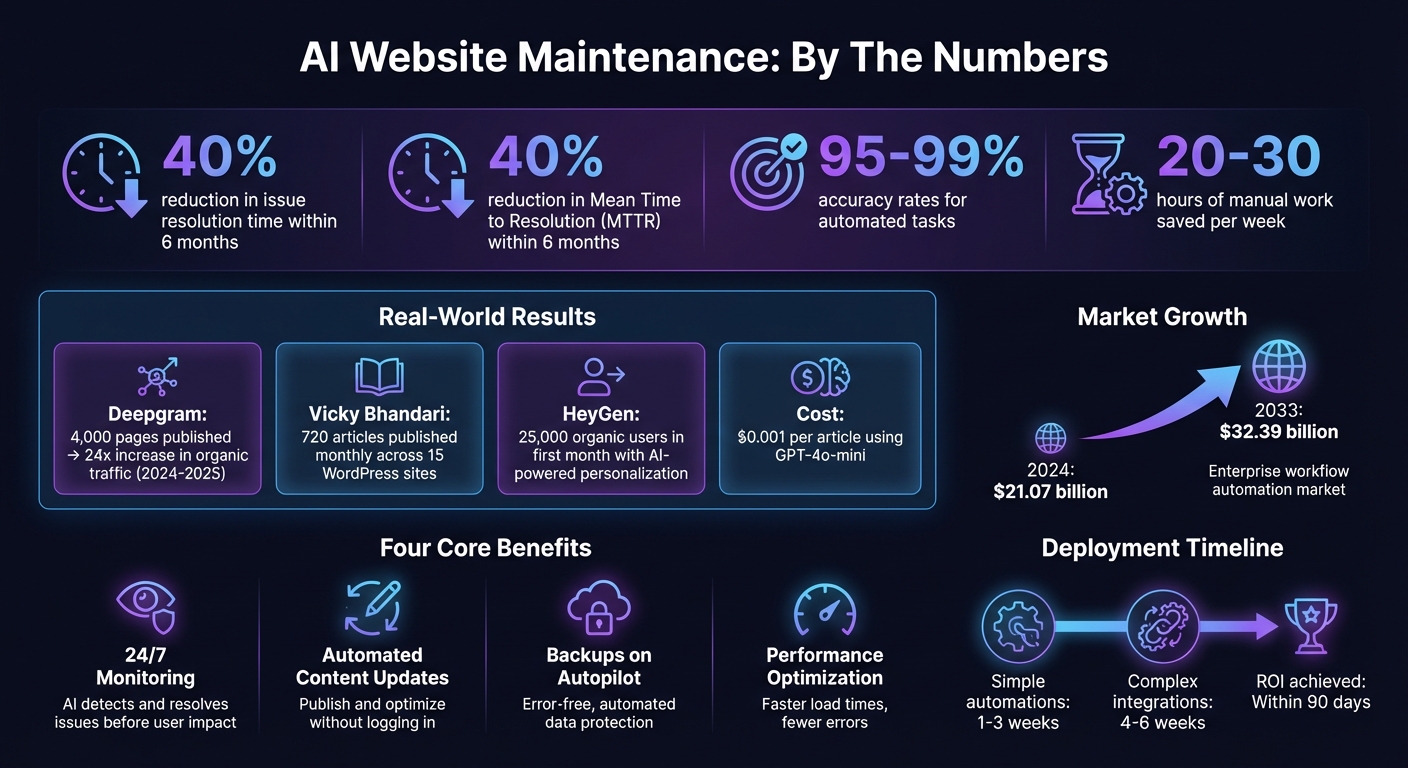
AI Website Maintenance Benefits: Key Statistics and Time Savings
How AI Handles Content Updates
Keeping a website relevant and engaging can be a time-consuming task, but AI makes it easier by automating content updates. From publishing fresh blog posts to tweaking product descriptions or refreshing homepage banners, AI workflows take over these repetitive tasks. Whether it’s on a set schedule or triggered by specific events, AI ensures your site stays up-to-date without you having to log into your CMS constantly.
Take Deepgram, for example. Between 2024 and 2025, they used AI-driven workflows with their Strapi CMS to publish a staggering 4,000 pages. The result? A 24x increase in organic traffic, all while maintaining high-quality standards [4]. Achieving this kind of scale manually would be nearly impossible.
Here’s how it works: AI fetches data from sources like news APIs or internal databases, processes it using tools like GPT-4o-mini, and pushes the finished content to your website through REST APIs. A real-world example of this comes from November 2025, when developer Vicky Bhandari applied this method to 15 WordPress sites. Using the GNews API, his system pulled trending news, refined articles for a professional tone, managed image uploads, and prevented duplicate content with Google Sheets. The outcome? Over 720 articles published monthly, cutting his team’s workload from 20-30 hours per week to almost zero [5].
For businesses ready to take the plunge, services like Open Head’s workflow automation solutions can create custom pipelines that integrate your website with CRMs, scheduling tools, and other systems. This ensures content updates happen automatically, as part of a streamlined operation.
Automated Text and Media Publishing
AI doesn’t just generate content – it handles the entire publishing process with precision. From crafting SEO-friendly titles and meta descriptions to assigning categories and uploading images, AI ensures every detail is taken care of.
For instance, an AI workflow might check a news API every two minutes for updates, rewrite articles using GPT-4o-mini (at just $0.001 per article [5]), and publish them to your WordPress site. It formats the content with proper HTML, optimizes images, and assigns the correct tags. The system can even cross-check a database or Google Sheet to avoid duplicate posts.
This level of automation is a game-changer for businesses managing multiple websites or high volumes of content. Instead of spending hours uploading images, formatting text, and filling out metadata, you set up the workflow once and let it handle the rest.
Dynamic Content Based on User Behavior
AI doesn’t stop at scheduled updates. It can also tailor content in real time based on how visitors interact with your site. For example, if someone explores three different product pages in the same category, AI can update your homepage or sidebar to display related recommendations, special offers, or case studies that match their interests.
In 2024, HeyGen partnered with Webstacks to create an interactive Stock Avatars page. Their AI system personalized the user experience by autoplaying preview clips based on how visitors navigated the page. This dynamic approach helped their AI Tools Directory attract 25,000 organic users in its first month [3].
AI tracks user behavior – like which pages they visit, how long they stay, and what actions they take – and uses this data to adjust layouts, suggest products, or highlight relevant content. Jesse Schor, Head of Growth at Webstacks, explains:
"AI serves as an intelligent layer that sits between your infrastructure and your team, continuously analyzing data streams… It transforms this raw data into actionable insights and automated responses" [3].
For businesses without a tech-savvy team, implementing these dynamic updates might sound daunting. That’s where Open Head’s AI consulting services come in. They help design and deploy systems that personalize your website based on visitor behavior – no technical expertise required on your end.
Automated Backups Using n8n, Make, and Zapier
Keeping your website data safe is crucial, and automated backups can take the hassle out of the process. Manual backups are not only time-consuming but also prone to errors or being forgotten altogether. Tools like n8n, Make, and Zapier simplify this by automating the backup process, ensuring your data is always protected without constant oversight.
These platforms let you connect your website to cloud storage options like Google Drive, Dropbox, or Amazon S3. For WordPress users, this often involves pairing with plugins like UpdraftPlus or BackupBuddy to automatically move backups to secure, off-site storage [2]. Once set up, the system runs on autopilot – no more manual reminders or missed backups.
n8n’s pricing model, which charges only for full workflow executions [7], makes it an affordable option for small and medium-sized businesses (SMBs). If you’re managing multiple websites or have complex backup needs, Open Head’s workflow automation services can create tailored solutions. Whether it’s daily database exports, weekly full-site backups, or real-time file syncing, they can build a system that fits your requirements perfectly.
Setting Up Recurring Backups
Automating backups is as simple as configuring a workflow to run on your preferred schedule – daily, weekly, or even hourly. For instance, you could use n8n’s HTTP Request node to trigger API calls that automatically export data from your website [7]. The workflow can then gather your database, media files, and configuration settings, packaging everything for secure storage.
Error handling is a key part of the setup. By adding conditional logic (like "IF" nodes in n8n or Make), you can trigger notifications via Slack or email if a backup fails [5]. This ensures you’re alerted to any issues right away. To keep track of successful backups, tools like Google Sheets can log timestamps and file IDs [5]. Scheduling backups during off-peak hours, such as 2:00 or 3:00 AM, minimizes any potential impact on your website’s performance [1].
Cloud Storage Integration for Backups
Once your backups are created, they need a safe place to live. Cloud services like Google Drive, Dropbox, or Amazon S3 provide reliable storage, protecting your data from server failures or cyber threats [2].
Most automation platforms make connecting to these services easy with OAuth, which ensures secure, ongoing access for recurring tasks [5]. For WordPress users, Application Passwords allow REST API integrations without exposing your main admin credentials [5].
To optimize storage, advanced workflows can include duplicate prevention. For example, the system can check a Google Sheet or database to avoid uploading the same backup multiple times. This not only saves space but also keeps your files organized [5]. Using clear file naming conventions further helps to avoid redundant backups.
If setting up these workflows feels daunting, Open Head’s AI consulting services can handle the entire process for you. From connecting your website to cloud storage to configuring error alerts and testing the system, they’ll ensure your backups are both reliable and efficient.
AI-Powered Performance Monitoring
Relying on manual monitoring to catch issues is a losing game – by the time something’s flagged, your visitors may already be frustrated. AI flips the script by constantly tracking performance metrics and identifying problems before they can harm your business.
Modern AI tools go beyond spotting obvious failures like complete downtime. They use predictive anomaly detection to uncover early warning signs, such as rising response times or unusual traffic patterns. As Jesse Schor, Head of Growth at Webstacks, puts it:
"AI replaces traditional threshold-based alerts with intelligent pattern recognition that detects subtle anomalies before they impact users" [3].
One standout feature is event correlation. When multiple alerts pop up – like slow page speeds, higher error rates, and spiking server CPU usage – AI connects the dots and pinpoints the root cause. This eliminates the flood of false alarms and lets your team focus on fixing the actual issue instead of chasing unrelated symptoms [3].
Uptime Monitoring and Alerts
AI-powered uptime monitoring works nonstop, checking your website’s availability from multiple locations worldwide. If downtime hits, the system instantly notifies your team via email, Slack, or SMS so they can act fast [2]. But it doesn’t stop at real-time alerts – advanced systems analyze historical data to predict potential disruptions before they occur.
For businesses juggling multiple websites or complex setups, customized workflows can make monitoring even smarter. Open Head’s workflow automation services use tools like n8n, Make, or Zapier to integrate hosting data with traffic insights from Google Analytics. The result? Detailed alerts that tell you exactly what’s happening and why.
Of course, staying online is only part of the equation – your website also needs to load fast to keep visitors engaged.
Page Speed Analysis and Optimization
A slow website is a customer killer. AI performance tools constantly analyze your page load times and pinpoint the culprits – whether it’s oversized images, bloated JavaScript, or sloppy database queries. These tools don’t just diagnose issues; they fix them by compressing images, minifying code, and tweaking caching settings to speed things up. The system even learns which pages get the most traffic and prioritizes those for optimization.
Here’s a smart strategy: AI workflows can tap into Google Search Console to flag pages ranking in positions 2–10. These pages, which are just shy of the top search results, can be targeted for technical improvements like lazy loading or CDN integration [4].
Automatic Error Detection and Resolution
Broken links, missing images, and 404 errors not only annoy visitors but can also hurt your search rankings. AI systems continuously scan your site for these issues and fix them automatically. For instance, if a new update introduces a bug that disrupts your checkout process, AI can roll back to the last working version and notify your team [3]. Missing images? The system can restore them from backups or temporarily replace them with placeholders.
Security threats get the same proactive treatment. AI tools use behavior-based detection to catch malware that traditional scanners might overlook and can restore clean versions of infected files automatically.
For businesses without an IT department, this level of automation is a game-changer. Open Head’s AI consulting services help small and medium-sized businesses set up these systems, keeping websites fast, secure, and error-free without constant manual intervention.
The results speak for themselves: many businesses report a 40% reduction in Mean Time to Resolution (MTTR) within six months of adopting AI-powered monitoring [3]. With these systems ensuring quick problem-solving, the next step is to explore how they integrate seamlessly with your core business tools.
sbb-itb-2339147
Connecting AI Maintenance to Your Business Tools
AI maintenance becomes far more effective when it works hand-in-hand with your business tools. By connecting your maintenance system to your CRM, ecommerce platform, and other software, you can eliminate repetitive tasks like data entry and ensure everything stays updated in real time.
Think of AI maintenance as the glue that binds your website to the rest of your operations. For example, when your website changes, your sales team can get instant updates, or when inventory levels shift, your product pages can adjust automatically. These connections turn everyday updates into opportunities for efficiency and growth.
CRM Integration
Integrating your AI maintenance system with CRMs like Salesforce or HubSpot takes customer data management to another level. AI workflows can pull new website content – like product launches or blog updates – and automatically create sales materials that feed directly into your CRM. This keeps your sales team informed and ready without lifting a finger.
Here’s an example: If a high-value lead repeatedly visits a specific product page, the system can log this activity in Salesforce and send an alert to your sales rep. No more missed opportunities.
To make this happen, tools like n8n, Make, and Zapier are often used to connect your tech stack. At Open Head, integrations are first tested in "shadow mode", running alongside your existing processes to ensure everything works smoothly before going live. This approach minimizes errors and ensures your data stays accurate.
While CRM integration focuses on streamlining customer interactions, ecommerce integration takes care of your product and inventory updates.
Ecommerce Platform Integration
AI integration can handle tasks like updating product details, managing inventory, and optimizing content – without constant supervision. It can even tweak meta tags, create FAQ sections, or refine product descriptions based on performance data, all while staying true to your brand’s tone.
For WooCommerce users, security is key. Use tools like Application Passwords (introduced in WordPress 5.6) to grant limited access for automation tools without compromising your admin credentials. A tracking system – like a Google Sheet or database – can log updated product IDs to avoid redundant changes and save API calls.
Even with automation, some tasks benefit from a human touch. Critical updates, such as pricing changes or major content revisions, should include a manual review step to maintain accuracy and brand consistency. And before launching a new automation pipeline, always back up your site to protect against errors during bulk updates.
Here’s a real-world example: In late 2024, Deepgram leveraged AI workflows integrated with their CMS to publish over 4,000 new pages. By incorporating human review for quality assurance, they achieved a 24x boost in organic traffic while cutting down on manual work hours [4].
The growing interest in connected systems is clear. The enterprise workflow automation market was valued at $21.07 billion in 2024 and is expected to hit $32.39 billion by 2033 [6]. For small and medium-sized businesses without in-house IT teams, Open Head’s AI consulting services offer a way to design and implement these integrations, delivering measurable results from the start.
How Open Head Builds Custom Website Maintenance Automation
Open Head specializes in creating tailored website maintenance automation that aligns with your unique workflows, technology stack, and business goals. Instead of relying on cookie-cutter solutions, they design systems that handle exactly what your business requires – whether that’s automated content publishing, regular backups, or performance monitoring.
The process kicks off with a technical audit of your existing infrastructure. This step identifies performance benchmarks and highlights manual tasks that often lead to errors. Based on these findings, Open Head determines the ideal automation platform – whether that’s n8n, Make, or Zapier – to seamlessly integrate with your tools and APIs [3]. This meticulous groundwork ensures smooth integration with your current systems.
Custom Workflow Development
After completing the audit, Open Head develops automation workflows from the ground up. These workflows go beyond just linking apps; they create smart systems capable of managing complex, repetitive tasks. Examples include fetching trending content, rewriting it to fit your brand’s tone, managing media uploads, or publishing across multiple platforms.
This kind of automation can save businesses a significant amount of time – up to 20–30 hours of manual work per week [5]. Before going live, workflows are thoroughly tested in "shadow mode" to ensure reliability [3]. Once finalized, deployment happens quickly, delivering tangible results right away.
Fast Deployment with Proven Results
Most website maintenance automations are up and running within 1–3 weeks, depending on their complexity. More advanced systems, such as those syncing content updates with a CRM or ecommerce platform, may take 4–6 weeks [8]. Clients commonly experience a return on investment within 90 days, supported by detailed analytics that measure time savings, error reductions, and performance improvements. For example, implementing AI in web operations has been shown to cut Mean Time to Resolution (MTTR) by 40% within six months [3].
"Every automation we build is custom-coded, rigorously tested, and designed to deliver measurable ROI from day one." – Open Head [8]
Denver-Based Support Team
Open Head’s Denver-based support team is available to handle troubleshooting, adjustments, and ongoing optimization.
"We handle the technical heavy lifting so you don’t have to." – Open Head [8]
As your business grows, your automation evolves too. Open Head offers continuous optimization cycles based on performance metrics and user feedback, ensuring your website maintenance adapts to your changing needs and delivers ongoing improvements [2][3].
Conclusion
AI-driven website maintenance takes the hassle out of repetitive tasks and significantly reduces errors. Instead of manually monitoring uptime, updating plugins, or scheduling backups, AI tools work around the clock to handle these duties automatically. Companies adopting AI for web operations have reported cutting manual review times by as much as 40% while achieving accuracy rates between 95% and 99% [9].
This shift changes the game for web management. Moving from reactive problem-solving to proactive oversight means fewer crises, quicker load times, and stronger security – all without adding extra staff. As Jesse Schor, Head of Growth at Webstacks, explains:
"AI serves as an intelligent layer that sits between your infrastructure and your team… enabling proactive management over reactive firefighting" [3].
At Open Head, we specialize in creating custom maintenance solutions that simplify complex processes, letting you concentrate on growing your business. Whether it’s automated content publishing, performance monitoring, or backup workflows using tools like n8n, Make, or Zapier, our team takes care of the technical heavy lifting while offering expert support every step of the way.
If you’re tired of losing time to routine maintenance, Open Head’s workflow automation services can help. Schedule a free consultation to uncover which tasks are draining your time and learn how automation can free you up to focus on what drives your revenue.
FAQs
How does AI improve website content and boost traffic?
AI tools take the hassle out of keeping your website content up-to-date and in sync with SEO best practices. By analyzing search trends and how users interact with your site, these tools ensure your content stays relevant, ranks higher on search engines, and keeps visitors engaged.
For businesses, the impact has been impressive – some report traffic boosts as high as 24× after adopting AI-driven content updates. The best part? These updates run automatically, saving you time while maintaining a steady stream of potential leads. It’s like having a 24/7 content manager working behind the scenes to keep your site performing at its best.
How does AI simplify website maintenance when integrated with tools like CRMs and ecommerce platforms?
Integrating AI-driven website maintenance with platforms like CRMs (such as Salesforce and HubSpot) and ecommerce tools (like Shopify and WooCommerce) can simplify your workflow and keep everything running smoothly. With AI, your website’s health is constantly monitored, updates are applied automatically, and performance is optimized. Key metrics – like uptime or load speed – are fed directly into your CRM, keeping your team informed without lifting a finger.
For ecommerce businesses, AI can handle tasks like tracking inventory changes, updating promotions, adjusting pricing, and triggering follow-up emails through your CRM. This removes the need for manual data entry, minimizes errors, and ensures all your tools work in harmony. Plus, AI can adapt to sudden traffic surges or seasonal campaigns, preventing slowdowns or other disruptions.
At Open Head, we design AI maintenance solutions tailored to your business, ensuring your tools work together seamlessly while saving you time and boosting efficiency. Ready to take the technical burden off your plate? Schedule a free consultation today!
How does AI help protect data and ensure reliability with automated backups?
AI takes the hassle out of safeguarding your data by automating backup processes. It ensures your website’s essential information is securely stored and ready to recover whenever needed. From scheduling regular backups to monitoring for potential issues, AI even checks the integrity of saved data to prevent errors or corruption from slipping through.
By automating these tasks, businesses can reduce the risk of data loss caused by human mistakes, cyberattacks, or unexpected system failures. AI keeps backups running smoothly and consistently, so your website stays up and your data stays safe – letting you focus on running your business without worry.