


If you’re a small business owner, here’s the bottom line: AI tools can save you 5–10 hours per week and deliver a return on investment of 10x or more. You don’t need coding skills or a tech team to get started – just a clear plan to automate repetitive tasks like answering customer inquiries, scheduling, or lead management.
Key Steps to Begin:
- Identify Tasks to Automate: Focus on frequent, time-consuming, and predictable tasks – like responding to FAQs or following up with leads.
- Choose the Right Tools: Use beginner-friendly platforms like Zapier, Make, or n8n to integrate apps and automate workflows.
- Start Small: Set up one simple automation (e.g., an AI chatbot for inquiries) and test its performance.
- Track Progress: Measure time saved, response accuracy, and customer satisfaction to refine and expand your setup.
Example: An AI receptionist can answer calls 24/7, book appointments, and qualify leads. For $297/month, it can prevent missed opportunities and save hours of work.
If the technical setup feels overwhelming, experts like Open Head can create and manage these systems for you, ensuring they align with your business goals and deliver measurable results. Ready to simplify your operations? Start with one task and watch the impact grow.
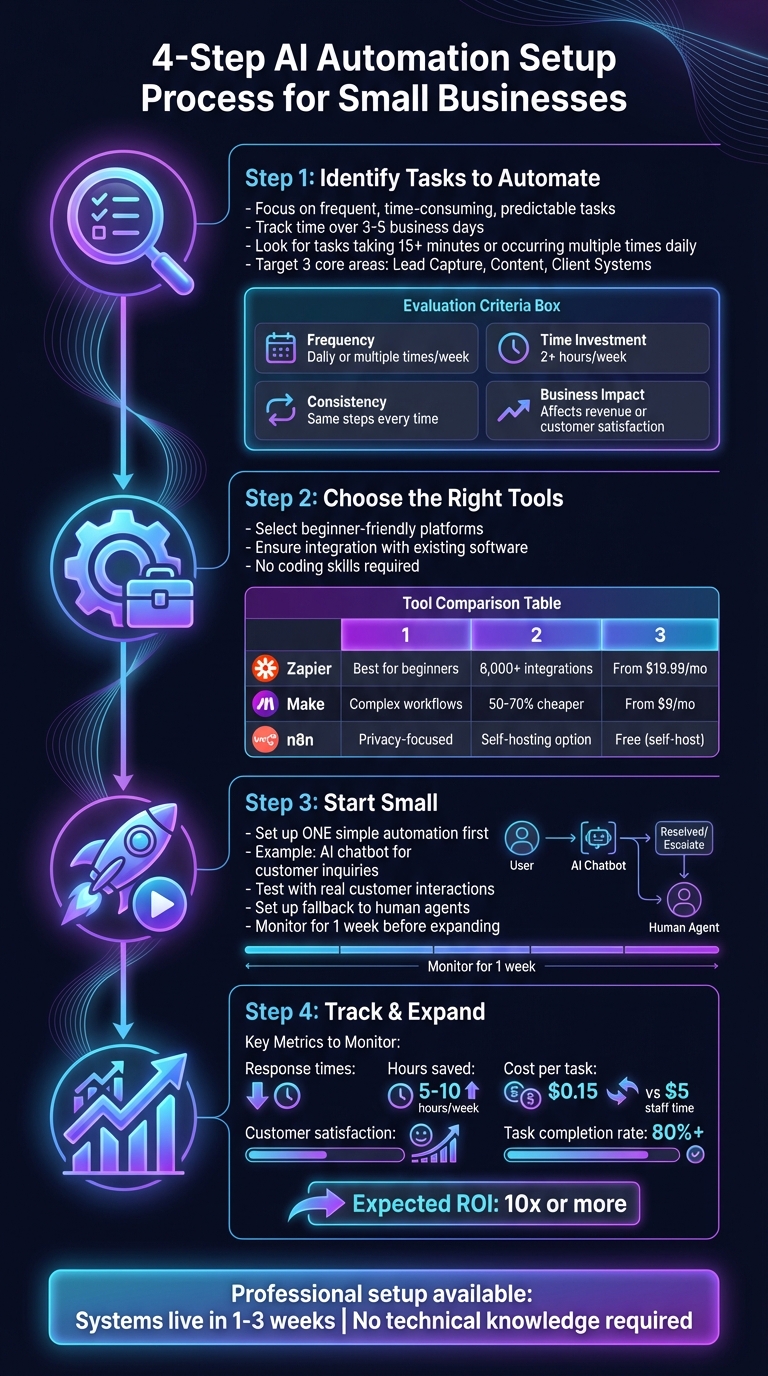
4-Step AI Automation Setup Guide for Small Businesses
How to Automate Any Business With AI in 3 Steps (Beginner’s Guide)
sbb-itb-2339147
Step 1: Find Which Tasks to Automate First
The best automation candidates have three things in common: they happen frequently, take up a significant amount of time, and follow predictable steps. These aren’t the creative, strategic tasks that drive your business forward – they’re the repetitive ones that eat away at your day.
How to Evaluate Your Daily Tasks
Start by tracking how you spend your time over 3–5 business days. Pay attention to tasks that take more than 15 minutes or pop up multiple times a day. Then ask yourself: Does this task repeat often? Does it follow the same process every time? Could someone else do it if given clear instructions?
Focus on three core areas where automation can make the biggest difference: Lead Capture (how new customers find you), Content (how you share information), and Client Systems (your sales and onboarding workflows) [1]. These areas are directly tied to your revenue and customer experience, making them ideal for automation.
| Evaluation Criteria | What to Look For | Good Automation Fit |
|---|---|---|
| Frequency | How often does it happen? | Daily or multiple times a week |
| Time Investment | How much time does it take? | 2+ hours each week |
| Consistency | Does it follow the same steps? | Yes, with little to no variation |
| Business Impact | Does it affect revenue or customer satisfaction? | Directly impacts leads, sales, or service quality |
By evaluating tasks this way, you’ll uncover opportunities to save time and improve how you interact with customers.
Common Tasks Small Businesses Automate
The tasks most small businesses automate tend to be frequent, repetitive, and customer-facing. These include answering common questions, scheduling appointments, and qualifying leads – things that happen regularly and follow clear, predictable patterns. For example, an AI receptionist can answer calls 24/7, ensuring you never miss a lead, even if it’s after hours or during lunch.
Other popular automation candidates include sending quick email replies to frequently asked questions, following up with leads right after they submit a form, and routing customer inquiries to the correct team member. If you find yourself typing the same responses over and over or manually transferring data between systems, those are red flags for automation. As Reuben Lopez, an Automation & Ops Engineer, says: "Automation moves information without you touching it" [1].
Step 2: Pick the Right AI Tools
Now that you’ve identified the tasks you want to automate, it’s time to choose the tools that fit your business. The best AI tools should integrate with your existing software, handle the tasks you’ve pinpointed, and work without requiring advanced technical knowledge. As Reuben Lopez explains: "Automation isn’t a tech skill – it’s a systems skill" [1].
Here’s a look at the main categories of AI tools that can help streamline your operations.
Types of Tools and Their Functions
AI tools for small businesses generally fall into a few key categories:
- Customer service automation: Tools like chatbots and AI receptionists can handle inquiries 24/7. For instance, an AI receptionist can answer calls, book appointments, and qualify leads – even when your team is unavailable.
- Marketing tools: These help manage email campaigns, schedule social media posts, and nurture leads.
- Sales support tools: Automate tasks like lead qualification, follow-ups, and moving prospects through your sales pipeline.
- Workflow connectors: Platforms like Zapier, Make, and n8n link your existing software, ensuring seamless data flow without manual input.
A great starting setup for beginners includes a brain (Notion for organizing information), a connector (Zapier or Make to link apps), a database (Airtable for customer data), and a payment processor (Stripe for transactions) [1]. This basic stack covers most automation needs for small businesses.
Comparing Tools: What to Look For
When evaluating automation platforms, focus on three core factors: ease of use, integration options, and cost at scale. Here’s how some popular tools stack up:
- Zapier: Best for beginners, it offers over 6,000 app integrations and a user-friendly interface. You can connect tools like Gmail, Slack, and Google Sheets in minutes without coding [2].
- Make: Known for its visual workflow designer, it’s a cost-effective option for high-volume automations, often 50% to 70% cheaper than Zapier [2]. Perfect for businesses managing multiple workflows daily.
- n8n: Ideal for privacy-conscious users, it allows self-hosting, giving you full control over your data. Unlike Zapier and Make, which are cloud-only, n8n ensures your data stays where you want it [2].
| Tool | Best For | Key Feature | Starting Price |
|---|---|---|---|
| Zapier | Beginners | 6,000+ integrations | Free / $19.99 per month |
| Make | Complex workflows | Visual designer & value | Free / $9 per month |
| n8n | Privacy-conscious | Self-hosting option | Free (self-host) / $20 per month |
For AI tools that handle customer interactions, prioritize those with memory and persistence – the ability to retain context across multiple conversations [3]. This is especially useful when customers ask follow-up questions or return after some time. Look for structured output features as well, which ensure the AI delivers data in reliable formats like JSON, making it easier to integrate with other systems [5].
If you need a tailored solution that combines these features with your specific workflows, workflow automation services can design and maintain these systems for you – saving you the hassle of trial-and-error setups. Ready for the next step? Let’s dive into creating your first automation.
Step 3: Set Up Your First Automation
Now that you’ve chosen your tools, it’s time to build your first automation. The best way to get started is by tackling a straightforward task that meets a real business need. Think about something practical – like responding to frequently asked customer questions or qualifying leads from your website. An AI agent works by following instructions, using tools, and relying on memory to handle a trigger (like a form submission, webhook, or email) and complete tasks.
Example Setup: Automating Customer Inquiries
Let’s walk through setting up an AI-powered chat assistant to handle customer inquiries. For this, you’ll need an automation platform – n8n is a great option, offering a free trial for its cloud services – and an AI model, such as OpenAI‘s gpt-4o-mini, which is budget-friendly for beginners.
Start by defining your AI’s role and objectives with clear instructions. For example: "You are a friendly receptionist for a bookkeeping service. Your job is to answer questions about our services and schedule consultations." To make interactions feel natural, add a memory node to your workflow to store details like a customer’s name or previous questions. This helps the AI maintain a conversational flow rather than sounding mechanical.
Next, connect the tools your AI will need. This might include integrating with your calendar or CRM. If your chosen platform doesn’t natively support a tool, you can bridge the gap using an MCP (Model Context Protocol) server – this works well for adding integrations like Gmail.
Once you’ve configured your AI’s behavior and connected the necessary tools, you’ll want to review everything carefully. The next section will guide you through final checks to ensure your setup is ready to go.
What to Check Before Going Live
Before launching, test your automation with real customer inquiries and review the logs. These logs show how the AI processes requests and makes decisions step by step. If something goes wrong – like an inaccurate response or a tool being misused – the logs will help you identify the problem.
It’s also important to set up a fallback plan. If the AI struggles to understand a customer after a few attempts, it should automatically escalate the issue to a human agent [4]. As OpenAI points out:
"Agents are uniquely suited to workflows where traditional deterministic and rule-based approaches fall short" [4].
That said, human support is a crucial backup for when the AI reaches its limits.
Start small and keep a close eye on performance. Focus on one use case – like answering FAQs or qualifying leads – and monitor it for a week. Check the accuracy of responses, customer satisfaction, and whether issues are correctly escalated. Once you’re confident in its performance, you can expand to other tasks.
If you’d prefer to skip the trial-and-error process, Open Head’s chatbot development services can handle the setup and testing for you. This ensures everything is running smoothly before your customers interact with the system. Once your automation is fine-tuned, you’re ready to measure its impact and scale it further.
Step 4: Track Results and Expand Your AI Use
Once your automation is up and running, it’s time to measure its impact. Keep an eye on response times and the hours saved to gauge its effectiveness. For instance, if handling 50 inquiries used to take 10 minutes each, automation can save you over 8 hours of work.
If your workflow automation services handle lead qualification at $0.15 per conversation compared to $5 in staff time, the cost savings are clear. Also, track customer satisfaction to ensure responses are both timely and accurate. Pay attention to revenue shifts – faster response times often lead to higher conversion rates. These insights will guide your next steps as you scale your automation efforts.
What to Measure
Focus on metrics that directly affect your business, not just technical performance. Key areas to monitor include:
- Latency: Ensure your system responds quickly to customer inquiries.
- Cost per Task: Confirm that automation is delivering noticeable savings [4].
- Task Completion Rate: Check how often the AI successfully handles tasks versus when it escalates to a human. For example, if the AI fails to grasp customer intent after three tries, it should hand off to your team [4].
Start by setting a performance baseline using the most capable AI models. Once you understand what works well, you can fine-tune for cost efficiency [4]. Review these metrics weekly for the first month, then shift to monthly checks. For example, if your AI sales chatbot correctly qualifies 80% of leads but misses 20%, you’ll know exactly where to make improvements. With clear data, you can expand your systems with confidence.
How to Add More Automations
Use the insights from your first automation to identify your next opportunity. If your customer inquiry chatbot is saving 10 hours a week, look for other repetitive tasks to automate – such as appointment scheduling, invoice follow-ups, or data entry. Each automation you add builds a system that frees up more time for higher-priority work.
Start with tasks that are straightforward and have measurable outcomes. If your initial focus was on FAQs, the next step could be automating appointment reminders or lead nurturing emails. Roll out one automation at a time, monitor its performance for two weeks, and then move on to the next. This approach avoids overwhelming your team and makes it easier to address any issues before scaling further. When you’re ready to take on more complex projects, AI consulting services can help you create a long-term strategy tailored to your business goals.
When to Hire AI Implementation Experts
Feeling swamped by terms like "API keys" or "JSON"? You’re not alone [5]. If setting up AI systems feels more like a chore than a solution, it might be time to call in the pros. Instead of wrestling with the technical side, you can focus on running your business while experts handle the heavy lifting, building automation systems that work seamlessly.
Hiring professionals not only removes the steep learning curve but also saves time and money in the long run. With properly implemented AI, businesses can trim operational costs by up to 30% [6]. At Open Head, our chatbot development services take a strategic approach, starting with mapping out your workflows before layering automation on top [1]. This ensures the AI isn’t just a disconnected tool but a well-integrated part of your operations.
Why Professional Setup Makes Sense
Open Head specializes in creating custom AI systems that connect effortlessly with the tools you already use. You won’t need to invest in costly enterprise CRMs or learn how to navigate overly complicated software. Using platforms like Make, n8n, and Zapier, Open Head ensures your systems work together, forming a cohesive and reliable ecosystem [1].
Most solutions are up and running in as little as 1 to 3 weeks, and no technical know-how is required on your end. Open Head handles everything – setup, training, and ongoing support – so you’re never left to figure things out alone. As Reuben Lopez, Automation & Ops Engineer at Lopez Productions, aptly says:
"Automation removes decisions, removes friction, and removes chaos" [1].
That’s the beauty of professional implementation: it brings clarity, consistency, and efficiency to your business. These tailored systems don’t just solve problems; they deliver measurable results by addressing the repetitive tasks that often bog small businesses down.
What Open Head Builds for Small Businesses
Open Head focuses on three key areas of automation that can make a noticeable difference in your daily operations:
- AI Receptionist: Available 24/7, this service answers calls, books appointments, qualifies leads, and sends instant confirmations. It ensures you never miss a potential opportunity.
- AI Sales Chatbots: These chatbots engage website visitors, qualify leads in real time, and even schedule meetings directly on your calendar.
- Workflow Automation: From moving data between forms and your CRM to automating invoicing and publishing content, this service eliminates the need for manual effort in repetitive tasks.
If you’re juggling more than 20 repetitive tasks daily, it’s time to bring in the experts [1]. Open Head’s solutions are designed to fit your needs, with workflow automation starting at $1,500, AI chatbots at $2,500, and AI receptionist services starting at $297 per month. Every solution is crafted with your business goals in mind, ensuring you see measurable returns on your investment.
Conclusion
AI automation is a game-changer for businesses, but it’s not about replacing your team – it’s about cutting through the chaos and simplifying your workflows. As Reuben Lopez, Automation & Ops Engineer at Lopez Productions, explains:
"Automation removes decisions, removes friction, and removes chaos." [1]
By automating repetitive tasks that eat up 5–10 hours of your week, you gain time to focus on what truly matters: growing your business and strengthening customer relationships. Start with the essentials – lead capture, content publication, and client onboarding [1]. These tasks form the foundation for building scalable systems.
If you’re juggling more than 20 repetitive tasks daily, Open Head offers tailored solutions to streamline your operations. Their services include workflow automation starting at $1,500, AI sales chatbots at $2,500, and AI receptionist services beginning at $297/month. Most systems are up and running within 1 to 3 weeks and come with full training and ongoing support.
Ready to see how automation can transform your business? Schedule a free 30-minute consultation at https://openhead.ai. Get a personalized roadmap, ROI projections, and a clear plan to maximize your impact.
FAQs
How can AI help streamline my small business operations?
AI tools take the hassle out of repetitive tasks, freeing up your time and cutting down on errors. Imagine this: leads from your web forms are instantly captured and sent straight to your CRM – whether it’s HubSpot or Salesforce – without lifting a finger. No more manual data entry, no more missed opportunities. AI can also tackle scheduling appointments, generating invoices in QuickBooks, or handling customer inquiries, all while speeding up response times and keeping customers happy.
At Open Head, we craft custom AI automation solutions designed specifically for your business. Using tools like n8n, Make, and Zapier, we seamlessly integrate AI with platforms you already rely on – think Shopify, Calendly, or QuickBooks. Whether it’s a chatbot to qualify leads, a system to sync your e-commerce orders, or workflows that automatically update records, we take care of the setup so you can concentrate on growing your business. Ready to see what AI can do for you? Book a free consultation today and let’s get started.
What are the first tasks I should automate in my business?
Start by automating tasks that eat up your time but are crucial for keeping your business running smoothly. Some practical examples include:
- Capturing leads: Automatically save web form submissions to your CRM.
- Post-payment workflows: Trigger actions like sending invoices or updating customer records after a payment is made.
- Appointment scheduling: Automate calendar updates and booking confirmations.
- Content organization: Save email attachments or client files directly to your cloud storage.
Open Head helps businesses implement these types of automations using tools like n8n, Make, and Zapier. The result? Systems designed specifically for your needs that save you time, cut down on errors, and free you up to focus on scaling your business.
What are the best AI tools for small business beginners?
For small business owners exploring AI for the first time, platforms like Zapier, Make, and n8n offer a straightforward way to dive in. These tools feature no-code, drag-and-drop interfaces that make setting up automations a breeze – no technical expertise required.
With these platforms, you can automate repetitive tasks, boost efficiency, and grow your business without adding complexity. Imagine saving hours each week, capturing more leads, and delivering a smoother customer experience – all with just a few clicks. If you’re unsure where to start, experts like Open Head can help design custom AI solutions tailored specifically to the needs of small businesses.