

Slow lead follow-up can cost you sales. Research shows responding within 5 minutes makes you 100x more likely to connect with a lead. Yet, many businesses struggle with delays, inconsistent follow-ups, and disorganized data. Here’s the solution: automate your lead follow-up process.
By using AI tools, you can respond instantly through email, SMS, phone, or chat, ensuring no lead is overlooked. These systems integrate with your CRM, track every interaction, and free your team to focus on closing deals.
Key Takeaways:
- Response Time Matters: Leads are 21x more likely to qualify if contacted within 5 minutes.
- Consistency is Key: 80% of sales need 5–12 follow-ups, but most teams give up after 2 attempts.
- Automation Benefits: AI handles repetitive tasks, logs interactions, and personalizes outreach.
This article walks you through identifying process gaps, setting follow-up rules, and using AI tools to improve efficiency and maximize conversions.
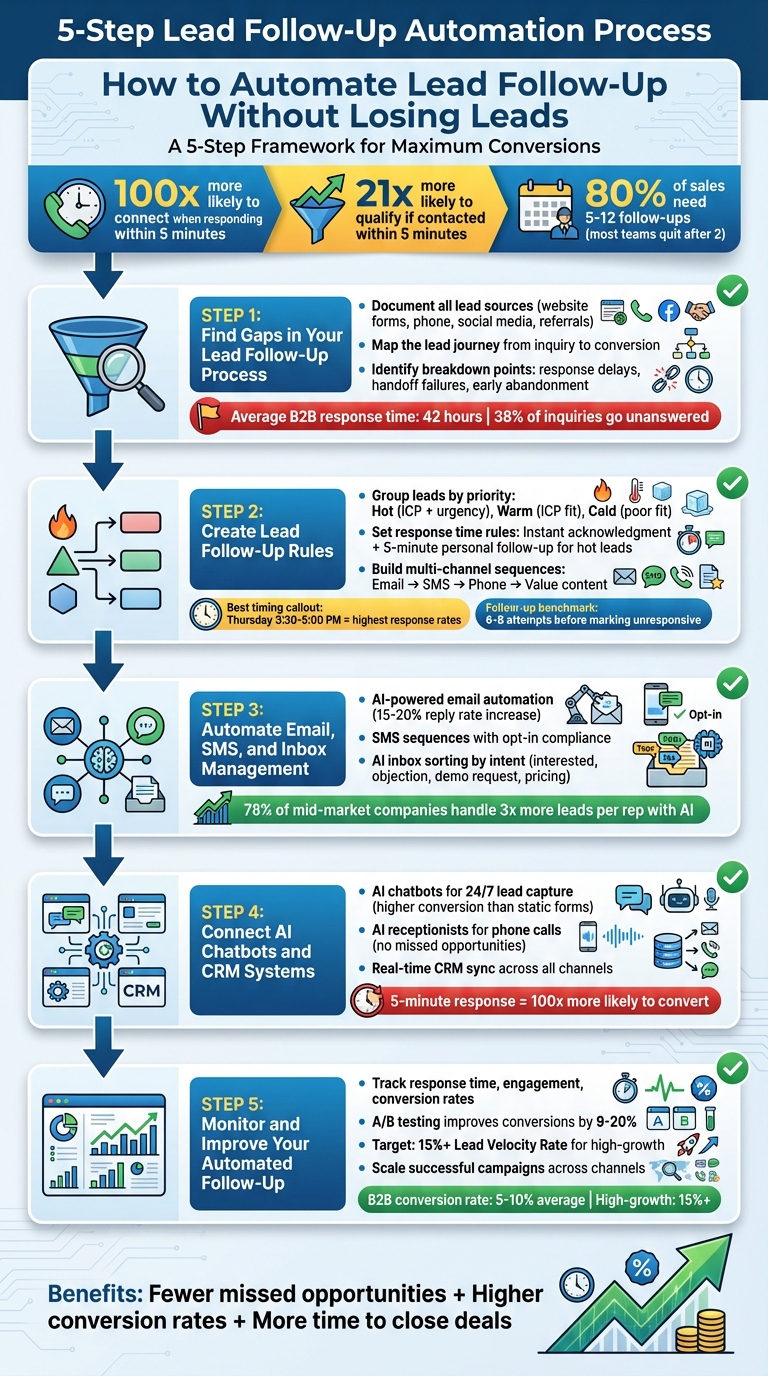
5-Step Lead Follow-Up Automation Process for Higher Conversions
Lead Follow-Up Made Easy: Funnels, Automation & Retargeting
Step 1: Find Gaps in Your Lead Follow-Up Process
To improve your lead follow-up, it’s crucial to identify where things might be falling apart. Many small and medium-sized businesses notice that leads often get lost between the initial inquiry and the first response, during handoffs between team members, or after only a couple of follow-up attempts. These weak spots can cost you opportunities.
Breaking your process into key segments will make it easier to pinpoint where leads are slipping through the cracks.
Document Your Lead Sources and Steps
Start by listing all your lead sources. This could include website forms, phone calls, social media messages (like LinkedIn [5]), Google searches [6], customer referrals [5], or even offline channels like trade shows. For each source, note who receives the lead notification, how quickly they respond, and what happens next.
Then, map out the lead journey step by step – from the moment a lead comes in to when it converts. Track how many times each lead is contacted and which communication methods (email, phone, SMS, chat) are used at each stage. This process can highlight if certain lead sources are being prioritized or neglected.
Identify Where Your Process Breaks Down
Look for signs of disorganization: scattered spreadsheets, long email chains debating who should follow up, or sticky notes piling up on desks. These are red flags that your system might be letting leads slip away [7].
Response time is another critical factor. If it takes longer than five minutes to reply to a new inquiry, you may already be falling behind. Pay attention to how many follow-up attempts are typically made before a lead is abandoned. Also, review what happens during handoffs between teams, how after-hours inquiries are handled, and whether your team has quick access to the information they need.
Once you’ve identified these gaps, you’ll be ready to take targeted action to fix them.
Get a Workflow Audit from Open Head
Open Head offers a detailed review of your lead follow-up process to uncover inefficiencies. During a free 30-minute consultation, their team analyzes your workflow to find bottlenecks and manual errors. This audit can reveal issues like untracked lead sources, follow-up sequences that end too early, or poorly connected communication tools. At the end of the session, you’ll receive a tailored automation roadmap with an estimated ROI.
This kind of assessment can help you move from constantly putting out fires to running a smooth, automated system where every lead gets the attention it deserves.
Step 2: Create Lead Follow-Up Rules
After identifying the gaps in your follow-up process, the next step is to establish clear rules for handling leads. Without these rules, your automation might either overwhelm prospects with too much communication or lose them due to insufficient follow-up.
The aim here is to create a system that tailors follow-ups based on a lead’s interest level, fit for your business, and engagement with your outreach efforts.
Group Leads by Priority
Not all leads are created equal. A prospect who fits your ideal customer profile (ICP) and shows immediate buying intent should be treated differently than someone casually browsing. To prioritize effectively, divide leads into categories like "hot", "warm", and "cold" based on specific criteria.
- Hot leads: These are prospects who align perfectly with your ICP. They’re in the right industry, have the budget, and display urgency – like frequent visits to your product page or mentioning a specific timeline.
- Warm leads: While they fit your ICP, they haven’t shown strong buying signals yet.
- Cold leads: These may be a poor fit for your business or have gone quiet after initial contact.
Your ICP should be based on patterns from your most successful deals, not just your largest clients. Consider firmographic data (e.g., company size, industry, location), technographic data (e.g., tools they use), and behavioral data (e.g., website visits, product interactions, hiring trends, or recent funding). For instance, if director-level prospects visiting your product page are more likely to convert than C-suite executives merely opening emails, adjust your scoring criteria accordingly [8].
Set Response Time Rules
Once you’ve categorized your leads, timely responses become critical. Research shows that responding within five minutes can significantly improve lead qualification rates [2][1]. In fact, the first hour after receiving a lead’s contact information is the most crucial [9].
Set up automation to send an instant acknowledgment when a lead comes in – whether through a website form, phone call, or social media message. This acknowledgment should clarify when they can expect a follow-up. For high-priority leads, trigger immediate alerts to your sales team so they can reach out personally within minutes.
Beyond the initial response, plan a strategic follow-up cadence. According to a Harvard Business Review study analyzing over 100,000 call attempts, Thursday is the best day to follow up, with Wednesday as a close second [9]. The most effective times to reach out are between 3:30–5:00 PM, with a secondary window from 8:00–9:00 AM [9]. On average, it’s a good practice to follow up with leads at least 6–8 times before marking them as unresponsive [9].
With your timing rules in place, the next step is to diversify your outreach methods.
Build Multi-Channel Follow-Up Sequences
Using the lead priority and timing rules as a foundation, create follow-up sequences that leverage multiple channels. Combining email, SMS, social media, and phone calls ensures broader engagement.
Design these sequences to adapt based on a lead’s behavior. For example, if a prospect opens your email but doesn’t click, try a different approach in your next follow-up. If they ignore emails but respond to SMS, shift more of your communication to text. AI tools can analyze response patterns to recommend the best next steps [10].
Here’s an example of a follow-up sequence for a warm lead:
- Day 0: Send an immediate email confirmation.
- Day 1: Follow up with an SMS check-in.
- Day 3: Make a phone call if there’s no response.
- Day 5: Send a value-driven email (e.g., a case study or helpful resource).
- Day 7: Send a final message asking if they’d prefer to reconnect at a later time.
Each touchpoint should provide something valuable – whether it’s a relevant case study, answers to common questions, or a limited-time offer. Tailoring your outreach this way ensures a better chance of turning leads into customers.
Step 3: Automate Email, SMS, and Inbox Management
Streamline your daily communications by automating them. This step sets the stage for an efficient, multi-channel follow-up process that keeps your leads engaged across multiple platforms.
Automate Email Follow-Ups
Using AI-powered email automation, you can send personalized messages instantly, pulling data from your CRM and digital profiles. The system adapts on the fly – if a lead opens an email but doesn’t click, it adjusts the tone or content of the next message. Businesses using AI-driven email platforms have seen reply rates increase by 15–20%[10]. Start by training your AI with your best email templates and sales strategies. The system can even recognize when a lead books a meeting or asks a question, syncing appointments automatically and notifying your team with a detailed summary.
Set Up SMS Follow-Up Sequences
Expand your follow-up strategy by adding SMS to your toolkit. These automated text sequences complement email outreach, creating a cohesive multi-channel approach. AI can send dynamic, behavior-driven messages based on how leads interact with your communications[12]. For U.S. numbers, make sure you follow opt-in regulations by securing clear consent and including an opt-out option in every message. AI personalizes texts based on engagement history and routes replies to a unified inbox. From there, it identifies intent – whether it’s interest, pricing questions, or opt-out requests – and triggers the appropriate next steps[12].
Use AI for Inbox Management
AI agents can take over the heavy lifting in your inbox. They sort messages by intent, tagging emails as "interested", "objection", "demo request", "pricing inquiry", or "out-of-office." This system ensures leads are directed to the right workflows, whether that’s scheduling a follow-up call or passing a customer query to the support team. It also prioritizes messages with the highest revenue potential, so your team focuses on high-value prospects. To save even more time, AI can draft replies in your company’s tone, reducing the need for manual sorting. Notably, 78% of mid-market companies using AI for lead management report handling three times more leads per sales rep without adding new team members[2].
sbb-itb-2339147
Step 4: Connect AI Chatbots and CRM Systems
Once your email and SMS automation is up and running, the next step is integrating AI chatbots and receptionists with your CRM. This creates a centralized system where every interaction – whether it’s through website chats or phone calls – is tracked, qualified, and routed automatically. By breaking down data silos, this integration lays the groundwork for smarter, more cohesive AI-driven engagement across all communication channels.
Add AI Chatbots for 24/7 Lead Capture
AI chatbots are like digital greeters, ready to engage visitors the moment they arrive on your website. These bots don’t just sit back and wait – they ask targeted questions to understand visitors’ needs. Instead of relying on static forms, chatbots gather key details like budget, timelines, and pain points, all in real time. This proactive approach can significantly boost lead capture rates compared to traditional methods[13]. And when a visitor’s question goes beyond what the chatbot can handle, it smoothly transfers the conversation to your team, providing all the context they need. Every interaction is instantly logged in your CRM, ensuring a complete record of the conversation. Once your digital engagement is covered, you can expand this automation to include real-time voice interactions.
Deploy AI Receptionists for Phone Calls
AI receptionists take care of inbound calls 24/7, ensuring no lead is ever missed. They can answer FAQs, book appointments, and gather essential lead details, all while qualifying callers based on their business needs and urgency. After each call, the receptionist updates your CRM with detailed notes and next steps. This kind of responsiveness is critical – responding to leads within five minutes makes them 100 times more likely to convert[1]. AI receptionists make this level of speed and efficiency possible without requiring your team to stay on call around the clock. Whether it’s during off-hours or peak call times, every lead interaction is captured and logged in one place.
Sync Lead Data Across Systems
Open Head ensures seamless integration between AI chatbots, receptionists, email, and SMS platforms with your CRM. When a chatbot qualifies a lead, all the details – tags, lead scores, and follow-up sequences – are automatically updated in the CRM. If that lead opens an email or schedules a meeting, those actions are synced in real time across all systems. This eliminates the risk of errors from manual data entry and ensures every piece of information is accurate and up to date. With all your data unified, AI analytics can step in to suggest the best next steps, keeping your lead management process smooth and efficient.
Step 5: Monitor and Improve Your Automated Follow-Up
Keeping a close eye on your automated follow-up process is essential to getting the most out of your investment. Once you’ve set up automated lead engagement, regular monitoring ensures the system continues to deliver results. By analyzing key performance indicators (KPIs), you can identify areas for improvement and make adjustments that drive better outcomes.
Keep an Eye on Response and Conversion Metrics
Pay attention to both immediate metrics like response time and long-term indicators such as closed deals. Tools like Open Head dashboards provide real-time data on contact, engagement, and conversion rates. Use these to check in daily, review trends weekly, and perform deeper analyses monthly. Here’s a critical insight: the average B2B team takes 42 hours to respond to leads, leaving 38% of inquiries unanswered – a huge missed opportunity[4]. While the average lead-to-customer conversion rate for B2B businesses hovers between 5% and 10%, high-growth companies aim for a Lead Velocity Rate of 15% or more to maintain momentum[14].
Improve Follow-Up with AI Analytics
AI-powered analytics can fine-tune your follow-up process by learning from every interaction. These tools analyze lead behavior to optimize the timing and channel of your messages. Running A/B tests on messaging and cadence can lead to conversion rate increases of 9%–20%[4]. Monthly reviews of conversation transcripts and conversion data are also crucial. These reviews help update the AI’s knowledge base and refine how it handles objections[2]. For example, if engagement rates are low, consider tweaking your messaging. If lead qualification isn’t hitting the mark, revisit your criteria[2]. By continuously refining your process, you can confidently scale your efforts across multiple campaigns.
Scale Automation to New Campaigns
Once your automated follow-up system is delivering consistent results, it’s time to expand it to other campaigns. Open Head ensures lead quality remains high by aligning data across integrated systems[11][10][4]. Streamline workflows to remove redundancies and allow your team to focus on high-value tasks[2][11]. Regular pipeline reviews can help you refine lead scoring based on updated conversion data[4]. Keep in mind that 80% of sales require at least five follow-ups, yet many businesses stop too early[4]. With automation, you can nurture leads persistently until they’re ready to take the next step.
Conclusion
Streamlining lead follow-up doesn’t mean sacrificing a personal touch. By adopting a five-step approach – identifying gaps in your current process, setting clear follow-up rules, automating email and SMS sequences, integrating AI chatbots with CRM systems, and consistently tracking performance – you can ensure smart, consistent engagement with leads while freeing your team to focus on closing deals. This approach balances speed and human connection, delivering timely, thoughtful responses across multiple channels.
With AI-powered tools working around the clock, every inquiry gets an immediate response – even after business hours – eliminating long wait times and handling multiple conversations at once[15][3][17]. These systems simplify workflows, giving small and medium-sized businesses a chance to compete effectively in a fast-paced market[15][18].
Open Head provides AI-driven solutions that centralize lead management, ensuring personalized and responsive outreach across platforms[3][16]. The benefits? Fewer missed opportunities, improved conversion rates, and more time for your team to focus on closing deals.
FAQs
How can small businesses use AI to streamline lead follow-up?
AI is a game-changer for small businesses when it comes to managing lead follow-ups. By taking over repetitive tasks like sending follow-up emails, setting reminders, and keeping CRM systems up to date, it frees up time while maintaining a personal touch with leads. This means businesses can engage effectively without the constant grind of manual effort.
What’s more, AI makes multi-channel follow-ups – through email, SMS, and chat – a breeze. It even analyzes lead behavior to suggest the next best move, ensuring no potential opportunity goes unnoticed. The result? Time saved and higher conversion rates, all while keeping leads engaged and valued.
How can I set up an automated process to follow up with leads effectively?
To get the most out of your lead management efforts, start by organizing your leads with AI-driven scoring and clear qualification benchmarks. This helps you focus on the most promising prospects. Next, set up multi-channel workflows – think email, SMS, and LinkedIn – featuring personalized messages that connect with leads on the platforms they prefer. Sync your CRM to automatically track interactions and ensure your data stays current. Lastly, leverage AI triggers to respond instantly to lead actions and consistently review your performance to refine your approach and boost conversions.
Why is lead prioritization important for effective follow-up?
Lead prioritization plays a key role in ensuring your sales efforts hit the mark. By zeroing in on the leads with the highest potential, you can craft follow-ups that are timely and personalized – making it much more likely to turn prospects into customers.
On top of that, focusing on the right leads helps you make the most of your resources. Your team can dedicate their time and energy to prospects that are more likely to close, which doesn’t just save effort – it also drives better results for your business.