

Email automation can save small businesses hours each week, improve customer engagement, and boost revenue. By automating repetitive tasks like follow-ups, abandoned cart emails, and subscriber management, you can focus on growing your business without sacrificing personal touches. Here’s what you need to know:
- Set Goals and Segment Your Audience: Identify your key objectives (e.g., reduce churn, increase sales) and organize your audience into segments based on behavior, preferences, or activity.
- Build Automation Frameworks: Authenticate your email domain (SPF, DKIM, DMARC), set up triggers for key actions (e.g., sign-ups, purchases), and use AI tools to personalize messages.
- Create Engaging Campaigns: Write clear subject lines, design mobile-friendly templates, and tailor content to match each recipient’s journey.
- Test and Stay Compliant: Test emails on multiple devices, ensure compliance with laws like CAN-SPAM, and keep workflows error-free.
- Track and Optimize: Monitor metrics like open rates and conversions, clean your email list every 90 days, and use data to refine your approach.
Pro Tip: Automated emails, like welcome sequences and abandoned cart reminders, often outperform standard campaigns, delivering 76% higher open rates and 6x higher transaction rates. Start small, test regularly, and use data to guide improvements.
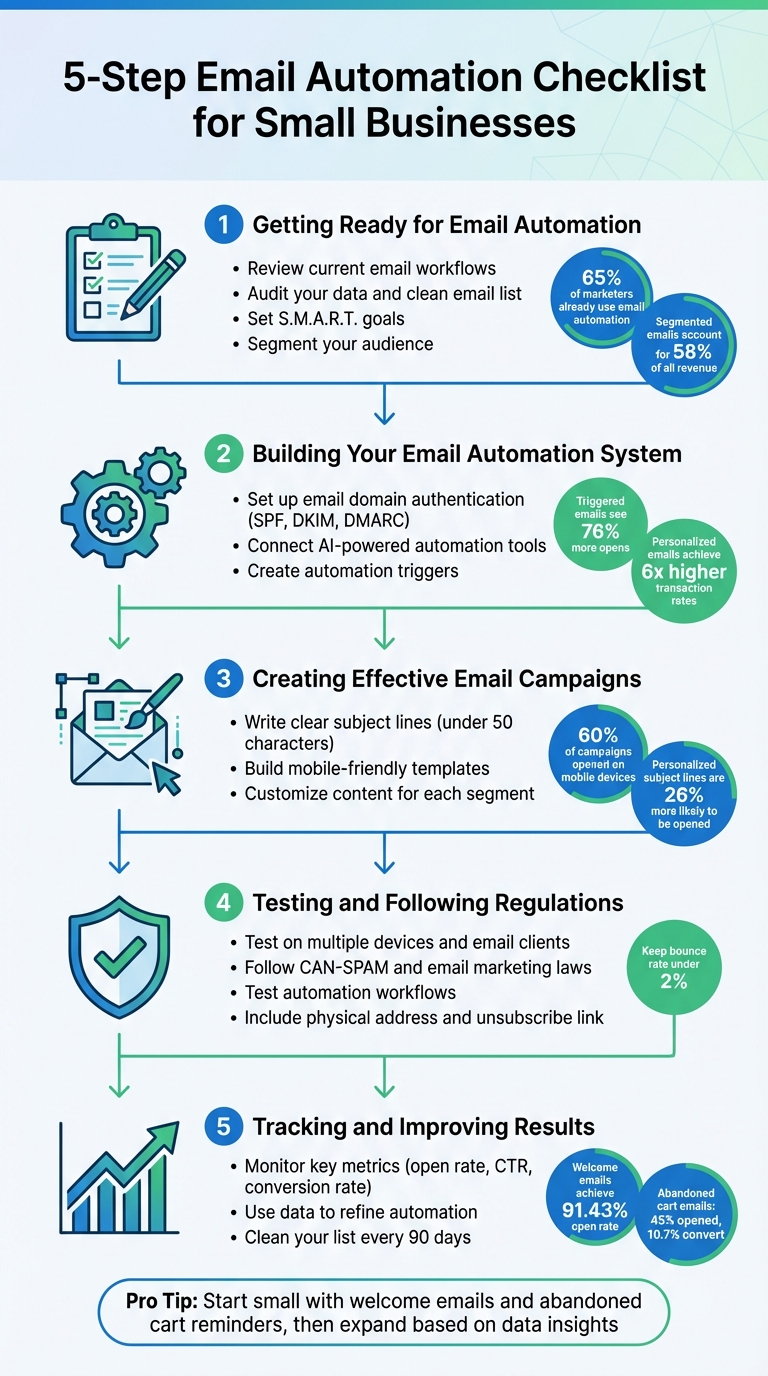
5-Step Email Automation Checklist for Small Businesses
3 Email Automations For Every Business
Step 1: Getting Ready for Email Automation
Before diving into automation, take a step back and evaluate your current email processes. Email remains the most commonly automated marketing channel, with 65% of marketers already leveraging it. But without proper preparation, automation can lead to wasted time and missed opportunities.
Review Your Current Email Workflows
Start by documenting all the emails you send manually. Look at the emails you sent last week – are there recurring messages like welcome emails, appointment confirmations, follow-ups, or re-engagements? These repetitive tasks are perfect for automation. In fact, if you’ve sent the same type of email more than three times, it’s time to automate. Did you know that welcome emails alone boast an average open rate of 91.43%?
Next, audit your data. Ensure you have the essential details – email addresses, purchase history, website activity, and product preferences – needed to trigger automated workflows. Clean up your email list by removing invalid addresses (like generic ones such as info@ or sales@) and subscribers who haven’t engaged in six months or more. This step protects your deliverability rates before launching your automated campaigns.
Set Specific Automation Goals
Clear goals are essential for effective automation. Use the S.M.A.R.T. framework to ensure your objectives are Specific, Measurable, Attainable, Relevant, and Timely. For example, you might aim to reduce customer churn by 15% within six months by sending post-purchase follow-up emails.
Tie your goals directly to business challenges. If abandoned carts are costing you revenue, set a target to recover 20% of those sales within 90 days. If manual follow-ups are eating up too much time, aim to automate 80% of them by the end of the quarter. It’s worth noting that 49% of professionals cite saving time on repetitive tasks as one of automation’s biggest benefits.
Define success for each workflow. A welcome sequence might aim to drive a first purchase, while a re-engagement campaign could focus on getting subscribers to click a link. Configure your system to stop sending emails once the goal is achieved – if someone books a consultation, they shouldn’t keep receiving reminders.
| Goal Category | Specific Objective | Key Metric to Track |
|---|---|---|
| Lead Nurturing | Advance leads to qualified status | Click-through rate on educational content |
| Sales Growth | Recover lost revenue | Abandoned cart conversion rate |
| Retention | Encourage repeat purchases | Repeat purchase rate |
| Efficiency | Reduce manual workload | Hours saved on repetitive follow-ups |
| Engagement | Re-activate dormant subscribers | Re-engagement email open/click rate |
Divide Your Email Audience into Segments
Segmented and targeted emails account for 58% of all revenue. Start simple by creating one or two broad segments, like "active openers" and "recent purchasers."
Use the data you already have to refine your segments. Demographic information, such as location or age, can guide the timing of your emails and the products you recommend. Behavioral data – like clicks on specific links or abandoned carts – offers insights into your audience’s interests and intent. Don’t forget to consider where customers are in their journey. A new subscriber needs different messaging than someone who hasn’t engaged with your emails in months.
To keep your segments relevant, implement a preference center. This allows subscribers to choose topics, frequency, and product categories they’re interested in. Collecting this zero-party data – information willingly shared by users – ensures your emails stay aligned with their preferences. Plus, 72% of consumers say they only engage with personalized messaging, so giving them control can boost engagement and reduce opt-outs.
Avoid overcomplicating your segmentation. Extremely small segments may not justify dedicated campaigns. Start broad, and refine your approach as you gather more data.
Once you’ve mapped out workflows, set clear goals, and segmented your audience, you’ll be ready to build a successful email automation system.
Step 2: Building Your Email Automation System
With your goals and audience segments ready, it’s time to set up the technical framework for your email automation. A properly configured system ensures your emails land in inboxes and your workflows operate seamlessly. This step builds on your initial planning and lays the groundwork for successful campaigns.
Set Up Email Domain Authentication
Email authentication is non-negotiable. Providers like Gmail and Yahoo now require DMARC for bulk senders handling over 5,000 emails daily. Without it, your emails risk being flagged by spam filters.
Start by accessing your DNS provider to add three essential records:
- SPF: A TXT record listing approved IPs for sending emails.
- DKIM: A digital signature that verifies your email’s integrity.
- DMARC: A policy that dictates how to handle authentication failures.
These records typically verify within 10–70 minutes . Ensure your authenticated domain matches the ‘From’ address to stay compliant with DMARC.
"Email authentication technology makes it a lot harder for a scammer to send phishing emails that look like they’re from your company."
Using subdomains for different email types – like separating transactional emails from marketing campaigns – can safeguard your primary domain’s reputation. Avoid "cousin domains" (e.g., "examplemail.com" instead of "example.com"), as they can erode trust. Conduct quarterly audits of your DNS records to catch any issues early.
Connect AI-Powered Email Automation from Open Head
Once your domain is authenticated, you can leverage Open Head’s AI-powered tools to automate and optimize your email workflows. The platform integrates with lead sources like Facebook Ads, website forms, or Typeform submissions, using AI to classify incoming data, tag intent (e.g., "high interest" or "at-risk"), and trigger workflows automatically.
Open Head’s AI also enhances your messaging. It can refine long-form content into concise captions, tailor calls-to-action for specific audiences, and transform bulk messaging into personalized, one-to-one interactions . Predictive analytics take it a step further by forecasting customer behavior, such as churn risk or next purchase dates, ensuring workflows are activated at just the right time.
This approach isn’t just theoretical – it delivers results. Personalized emails achieve six times higher transaction rates, while triggered emails see 76% more opens than standard promotional ones . Open Head ensures these personalized touches happen automatically, saving you time and effort.
Create Automation Triggers
Triggers are the rules that kick off workflows based on customer actions, behaviors, or other data points. Start with high-impact scenarios, like sending a welcome email immediately after signup or an abandoned cart reminder 1–2 hours after items are left behind.
Mapping the customer journey helps pinpoint key moments for automation, such as post-purchase follow-ups or re-engagement. For instance, abandoned cart emails have a strong impact: 45% are opened, 21% are clicked, and 10.7% lead to completed purchases.
Make sure to include "unenrollment" goals in your workflows. For example, once a customer books a consultation or makes a purchase, they should automatically exit the sequence. Timing is also critical – add delays ranging from minutes to days to ensure emails arrive at just the right moment .
| Trigger Type | Common Action/Behavior | Recommended Timing |
|---|---|---|
| Welcome Sequence | Newsletter signup or account creation | Immediate |
| Abandoned Cart | Items left in a cart without purchase | 1–2 hours after abandonment |
| Browse Abandonment | Viewing a product page multiple times | 2–3 hours after visit |
| Post-Purchase | Completing a transaction | Immediate (confirmation) or 7–10 days (review request) |
| Re-engagement | No activity for 30–90 days | 30 days after last engagement |
Before launching triggers on a large scale, test them with a small audience segment. Use visual tools to map out workflows, identify overlaps, and avoid overwhelming recipients with too many emails. Regularly review these flows to ensure they aren’t targeting unengaged users, which can harm your deliverability and increase the risk of emails being marked as spam.
Step 3: Creating Effective Email Campaigns
Your automation system is ready, and your triggers are in place – now it’s time to focus on crafting emails that deliver results. A successful email campaign depends on three crucial components: subject lines that grab attention, designs that work seamlessly on any device, and content tailored to each recipient. Let’s start by refining your subject lines, as they play a pivotal role in driving engagement.
Write Clear Subject Lines
The subject line is the first impression of your email – it’s what determines whether someone opens it or skips it. Keep subject lines under 50 characters to ensure they display well on mobile devices. Research shows that personalized subject lines are 26% more likely to be opened. Incorporate recipient names or reference past interactions to make your emails feel more personal.
For example, a subject line like “We’d love your feedback!” can encourage recipients to engage with a survey. The key takeaway? Relevance and curiosity always outperform generic promotional language.
Create urgency by using time-sensitive phrases such as “Sale Ends in 48 Hours” or by placing the most compelling part of your message at the beginning. Avoid spam triggers like excessive exclamation points, all-caps text, or misleading language. If using personalization tags, always include a fallback word like “Friend” to prevent awkward errors.
"The sender is the most influential factor when recipients decide to open an email. It’s even more important than the subject line, offer, email content, or time of day." – Jesse Sumrak, Content Manager, Twilio SendGrid
Experiment with different formats through A/B testing. Compare question-based subject lines to statement-based ones, or try listicle formats like “7 Ways to Declutter Your Space” for educational content. TGI Golf demonstrated the power of personalized hooks and strategic timing, achieving a 58% average open rate in 2024 – exceeding industry averages by over 20%.
Build Mobile-Friendly Email Templates
Once you’ve nailed the subject line, your email’s design must support the message effectively, especially since 60% of email campaigns are opened on mobile devices. Use a single-column layout to ensure content is easy to read. Set body text to at least 14px for readability and design call-to-action (CTA) buttons to be at least 44×44 pixels for easy tapping.
Position your primary CTA above the fold so it’s immediately visible without scrolling. Keep paragraphs concise – just 2-3 lines each – and use ample white space to avoid a cluttered look. Your CTA button should stand out with contrasting colors.
Before hitting send, test how your email appears across platforms like Outlook and Gmail, and on both iOS and Android devices. This ensures your design looks polished no matter where it’s viewed.
Maintain consistency with your brand by using templates that match your website’s colors, fonts, and logo. Many email platforms now offer auto-branded templates that pull design elements directly from your website.
Customize Content for Each Audience Segment
To maximize engagement, tailor your emails to match each recipient’s stage in the customer journey. By 2025, 74% of consumers are expected to demand more personalization, and personalized emails already deliver six times higher transaction rates compared to generic ones.
Use dynamic content blocks to customize visuals and offers based on user behavior. For example:
- New subscribers might receive welcome emails introducing your brand and offering a first-purchase discount.
- High spenders may appreciate VIP perks like early access to new collections.
- Inactive users often respond to re-engagement campaigns with messages like “We miss you” or requests to update their preferences.
- Recent site visitors could be sent personalized product recommendations.
Dynamic content transforms mass emails into one-on-one conversations, making recipients feel valued and understood.
TGI Golf leveraged segmentation and analytics tools in 2024 to target specific member behaviors, achieving a 58% average open rate and a 21% click-through rate – far surpassing industry benchmarks.
To avoid overwhelming inboxes, exclude recent purchasers or highly engaged users from broad promotional emails. Adjust the frequency of your emails based on engagement levels, sending exclusive offers to active users while scaling back for others. Preference centers can also empower subscribers to control the type and frequency of content they receive.
With these strategies in place, your campaigns will be set up for success. The next step? Test rigorously and ensure compliance.
sbb-itb-2339147
Step 4: Testing and Following Regulations
Your email campaigns may look flawless on paper, but they need to perform effectively in real-world scenarios while meeting legal requirements. Rigorous testing across devices and compliance with email regulations are essential to avoid delivery problems and potential penalties.
Test on Multiple Devices and Email Clients
An email that looks perfect in Gmail might display poorly in Microsoft Outlook, thanks to differences in how email clients handle HTML and CSS. And with 60% of email campaigns being opened on mobile devices, testing on smartphones and tablets is a must.
Start by making sure your single-column layout adjusts seamlessly to smaller screens. Also, preview your emails in dark mode to ensure logos and text remain clear against a dark background.
You can manually test emails on key devices or use software tools to preview how they render across platforms. Check that all images load correctly, include descriptive alt text, and ensure links take users to the right destinations. Always provide a plain-text version as a backup for those using accessibility tools or with limited connectivity. Finally, send a test email to a colleague – they may catch design or functionality issues you might have missed. This step ties your design efforts to practical usability and sets the stage for meeting legal requirements.
Follow CAN-SPAM and Email Marketing Laws
Staying compliant with email regulations not only shields your business from fines but also helps keep your emails out of spam folders. The CAN-SPAM Act requires every email to include a valid physical address, a clear unsubscribe option, and a commitment to process opt-out requests within 10 business days. Avoid misleading subject lines or false sender information.
If you’re emailing subscribers in the European Union, GDPR mandates explicit, documented consent before sending marketing messages. Similarly, Canadian businesses must follow CASL, which requires express or implied consent and clear sender identification.
To maintain a good sender reputation, keep your bounce rate under 2% and remove subscribers who haven’t engaged in 90 days. Offering a preference center can also help – this lets users select the type and frequency of emails they want, rather than forcing them to unsubscribe entirely.
Make sure your physical address is visible in the email footer, and double-check that your unsubscribe link works. A broken link can lead recipients to flag your email as spam. Together, these compliance steps and testing efforts ensure your campaigns are both effective and legally sound.
Test Your Automation Workflows
After testing your emails on devices and confirming compliance, it’s time to verify that your automation workflows are functioning correctly. Errors in automation can result in duplicate emails or misfired sequences.
Test triggers like "New Subscriber" or "Abandoned Cart" to ensure they activate the right workflows. Verify that delays, such as a 24-hour wait, are working as expected. Use personalization tags with fallback text to prevent broken code when subscriber data is missing. To be thorough, walk through the entire workflow using a test email address to confirm that messages are delivered at the right time with the correct content.
Double-check that unsubscribe links work and that automation stops for users who opt out. Regularly review your workflows to ensure they’re not targeting disengaged subscribers, as this can hurt your email deliverability. Setting up alerts for unexpected issues is also smart – this way, you can quickly pause automated campaigns during emergencies.
| Testing Category | What to Check | Why It Matters |
|---|---|---|
| Technical QA | Broken HTML, link functionality, plain-text version | Prevents rendering issues and broken links |
| Deliverability | SPF/DKIM authentication, spam filter tests | Keeps emails out of spam folders |
| Content | Typos, alt text, personalization fallbacks | Ensures accessibility and proper display |
| Compliance | Physical address, unsubscribe link, consent records | Avoids legal risks and protects sender reputation |
With all testing and compliance checks in place, you can confidently launch your automated email campaigns, knowing they’re optimized for performance and aligned with legal standards.
Step 5: Tracking and Improving Results
Once your automated emails are up and running smoothly, and you’ve ensured compliance, the next step is to let the data guide your optimizations. Email automation isn’t a "set it and forget it" strategy – it demands regular monitoring. Smart small businesses treat email metrics like a dashboard, checking them frequently to see what’s working and where tweaks are needed. These numbers inform your next moves.
Keep an Eye on Key Email Metrics
Your email metrics tell a story. The open rate reveals whether your subject lines are grabbing attention. The click-through rate (CTR) shows if your content and calls-to-action (CTAs) are engaging enough to prompt interaction. And the conversion rate tracks whether recipients are taking the desired actions. For B2C campaigns, aim for an open rate of around 38%. Automated flows, like welcome emails, often perform even better, with open rates reaching as high as 91.43%.
When it comes to CTR, industry averages fall between 2% and 5%. Automated abandoned cart flows, for example, can deliver impressive results, with revenue per recipient averaging $3.07 – up to 30 times higher than standard campaigns.
Other metrics to monitor include bounce rate (keep it under 2% to protect your sender reputation) and unsubscribe rate (if it climbs above 0.17%, it’s time to reevaluate your content or frequency). For product-focused businesses, revenue per recipient (RPR) is a direct measure of how emails contribute to your bottom line.
| Metric | What to Track | Why It Matters |
|---|---|---|
| Open Rate | 38% average for B2C; 49–51% for automated flows | Indicates subject line effectiveness |
| Click-Through Rate | 2–5% industry average | Measures engagement with content and CTAs |
| Conversion Rate | 2–5% average; top flows hit 9.89% | Tracks completed actions and revenue generation |
| Revenue Per Recipient | $1.18–$3.07 depending on industry | Shows the financial return of email campaigns |
| Bounce Rate | Keep under 2% | Protects sender reputation and deliverability |
Use Data to Refine Automation
Your metrics aren’t just numbers – they’re a roadmap for improvement. A/B testing is your best friend here. Experiment with one variable at a time, whether it’s the subject line, the color of a CTA button, or the timing of your emails. For instance, personalized subject lines can increase open rates by 26%.
If your abandoned cart emails aren’t converting well, try tweaking the timing. Instead of sending a reminder two hours after someone leaves their cart, wait 24 hours and adjust the tone to be more helpful than pushy. These small changes, guided by data, can make a big difference.
Pay close attention to behavioral trends in your audience. If certain subscribers consistently click links related to a specific product category, consider creating a separate email flow tailored to their interests. Tools like Open Head’s AI-driven email automation can analyze these patterns and adjust triggers automatically, saving you time while improving engagement.
"Don’t set it and forget it. I’ve seen customers set up really long, complex automations… and then the campaign isn’t monitored. Then, when people have stopped engaging… ISPs might start sending those messages to spam."
- Louis Driving Hawk, Twilio SendGrid
Clean Your List Every 90 Days
Inactive subscribers can hurt your deliverability. If someone hasn’t interacted with your emails in 90 days, they could be dragging down your metrics and signaling to inbox providers that your content isn’t relevant. Launch a re-engagement campaign with an enticing offer, and if they still don’t respond, it’s time to remove them.
Setting up an automated sunset policy can help. This policy moves inactive subscribers into a re-engagement flow or removes them entirely after six months of inactivity. This keeps your list healthy, protects your sender reputation, and ensures your open rates stay strong.
Additionally, remove role-based addresses like info@company.com or support@business.com, as these rarely engage and can lead to spam complaints. Using a double opt-in process during signups can also help weed out fake or invalid email addresses. Regularly cleaning your list every 90 days will keep your metrics accurate and your emails reaching the right people.
Conclusion
Email automation is no longer just a nice-to-have for small businesses – it’s a must. By following the steps outlined in this checklist, you’re setting yourself up to save time, cut down on manual errors, and scale your customer communications effortlessly. These practical strategies highlight how AI-driven email automation can reshape the way you engage with your audience.
The results speak for themselves: automation brings greater efficiency, boosts engagement, and delivers measurable ROI. These benefits are key to increasing productivity and driving higher returns.
With tools like Open Head’s AI-powered email automation, your business can shift focus from repetitive tasks to meaningful growth. Instead of spending hours crafting emails or manually segmenting your audience, AI steps in to generate personalized content, analyze subscriber behavior, and optimize send times – all in an instant. This lets you deliver tailored experiences to your customers at scale, without the hassle. As product management expert Linsa Saji explains:
"Automation isn’t just about convenience anymore. It’s become a business imperative for modern teams navigating complex workflows, tight deadlines, and rising expectations".
Start small with essential triggers like welcome emails and abandoned cart reminders, then refine your approach using data insights. Keep your email list clean every 90 days, test one variable at a time, and let the data guide your decisions. By following these steps, you’ll streamline your communications and achieve real, measurable results.
FAQs
What steps can small businesses take to ensure their email automation complies with U.S. regulations?
To align with U.S. email regulations, it’s crucial to start with clear and documented consent from your subscribers. Use simple, easy-to-understand sign-up forms, and consider implementing a double-opt-in process for extra verification. Keep records of this consent, including details like timestamps and the source of the sign-up, so you’re prepared to prove compliance if necessary.
Every email you send should include essential transparency elements: a valid physical mailing address, a clearly visible unsubscribe link, and an accurate subject line. When someone opts out, process their request swiftly – ideally within 10 business days – and ensure their email address is removed from future campaigns.
It’s also important to stay updated on state-specific rules, such as California’s CCPA, which may introduce additional requirements. Make it a habit to review your email workflows, consent practices, and compliance measures regularly – quarterly reviews are a solid benchmark – to keep your campaigns aligned with any changes in the law.
What are the best practices for effectively segmenting your email audience?
To make your email marketing more effective, start by organizing your subscribers into groups based on meaningful data. This could include their interests, purchase history, job titles, spending patterns, website activity, or how they engage with your emails. For instance, you might create segments for first-time buyers, loyal repeat customers, or subscribers who engage more with promotional content than updates.
Keep your segments flexible and useful by incorporating real-time behavior like recent clicks, abandoned carts, or downloads. This allows your groups to update automatically as customers interact with your brand. Regularly clean up your email lists to remove inactive subscribers, and avoid making segments so specific that they become too small to provide useful insights. Focus instead on creating groups that strike the right balance between relevance and measurable outcomes.
Lastly, don’t forget to experiment and improve. Use A/B testing to try out different subject lines, email designs, and offers for each segment. Keep an eye on performance metrics and adjust your criteria as your audience’s behavior changes. This approach helps keep your emails personalized, increases engagement, and drives better results for your business.
How does AI make automated email campaigns more personalized?
AI is reshaping email personalization by diving deep into customer data – like purchase history, browsing behavior, and engagement trends – to craft content that feels spot-on and timely. Instead of sending out one-size-fits-all emails, small businesses can now deliver messages tailored to each recipient’s unique interests, location, and stage in their customer journey. The result? Higher open rates and more clicks.
What makes this even better is how AI learns and adapts over time. It can automatically tweak audience segments and refine automation workflows without anyone lifting a finger. For instance, if a customer regularly interacts with content about eco-friendly products, the system will prioritize similar offers in upcoming emails. This way, every email feels personal, even though the entire process runs on autopilot.
With Open Head’s custom AI tools, small businesses can turn raw customer data into highly personalized email campaigns – saving time and driving engagement, all without the hassle of complex setups.